

An indexation strategy is a deliberate plan for which pages on your site should be stored in Google’s index and which should not. You audit what is indexed, decide what each URL is for, then use sitemaps, internal links, canonical tags, noindex and redirects to match the index to that plan. The goal is a site where the pages that can win customers are indexed, and the pages that cannot are kept out of the way.
This guide is for owners and marketing teams who do not want to read crawler documentation. It explains the terms in plain language, gives you an audit routine, a decision framework for each page and a way to measure whether the changes worked. If you want help running it on a large site, our SEO team does this kind of work.
TL;DR
- Indexing is Google’s decision to analyze and store a page after crawling it, and Google says indexing is not guaranteed for every crawled page.
- Index bloat is about quality, not page count: too many low-value URLs in search can pull down how your site is perceived.
- Audit first, then give every URL one job: keep, improve, consolidate, redirect, noindex or remove.
- Keep sitemaps limited to canonical, indexable URLs and use the right control for the right problem.
- Measure in Search Console by watching indexed pages, excluded reasons and crawl activity over several weeks.
Table of Contents
- What an indexation strategy means in SEO
- Index bloat: when a large index becomes a problem
- Step 1: Audit what is indexed
- Step 2: Give every URL one job
- Step 3: Pick the right control for each problem
- Step 4: Prevent bloat from coming back
- Step 5: Measure whether it worked
- Mistakes to avoid
- Perspective: why indexation belongs in your growth plan
- Getting help with your indexation strategy
- FAQ
- Sources
What an indexation strategy means in SEO
Google describes three stages in how Search works: crawling, indexing and serving results. In Google’s own guide to how Search works, crawling downloads content from pages it has discovered. Indexing analyzes that content and stores it. Serving then shows relevant stored content to people searching.
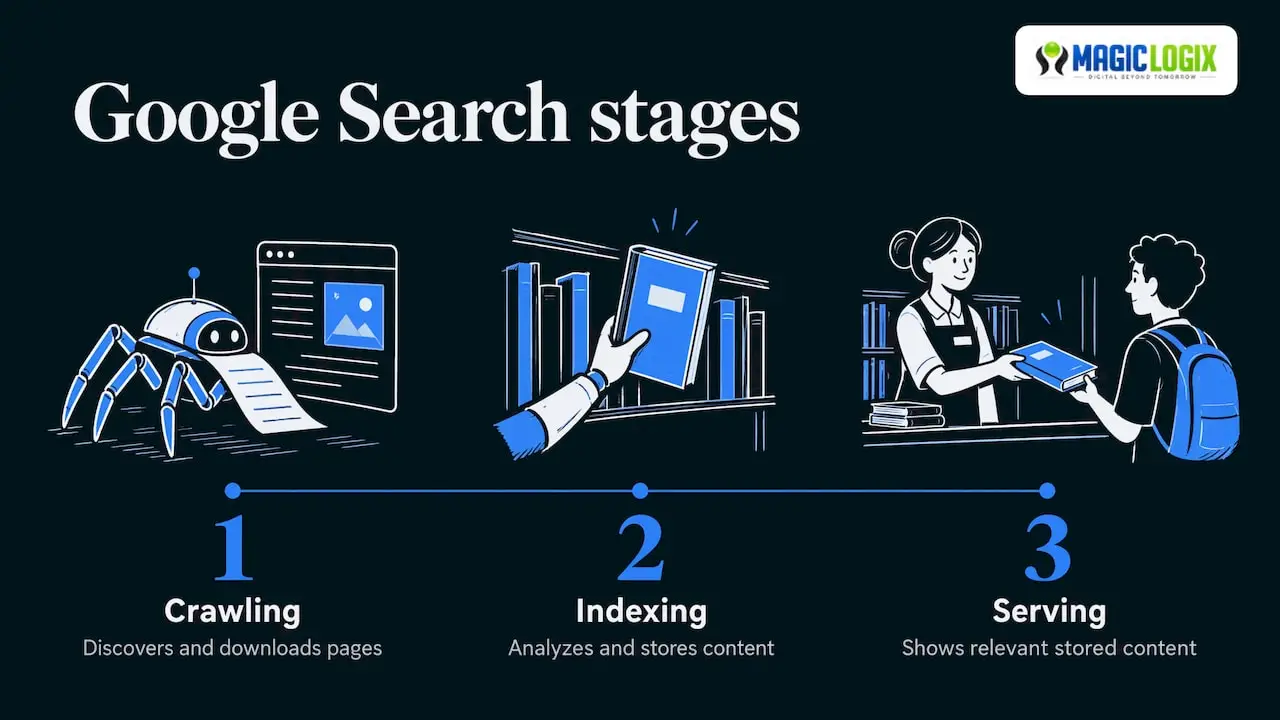
Think of a library. Crawling is a clerk finding a new book. Indexing is deciding whether to catalog it and where to shelve it. Serving is a librarian handing it to a visitor. A book that never gets cataloged cannot be recommended, no matter how well it is written.
The distinction matters because the two problems need different fixes. Crawlability is about discovery: can Googlebot, Google’s crawler, reach the page through links, sitemaps or other references? Indexability is about inclusion: whether a crawled page can be stored and shown, which depends on technical signals and on whether the content is useful. A page can be easy to crawl and still not be indexed because it adds nothing new.
An indexation strategy sits on top of both. It asks a business question first (should this URL ever appear in search?) and a technical question second (which control makes that happen?).
Why it matters for a business site
Every site generates URLs you never planned: filtered product listings, tracking-parameter copies, tag archives, internal search results, old landing pages from past campaigns. Left alone, they pile up. Meanwhile your service pages, location pages and best articles compete for attention with that clutter.
Indexation also feeds newer search surfaces. If your pages are not in the index, they are not eligible to appear in Google results, and that is the starting point for any work on AI-driven search visibility. Nobody can promise citations or rankings, but you cannot be considered for either from outside the index.
Index bloat: when a large index becomes a problem
Index bloat happens when a site has too many low-value or irrelevant URLs available in search. Search Engine Land’s content pruning guide is clear that it is about quality, not the number of indexed pages. A 50,000-page store with distinct, useful product pages is healthy. A 500-page site where 300 pages are thin duplicates is not.
The same guide explains the risk: when Google indexes content that gives users nothing, those pages can bring down the perceived quality of the site. That is a reason to care even if you do not run a huge site.
Common causes
- Faceted navigation and filters that create a new URL for each color, size and sort order.
- URL parameters from tracking, sessions or sorting.
- Near-duplicate pages, such as city pages that swap only the place name.
- Thin archives, including tag pages, author pages and date archives.
- Staging or test content that was never blocked.
- Old content that no longer matches anything you sell.
If your location pages are a worry, our guide to service area pages that rank shows how to build them so each one earns its place in the index.
Step 1: Audit what is indexed
Start with facts. You need three lists: the URLs Google has indexed, the URLs you want indexed and the URLs that exist on your site. The gaps between them are your work plan.
- Open the Page indexing report in Google Search Console. It shows how many URLs are indexed and groups the rest by reason. Google notes that this report is not meant for investigating a specific page. For one URL, use the URL Inspection tool.
- Read the not-indexed reasons. Google lists expected causes for URLs that are not indexed: a robots.txt rule, a noindex tag, a duplicate URL or a 404 for a removed page. Those are often fine. The ones to worry about are important pages sitting in that list.
- Crawl your own site with a site crawler to get the full URL inventory with status codes, canonical tags and noindex tags.
- Join the lists in a spreadsheet. Add columns for organic clicks, impressions and conversions from your analytics.
- Flag mismatches. Valuable pages that are not indexed go to the top. Low-value pages that are indexed go to the pruning list.
What to check for each important page
| Question | Where to look | Healthy answer |
|---|---|---|
| Is the URL indexed? | URL Inspection tool | Yes, for pages that should rank |
| Is it the canonical version? | Inspection result and page source | The chosen canonical is the URL you want |
| Is there a noindex tag? | Page source or crawl export | No, on pages meant to rank |
| Is it in the sitemap? | Your XML sitemap | Yes, if canonical and indexable |
| Do internal links point to it? | Crawl export | Yes, from relevant pages |
On a small site this takes an afternoon. On a large one, it is a project, and it is where crawl budget waste often shows up.
Step 2: Give every URL one job
Once you can see the site, sort each URL into a category. This is the decision framework that keeps the strategy from becoming a pile of tags.
The page-by-page decision framework
Search Engine Land describes pruning as a spectrum rather than deletion alone: leave, improve, consolidate or deindex, with redirects for redundant or obsolete pages. In practice, use these questions in order:
- Does the page serve a search need and earn traffic or conversions? Keep it indexed.
- Does it serve a real need but perform poorly? Improve it: update facts, add depth, fix the title, strengthen internal links.
- Does it overlap with another page? Consolidate. Merge the best material into the stronger page and redirect the weaker one.
- Is it useful to visitors or other teams but pointless in search? Keep it live and mark it noindex. Examples include thank-you pages, internal search results and some filtered views.
- Is it obsolete with no replacement? Remove it and return a 404 or 410 status. Google’s crawl budget guidance lists 404 or 410 for permanently removed pages among its recommendations.
- Is it obsolete with a close replacement? Redirect it to that replacement.
A worked example
Imagine a regional home services company with 400 URLs. Its crawl shows 120 blog posts, 60 city pages, 90 tag and archive pages, and 130 parameter URLs. This is an illustration, not a client result.
- The 130 parameter URLs get canonical tags pointing to clean versions.
- The 90 archive pages get noindex.
- Of the 60 city pages, 40 differ only by city name. They are merged into 8 stronger regional pages with real local detail, and the old URLs redirect.
- Of the 120 posts, 30 get updated, 20 are merged into related guides and 15 are retired.
The index shrinks, but every remaining page has a purpose and a clear owner.
Step 3: Pick the right control for each problem
The most common mistake is using one tool for every job. Each control does something different.
| Control | What it does | Use it when |
|---|---|---|
| Canonical tag | Points duplicates to the preferred URL | Several URLs show the same content |
| Noindex tag | Asks Google to keep a page out of search results | The page should exist but not appear in search |
| Robots.txt | Blocks crawling of URLs | Unimportant URLs waste crawl time and cannot be consolidated |
| 301 redirect | Sends visitors and Google to another URL | A page is replaced or merged |
| 404 or 410 | Signals that a page is gone | A page is permanently removed with no replacement |
| XML sitemap | Lists URLs you want found | You want to highlight your canonical, indexable pages |
Where these controls go wrong
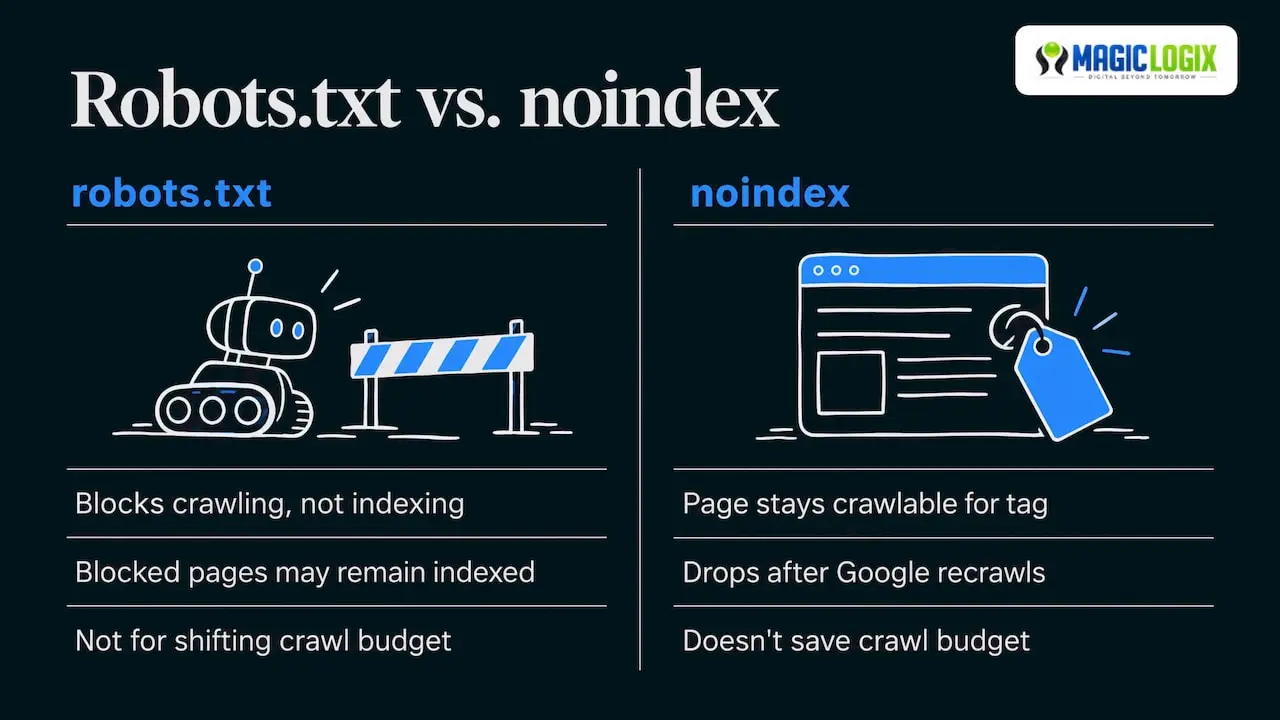
Blocking in robots.txt does not guarantee a page stays out. Google’s help documentation says pages blocked from crawling may still be indexed. If you want a page kept out of results, use noindex and leave it crawlable so Google can see the tag.
Noindex is not a crawl control. Google’s crawl budget guidance advises against using noindex to save crawl budget: Google still requests the page, then drops it on seeing the tag, so crawling time is wasted. The same guidance says robots.txt blocks crawling but should not be used to temporarily shift crawl budget unless Google is already at its crawl capacity.
Deindexing takes a recrawl. With a noindex tag, a page should drop out of the index after Google crawls it again, so the change is not instant. Plan for weeks, not days, on large sites.
Sitemaps: a short list of what you do want
Treat your XML sitemap as the list of pages you are proud of. Google’s sitemap guidance says to include only URLs Googlebot can fetch and only canonical URLs. It also says the last-modified date should reflect when the content last changed meaningfully, not the time the sitemap was generated. That guidance dates from 2014, but it remains the clearest Google statement we cite on these two points, so check Search Central for any later updates.
A quick sitemap checklist:
- Every URL returns a 200 status.
- No URL has a noindex tag.
- No URL redirects.
- Every URL is its own canonical.
- Last-modified dates change only when the content does.
Internal links: the quiet signal
Internal links help Google find your important pages and show how your site fits together. Pages with no internal links, often called orphan pages, are hard to discover. When you consolidate content, update the internal links to point at the surviving page rather than relying on the redirect alone.
Step 4: Prevent bloat from coming back
Pruning once is not enough if the site keeps generating clutter. Google’s crawl budget guidance says to manage your URL inventory so crawlers spend time on the URLs you want, and warns that too much time on the wrong URLs may mean the rest of the site is not explored.
Build prevention into how the site is run:
- Templates: decide which template types are indexable before launch, and set noindex or canonical rules there.
- Filters and parameters: agree on which combinations deserve a page and which do not.
- Content approvals: require a search purpose for every new page type.
- Quarterly review: re-run the audit and compare against the last one.
- Migrations and redesigns: map old URLs to new ones before launch. Our guide on building a 1:1 redirect map walks through this.
For teams shipping code often, indexation rules can break silently with a release. Treating them as automated checks is the idea behind enterprise technical SEO with CI/CD.
Step 5: Measure whether it worked
Indexation work shows its results slowly, so set your baseline before you change anything and judge over weeks.
| Metric | Source | What good looks like |
|---|---|---|
| Indexed pages that should be indexed | Page indexing report, sitemap-filtered | Rising toward the full list |
| Indexed low-value URLs | Same report, crawl comparison | Falling |
| Important pages in not-indexed reasons | Page indexing report | Fewer after fixes |
| Organic clicks and impressions to priority pages | Search performance report | Stable or growing |
| Crawl activity on valuable sections | Server logs or crawl stats | More requests on pages you want crawled |
| Conversions from organic landing pages | Analytics | Stable or growing |
Set a rule before you start: if total indexed pages fall but clicks and conversions hold or rise, the pruning did its job. If clicks to a pruned section fall, check whether you removed pages that had real demand and consider restoring or redirecting them.
No one can promise a specific ranking or traffic change from this work. Algorithms change, and what a cleaner index does for a given site depends on the starting point.
Mistakes to avoid
- Deleting by traffic alone. A page with few visits may support sales, legal needs or customer service.
- Noindexing and blocking the same URL. If robots.txt blocks the page, Google may never see the noindex tag.
- Putting redirected or noindexed URLs in the sitemap. This sends mixed signals.
- Redirecting everything to the homepage. Redirect to the closest relevant page.
- Treating the index count as a score. The aim is a useful index, not a small or large one.
Perspective: why indexation belongs in your growth plan
We see indexation as the foundation under every search investment. Content, paid traffic to landing pages and AI search work all depend on the right pages being available, clear and consistent.
Our approach at Magic Logix connects technical SEO with data analytics and design, because an index plan only works when it reflects how customers actually use the site. A page that looks redundant in a crawl may be a key step in a buying journey. A page that looks harmless may be one of dozens of near-copies.
That is why we start with the business question, which pages should represent you in search, and then choose the technical controls. It is also why we treat prevention as part of the job: templates, release checks and regular reviews, so the clutter does not return.
Hassan Bawab
Getting help with your indexation strategy
If your audit turns up thousands of URLs, tangled templates or a pending redesign, a specialist team saves time and reduces risk. Magic Logix offers Search Engine Optimization services and AI search visibility work that builds on a clean, intentional index. You can explore our search and AI visibility capabilities to see how the work is organized, or talk with us about your site.
FAQ
What is the difference between crawling and indexing?
Crawling is when Googlebot downloads content from pages it has found. Indexing is when Google analyzes that content and stores it so it can be shown in results. Google notes that not every crawled page gets indexed, so a page can be crawled and still not appear in search.
Is a bigger index better for SEO?
No. Index bloat is about quality rather than quantity. A large site with distinct, useful pages is fine, while a smaller site full of thin or duplicate URLs can weaken how the whole site is perceived. Aim for every indexed page to have a clear purpose.
Should I delete low-traffic pages?
Not automatically. Content pruning covers several actions: improve the page, consolidate it with similar content, redirect it, deindex it or remove it. Choose based on whether the page serves a real search need, a customer need or neither.
How do I keep a page out of Google?
Use a noindex tag and leave the page crawlable so Google can read the tag. Blocking with robots.txt alone may not keep a URL out of the index. After the next crawl, the page should drop out, which can take time.
How long do indexation changes take to show results?
Expect weeks, since Google has to recrawl and reprocess the pages you changed. Record a baseline in Search Console first, then compare indexed pages, excluded reasons, clicks and conversions at regular intervals.
Sources
- In-Depth Guide to How Google Search Works
- Indexability: Make Sure Search Engines Can Actually Find and Index Your Pages
- Page indexing report, Search Console Help
- Indexing, Search Console Help
- Crawl Budget Management, Google Crawling Infrastructure
- Best practices for XML sitemaps and RSS/Atom feeds
- Content Pruning: Boost SEO by Removing Underperformers