

Protect rankings by treating your redirect map as the single source of truth, not an afterthought. Before you touch DNS, freeze your GA4 and Google Search Console baselines, export a full URL inventory across every crawl and analytics source, and stage the new site with noindex protections active. Every other step in a migration follows from getting these three right first.
TL;DR:
- Building a comprehensive redirect map from unioned crawl, analytics, and backlink data is crucial to ensure all URLs are correctly mapped and avoid traffic loss after migration.
- Validating staging with noindex tags, canonical URLs, proper link structure, and static assets before launch prevents indexing issues and crawling errors during live cutover.
- Maintaining legacy redirects for at least twelve months protects rankings and link equity, especially given Google’s 180-day Change of Address signal window.
- Major migrations involving tens of thousands of URLs, cross-environment DNS or CDN management, or revenue-critical ecommerce flows benefit from experienced agency support.
- A thorough migration readiness audit and detailed planning reduce the risk of prolonged recovery and traffic setbacks, emphasizing quality control over speed.
Table of Contents
- What Site Migration Types Mean for SEO
- Pre-Migration Engineering Checklist: Crawl, Inventory, Prioritize, Baseline
- Building a 1:1 Redirect Map That Actually Holds Up
- Staging Validation Before You Flip the Switch
- Launch-Day Checklist: Hour by Hour
- What to Monitor After Launch, and How to Recover Fast
- Mistakes That Turn a Migration Into a Long Recovery
- When to Handle It In-House and When to Call In an Agency
- The Checklist Beats the Instinct Every Time
- Get a Migration Readiness Audit Before You Flip the Switch
- Sources
- FAQ
What Site Migration Types Mean for SEO
A site migration is any change that rewrites how search engines view your URLs, and different types carry different risk profiles. A domain move changes the hostname portion of every URL while usually keeping paths intact, requiring Google to map the indexed URLs to new addresses. An HTTPS upgrade changes the protocol on URLs and needs proper redirects to avoid duplicate indexation. A URL restructure modifies the path structure and typically has the strongest temporary impact on rankings as Google re-evaluates content relevance. Platform changes can combine these modifications.
That bundling is exactly why some migrations recover in two to four weeks and others limp along for six months. Search Engine Land’s migration guide notes that stacking multiple major changes into a single cutover, new domain, new design, new URL structure, all at once, is one of the most reliable ways to trigger a long recovery, because Google effectively has to re-evaluate the entire site’s quality signals simultaneously instead of isolating one variable.
This is why the redirect map deserves top billing before anything else. It is the document that tells search engines exactly how the old indexed URL set maps to the new one, and it becomes your reference point for every validation step that follows. Before you build it, freeze your baseline: pull GA4 traffic and conversion numbers, export your current Search Console performance report, and screenshot your top rankings. You cannot prove a migration succeeded, or diagnose what broke, without knowing exactly where you started.
Pre-Migration Engineering Checklist: Crawl, Inventory, Prioritize, Baseline
This is the phase most teams rush, and it’s also the phase where most migration disasters get baked in. A migration is only as good as the URL inventory behind it, and that inventory has to come from more than one source.
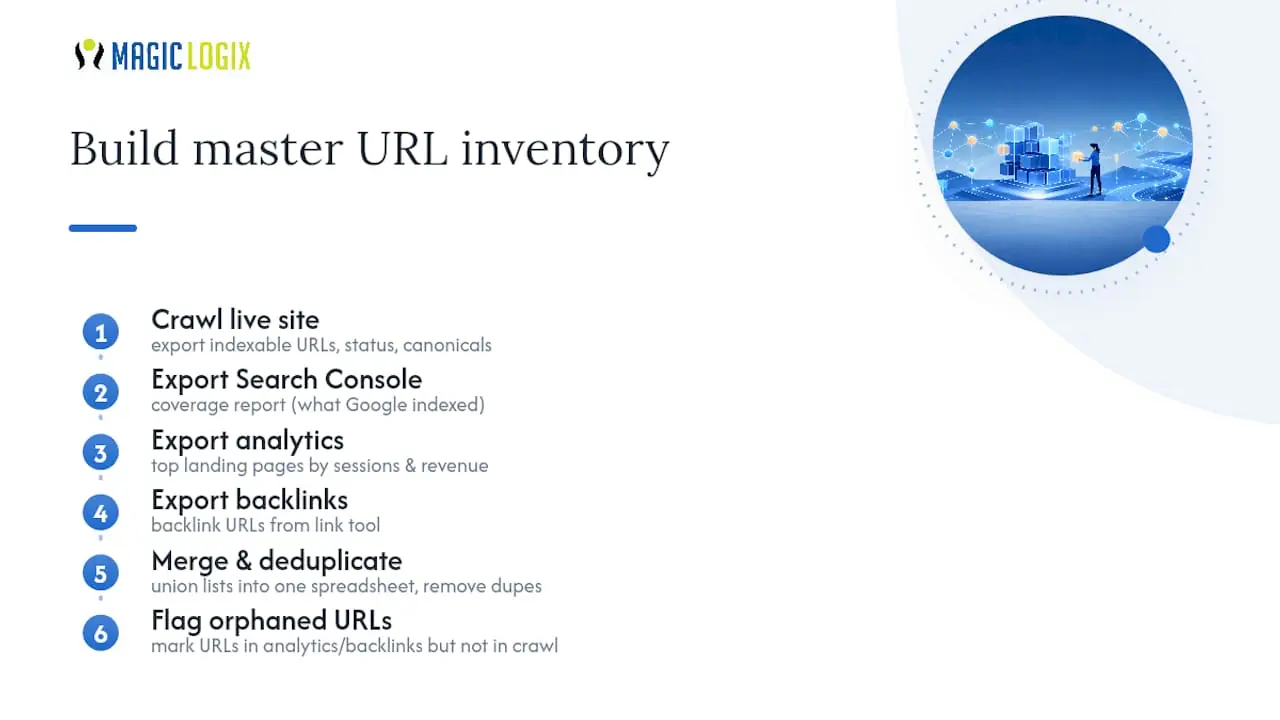
Build the master URL inventory
Run a full crawl of the live site with a tool like Screaming Frog or Sitebulb, and export every indexable URL, status code, and canonical tag. Then pull three more lists: your Search Console coverage report (which shows what Google has actually indexed, not just what your crawler found), your analytics platform’s top landing pages by sessions and revenue, and a backlink export from your link-tracking tool of choice. Union all four into a single spreadsheet, deduplicate by URL, and flag any page that shows up in the backlink or analytics data but not in your crawl. Those orphaned pages are frequently the ones that lose the most value in a sloppy migration, because nobody remembers they exist until the traffic disappears.
Don’t stop at HTML pages. Non-HTML discovery files, robots.txt, sitemap.xml, an ai/llms.txt if you have one, and even your Open Graph image URLs, get checked by crawlers and third-party agents before they ever load a page. A 404 on one of these files can produce indexing problems that are hard to trace back to the actual cause. If your current sitemap or old page content has decayed, the Wayback Machine is a useful backstop for reconstructing what a now-thin page used to rank for.
Baseline everything before you touch anything
You need a documented snapshot of where the site stands right now, because “did the migration hurt us” is unanswerable without one. That baseline should include:
- GA4 sessions, conversions, and revenue by landing page for the trailing 90 days
- A full Search Console performance export (queries, clicks, impressions, average position)
- Core Web Vitals scores from PageSpeed Insights or your CrUX dashboard
- Your top 50 to 100 ranking keywords with current positions, tracked in your rank tracker
- Screenshots of any AI Overview or generative search snippets your top pages currently appear in, since these surfaces are newer and harder to audit retroactively
If you skip the AI-surface screenshots, you will have no way to tell six weeks from now whether a lost citation in an AI Overview was caused by the migration or by an unrelated algorithm shift. It’s a small task that saves a real headache later.
Decide what actually deserves to migrate
Not every URL earns a spot in the new site. A pre-migration content cull, cutting thin, outdated, or duplicate pages before launch, tends to improve overall site quality signals and shrinks the number of URLs you have to map, test, and monitor, which lowers long-term risk. A reasonable cull rule: if a page has near-zero organic traffic over the trailing twelve months, no backlinks, and no business value beyond “someone wrote it once”; retire it with a 301 to the closest relevant equivalent rather than dragging it into the new architecture.
If you’re also considering a structural overhaul of your navigation or URL hierarchy, review your site architecture decisions separately from the migration timeline. Bundling a redesign with a domain move multiplies your variables and makes post-launch diagnosis far harder.
Lock down the operational guardrails
Before a single line of DNS config changes, get sign-off from whoever owns the decision to go or no-go, and write down your rollback criteria in advance: what traffic or indexing drop triggers a reversal, and who has the authority to call it. Set your DNS TTL plan now, since lowering it takes 24 to 48 hours to fully propagate, and define who has staging access and what “ready to launch” actually means in checkable terms, not vibes.
Pro Tip: Assign one person as the single owner of the redirect map spreadsheet. When five people edit the same file independently, duplicate rows and conflicting redirect targets creep in fast, and you won’t catch it until after launch.
Building a 1:1 Redirect Map That Actually Holds Up
A redirect map is a spreadsheet, nothing fancier, with one row per legacy URL and columns for: source URL, destination URL, redirect type, priority tier (based on traffic or revenue), and a status column for whether it’s been tested. Technical migration checklists consistently recommend building this as a comprehensive 1:1 map, meaning every legacy indexable URL gets its own specific destination, not a shared bucket.
Populate it from the same four sources you used for the URL inventory: crawl, Search Console, analytics, and backlinks. Union them, then deduplicate so each old URL appears exactly once with exactly one destination.
Follow these rules when deploying the map:
- Use 301 or 308 redirects served server-side. Google’s own guidance on site moves recommends server-side permanent redirects specifically because they pass ranking signals reliably; 302s signal “temporary,” which can cause Google to keep the old URL indexed indefinitely instead of consolidating to the new one.
- Never rely on JavaScript redirects or meta refresh tags for anything that matters. Both require a render pass before Google even sees the redirect, which adds latency and risk to the signal transfer.
- Eliminate redirect chains. A URL that hops A to B to C loses equity at each step and slows crawling; every entry in your map should resolve in a single hop.
- Never fall back to redirecting orphaned or hard-to-map pages to the homepage. This is a soft 404 in disguise, and it tells Google the old content simply vanished rather than migrated.
- Test the map before launch using an HTTP status checker across your top priority tier first, then run a site-wide crawl against the full list to catch anything missed.
Pro Tip: Automate the redirect test as a script or a Screaming Frog list-mode crawl that runs on a schedule, not just once before launch. Redirect rules have a way of silently breaking when a CDN config or server rule gets touched weeks later for an unrelated reason.
Staging Validation Before You Flip the Switch
Staging is where migrations go to die quietly, and it’s usually because a setting meant to protect staging leaks into production, or a setting meant for production never gets removed from staging. Both failure modes are common and both are checkable in minutes if you know where to look.
Password-protect your staging host or block it at the network level, never rely on noindex alone to keep it out of Google’s index, since a leaked staging URL with noindex removed by accident is exactly how duplicate content problems start.
Before requesting sign-off to launch, verify each of the following on staging:
- The
X-Robots-TagHTTP header and any meta robots tag are set to noindex, and you have a documented plan to remove them at launch, not before. - Every page has a self-referencing canonical tag pointing to its own staging URL, not the future production URL, to avoid confusing crawlers that do slip through.
- Internal links and navigation point to the correct new URL structure, not legacy paths, so you’re not inheriting a redirect chain on day one.
- Schema markup and structured data reference the correct host once live; run pages through the Schema.org validator to confirm markup parses cleanly before cutover.
- Images, PDFs, and other static assets resolve on the new host and are included in your redirect map, not just HTML pages.
Run a full crawl of staging in parallel with a crawl of the live production site, then diff the two. Any page that exists in production but has no staging equivalent is a gap in your redirect map that needs a decision before launch, not after. Treat a clean parallel crawl diff as your actual go/no-go gate, ahead of any calendar deadline.
Launch-Day Checklist: Hour by Hour
Launch day rewards preparation and punishes improvisation. Work through this sequence in order:
- Lower your DNS TTL to a short value at least 48 hours in advance, and confirm the new host is provisioned to handle a spike in both real user and bot traffic, since Google’s crawler will hit the new site harder than usual immediately after a move.
- Flip DNS during your lowest-traffic hour, based on your own analytics, not a generic “3 a.m.” assumption.
- Purge CDN cache keys that include the old hostname, since stale cached responses are a common source of “it’s still showing the old site” support tickets.
- Remove the staging noindex header and meta tag immediately, and confirm indexability with a live fetch, not a cached view.
- Spot-check your top priority tier of redirects to confirm each returns a 301 followed directly by a 200, in one hop, with no chain.
- Submit your new XML sitemap in Google Search Console and, if this is a domain move, begin the Change of Address process.
- Watch GA4 realtime reporting and your server logs for a spike in 404 or 500 errors in the first hour.
Decide your rollback trigger before launch, not during it: a specific error rate or downtime threshold, and one named person with authority to pull it. Ambiguity here is how a 20-minute problem turns into a 6-hour one.
What to Monitor After Launch, and How to Recover Fast
Migrations don’t end at launch, they end when your rankings stabilize, and that can take anywhere from two weeks to several months depending on the migration type. Set a monitoring cadence and stick to it.
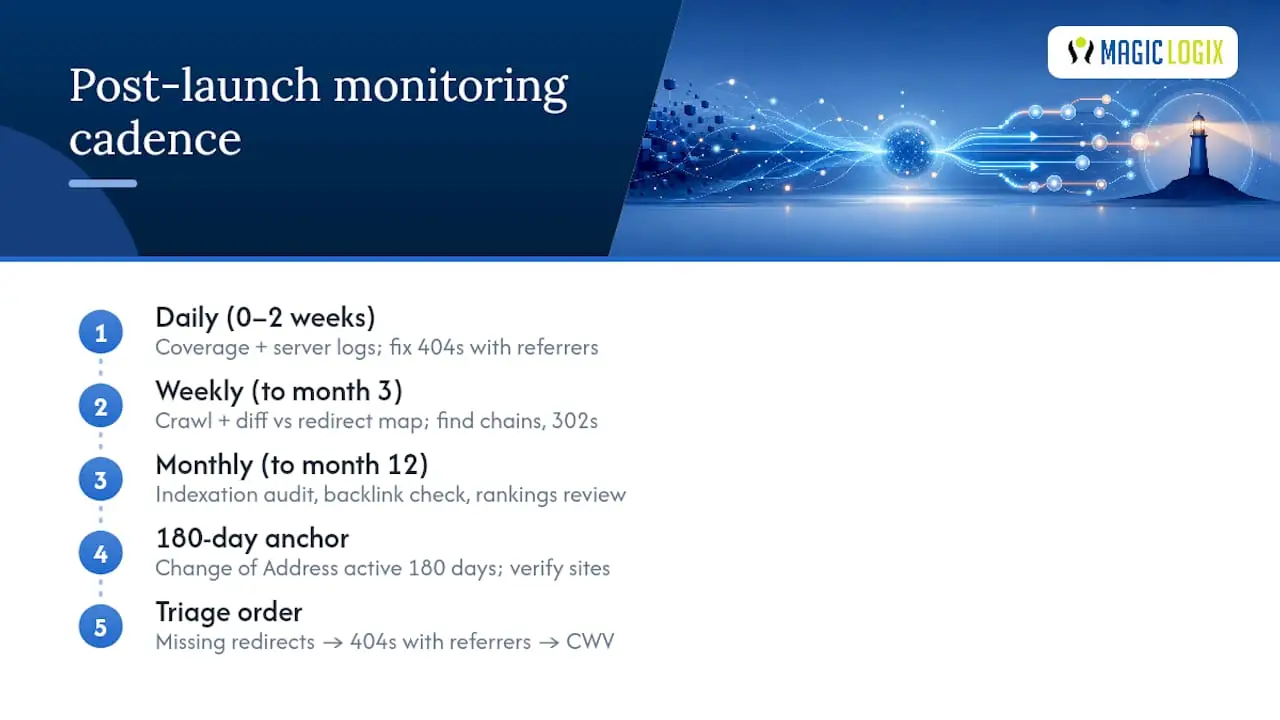
Daily, for the first two weeks: Check Search Console’s coverage report for a spike in “not found” or “excluded” pages, and scan server logs for 404s, especially ones with a referrer, since those are broken internal or external links you can fix immediately.
Weekly, through month three: Run a fresh crawl and diff it against your redirect map to catch chains that have crept in, scan for any 302s that should have been 301s, and compare current rankings against your frozen baseline.
Monthly, through month twelve: Full indexation audit, backlink profile check to confirm external links are landing correctly, and a rankings review against your baseline export.
A note on timing: Google’s Change of Address tool keeps its migration signals active for 180 days after filing, and it requires verified ownership of both the old and new properties in Search Console before you can use it. That 180-day window is a useful mental anchor: plan to keep your redirects live well beyond it, not just through the first month.
When you spot a problem, triage in this order. A missing redirect (a URL returning 404 that should have a mapped destination) gets an immediate fix and a note in your master spreadsheet on how it was missed. A 404 with an external referrer gets prioritized over one with no referrer, since it’s actively costing you traffic or link equity right now. A Core Web Vitals regression gets compared against your frozen baseline scores; if the new site is meaningfully slower, that’s a technical fix, not a “wait and see.”
Keep your legacy redirects live for a minimum of twelve months, longer if the domain carries significant backlink equity. Removing them early is one of the more common self-inflicted wounds in migration recovery. If your organic traffic hasn’t recovered within that window and you’ve ruled out an unrelated algorithm update as the cause, that’s the point to bring in a technical SEO audit.
Mistakes That Turn a Migration Into a Long Recovery
Most migration damage traces back to a small set of repeat offenders, and nearly all of them are preventable with a five-minute check.
- Redirecting orphaned pages to the homepage. Google treats this as a soft 404, not a real redirect, and it can drag down trust signals for the whole domain rather than just the affected URLs.
- Leaving noindex live after launch. This is the single most common migration failure, and it’s caused by nothing more exotic than forgetting to flip a header back.
- Combining a full redesign with a domain or URL migration. Stacking variables means that when rankings drop, you have no way to isolate which change caused it. Sequence a redesign and a migration as separate events whenever the timeline allows it.
- No rollback plan. Deciding your rollback threshold after something breaks is a decision made under pressure, and pressure decisions are usually worse ones.
Build in operational safeguards that catch these automatically: a pre-launch grep of your codebase and rendered HTML for the literal string “noindex” and the X-Robots-Tag header, a staged sign-off process where no one person can push to production alone, and an automated redirect test that runs on a schedule rather than a one-time manual check.
When to Handle It In-House and When to Call In an Agency
Some migration tasks are genuinely manageable by an internal marketing or dev team: a straightforward URL restructure on a few hundred pages, an HTTPS upgrade, a CMS content export. Others carry enough operational risk that experienced technical SEO support pays for itself, specifically large URL inventories running into the tens of thousands, CDN and DNS orchestration across multiple environments, and high-stakes ecommerce flows where checkout and product page redirects have direct revenue exposure.
Some firms approach migrations as a data problem first, combining crawl, analytics, and backlink data into a single redirect map and validating it against staged environments before cutover, following an engineering-grade discipline. If your team is confident building the redirect map and crawling staging but nervous about DNS cutover timing or CDN cache behavior, that gap is exactly where agency support tends to make the difference between a two-week wobble and a six-month recovery.
The Checklist Beats the Instinct Every Time
The conventional advice on migrations treats them as a one-time event: flip the switch, watch traffic for a week, move on. That framing undersells how much of the damage in a bad migration gets created weeks before launch, in a rushed URL inventory or a redirect map built from a single crawl instead of a union of four data sources. The migrations that recover fastest are the ones where nobody had to improvise on launch day, because every decision, rollback criteria, redirect priority, noindex removal timing, had already been made in writing.
What’s overrated is the idea that speed matters more than completeness. A slower launch with a verified 1:1 redirect map beats a fast one with gaps you’ll spend three months finding. What actually matters is treating the redirect map as living documentation, not a one-time export, and keeping monitoring discipline going well past the 180-day window Google’s own tools track. Prioritize the boring parts first: the baseline, the inventory, the map. The exciting part, DNS cutover, is the easy hour in a process that should have taken weeks.
— Hassan
Get a Migration Readiness Audit Before You Flip the Switch
A rushed migration checklist is how six-figure organic traffic evaporates over a weekend, and rebuilding that trust with Google takes months you probably don’t have. A coordinated approach builds the redirect map, runs the staging validation, and manages CDN and DNS cutover as one connected process rather than as separate tasks handed to different vendors.
If your team has the internal bandwidth for the URL inventory but not the confidence for launch-day orchestration, or you’re facing a large ecommerce catalog where checkout redirects carry real revenue risk, that’s exactly the gap our web development team closes. For migrations bundled with a broader ranking strategy, our SEO services team can also audit your existing site before you even finalize a launch date. Request a migration readiness audit and we’ll review your current URL inventory, redirect strategy, and rollback plan before you commit to a launch window.
Sources
Ground every claim in your migration in primary documentation, not secondhand summaries. Google Search Central’s site moves guide is the definitive source on redirect requirements and monitoring expectations. The Change of Address tool documentation covers domain-move prerequisites and the 180-day signal window. Use Schema.org’s validator to confirm structured data survives the move, and the Wayback Machine to recover content from URLs your crawl missed.
- Site Moves and Migrations | Google Search Central
- Change of Address tool – Search Console Help
- The ultimate site migration SEO checklist – Search Engine Land
FAQ
What is SEO migration?
SEO migration is the process of preserving search rankings, indexed pages, and organic traffic while changing a site’s domain, URL structure, protocol, or platform, primarily through comprehensive 301 redirects and Search Console validation.
How do I migrate a website without losing SEO rankings?
Build a complete 1:1 redirect map from a unioned crawl, analytics, and backlink export, use server-side 301 redirects with no chains or homepage fallbacks, validate staging for noindex and canonical errors before launch, and monitor Search Console and server logs daily for the first two weeks after cutover.
How long should I keep old redirects live after a migration?
Keep legacy redirects live for a minimum of twelve months, since Google’s Change of Address signals persist for 180 days and older backlinks or bookmarked URLs can still send traffic well beyond that window.
When should I bring in an agency for a site migration?
Bring in technical support when your URL inventory runs into the tens of thousands, when CDN and DNS orchestration spans multiple environments, or when ecommerce checkout flows carry direct revenue exposure; Magiclogix’s web development and SEO teams both support these engagements.