
A marketing automation workflow is an if/then chain of triggers, conditions, actions, and timing that moves a contact toward a goal without you touching every step. If you’re building your first one, start with a welcome or activation sequence, since most high-value workflows begin here before branching into nurture and recovery. This is typically treated as the foundation every other automation gets stacked on.
TL;DR:
- Most small teams should focus on building a few high-impact automations like welcome sequences, abandoned cart recovery, and post-purchase nurture rather than overbuilding.
- Automations should be driven by specific, measurable goals, with a clear customer journey mapped from trigger to desired outcome.
- Maintaining clean data and conducting quarterly audits are crucial to ensure automations remain effective and personalization stays accurate.
- Using the right channels—email for nurture and education, SMS for time-sensitive alerts—depends on the message type and timing, with testing necessary to optimize delivery windows.
- Prioritizing automation auditing, goal-setting, and gradual expansion over time leads to better revenue impact than launching multiple workflows without clear objectives.
Table of Contents
- High-Value Marketing Automation Workflows to Build First
- How Do You Build a Marketing Automation Workflow?
- What Are the Core Components of a Workflow?
- Which Type of Automation Platform Fits Your Team?
- How Do You Measure and Optimize Marketing Automation?
- Copy-Ready Workflow Templates and Timing
- Your 4-Week Rollout Plan
- How Magic Logix Approaches Automation for Clients
- Why Most Teams Overbuild Before They Optimize
- Get Automation Built Right the First Time
- Sources
- FAQ
High-Value Marketing Automation Workflows to Build First
Most small and mid-market marketing teams don’t need forty automations. They need eight or nine that actually earn their keep. Here’s the working set, organized by what triggers them and what they’re supposed to accomplish.
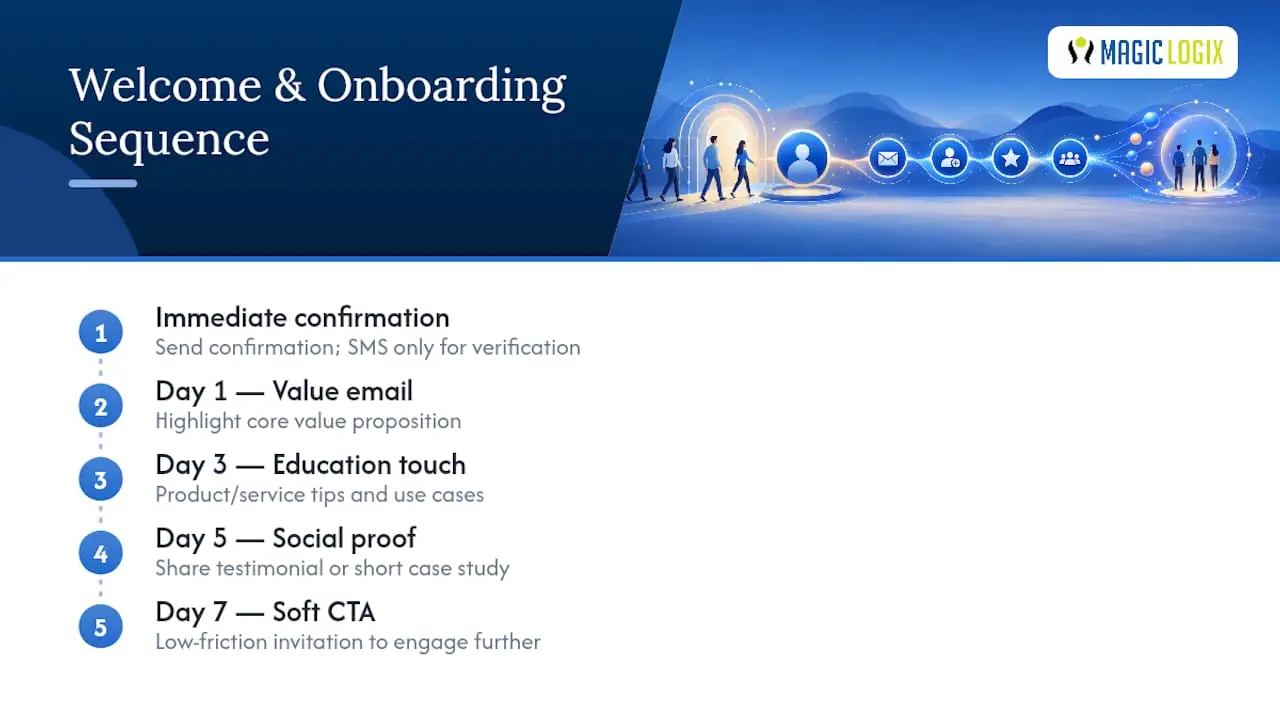
Welcome and onboarding. Triggered the moment someone subscribes, signs up, or creates an account. A solid version runs five steps: an immediate confirmation, a value-focused email at day 1, a product or service education touch at day 3, a social proof message at day 5, and a soft call-to-action at day 7. Email carries most of the weight here, with SMS reserved for time-sensitive account actions like verification.
Lead nurture. Triggered by a form fill, content download, or webinar registration. The path splits based on what the lead engaged with. Someone who downloaded a pricing guide gets a faster, sales-leaning track. Someone who read a blog post gets slower, educational content. Handoff to sales happens once a lead crosses a scoring threshold, not on a fixed calendar day.
Abandoned cart or abandoned inquiry recovery. Triggered within an hour of cart abandonment or an unfinished quote request. The classic pattern is three touches: a reminder at 1 hour, a value-add or FAQ-style follow-up at 24 hours, and a limited incentive at 72 hours if the first two haven’t converted. Timing this correctly, along with a modest incentive on the final touch, recovers a meaningful share of otherwise-lost revenue.
Post-purchase nurture and cross-sell/upsell. Triggered by a completed purchase. The first message confirms and sets expectations. The second, sent after typical time-to-use, checks satisfaction. The third introduces a complementary product or service tier based on what was bought. This is where segmentation by purchase category earns its complexity.
Win-back and reactivation. Triggered by an inactivity window, often 60 to 90 days depending on your typical purchase cycle. Start with a “we miss you” message, escalate to an incentive, then a final “last chance” touch before suppressing the contact from regular sends.
VIP and loyalty sequences. Triggered by a spend threshold or repeat-purchase count. These reward high-value customers with early access, exclusive content, or tier upgrades, and they tend to have the best engagement rates of any automation category because the audience already trusts you.
Replenishment. Triggered by average product lifespan for consumable goods. If you sell something people run out of on a predictable schedule, this workflow alone can outperform most of your paid acquisition spend.
Lead scoring and routing. Not a customer-facing sequence, but the backbone that decides when a lead moves from nurture to sales. Assign points for behaviors (page visits, email opens, form fills) and demographic fit (company size, role), then route anything above your threshold directly into a sales queue or CRM task.
How Do You Build a Marketing Automation Workflow?
Building a workflow that actually performs comes down to sequencing your decisions correctly, not the software you pick.
- Set one measurable goal. “Increase trial-to-paid conversion by defining a 14-day nurture” is a goal. “Improve engagement” is not. A workflow tied to a vague operational outcome instead of a business result is the single most common reason automations get built and then ignored.
- Map the customer journey. Identify the exact start event (form fill, purchase, inactivity) and the exact end event (conversion, unsubscribe, sales handoff). Everything in between is your workflow.
- Choose triggers and conditions. Keep branch logic to two or three paths maximum. A workflow with twelve conditional branches is a workflow nobody on your team will ever debug when it breaks.
- Define actions and timing. Decide what happens at each step and space it deliberately. Too tight, and you look desperate. Too loose, and you lose momentum.
- Confirm data hygiene. Tags and segments only work if your CRM sync is clean. A duplicate contact record or a stale tag silently breaks personalization long before anyone notices open rates dropping.
- Test before full rollout. Run a small cohort or holdout group for at least one full cycle length before turning the workflow on for everyone.
Pro Tip: Write your workflow’s goal as a sentence with a number in it before you touch a workflow builder. If you can’t, you’re not ready to build yet.
Skipping the goal step is why so many automations run for months delivering nothing measurable. Skipping the data hygiene step is why personalization tokens show up blank in a customer’s inbox.
What Are the Core Components of a Workflow?
Every workflow, no matter how elaborate, breaks down into the same four building blocks. A trigger starts the sequence, a condition filters who proceed, an action delivers the message or task, and timing controls when it happens. Get any one of these wrong and the whole chain misfires.
Channel choice follows a few reliable rules:
- Email handles most nurture, education, and post-purchase content because it supports longer messages and rich personalization.
- SMS works best for time-sensitive, short messages: shipping alerts, appointment reminders, flash offers with a tight deadline.
- Push notifications fit app-based businesses needing quick re-engagement without cluttering an inbox.
- Web personalization (dynamic homepage content, on-site offers) suits visitors you can’t yet email, using behavioral signals instead of a known address.
Send-window guidance matters more than most teams realize. B2B emails generally perform better midweek during business hours, while B2C promotional sends often do better in the evening or weekend. Test your own audience rather than assuming.
On deliverability: sender reputation directly affects whether any of this reaches an inbox at all. Programs and standards from groups like certified sender initiatives and operational guidance from M3AAWG exist precisely because inbox placement is not guaranteed just because you hit “send.” Keep an eye on consent records and unsubscribe handling too. Privacy regulations increasingly treat automated messaging the same as manual campaigns.
Which Type of Automation Platform Fits Your Team?
Picking a platform category matters more than picking a specific brand. Four broad types exist: email service providers with basic automation bolted on, CRM-integrated automation built directly into your sales database, standalone workflow engines built for complex branching, and low-code platforms aimed at non-technical marketers.
Run your shortlist against this checklist before committing to anything:
- Does it integrate natively with your CRM, e-commerce platform, and ad accounts?
- Does it support every channel you actually plan to use, not just email?
- How is contact data modeled, by individual, by account, or both?
- What testing and reporting tools are built in versus requiring a separate tool?
- Is pricing based on contacts, sends, or active workflows, and does that scale with your growth plan?
A small team with under 5,000 contacts usually needs simplicity over power. Mid-market teams juggling multiple product lines or sales territories need the CRM-integrated or workflow-engine categories, since branching complexity grows fast once you have more than one buyer persona.
Pro Tip: If your team can’t name who owns workflow maintenance six months from now, hire the expertise before you buy the platform. A powerful tool with no owner becomes shelfware.
How Do You Measure and Optimize Marketing Automation?
Open rates get too much attention. Conversion and revenue per active contact are the more reliable heuristics for small teams, since privacy protections built into major email clients inflate open-rate data.
Track these as your primary indicators:
- Conversion rate per workflow stage, not just the workflow overall.
- Revenue per lead or per active contact, which ties automation directly to the business outcome that matters.
- Activation rate for onboarding sequences specifically.
For testing, run A/B experiments with a large enough cohort to reach statistical confidence, typically over a full purchase or engagement cycle rather than a few days. Auditing workflows on a quarterly cadence catches automations that quietly stopped performing and prunes anything not earning its maintenance cost. Common failure points to check during that audit: broken CRM sync, contacts enrolled in a workflow twice, and deliverability drops tied to sender reputation issues.
Copy-Ready Workflow Templates and Timing
Use these as starting frameworks, then adjust timing to your own sales cycle and audience behavior.
Welcome sequence (5 steps):
- Immediate: confirmation and expectation-setting.
- Day 1: core value proposition, one clear next action.
- Day 3: education, showing a feature or use case in context.
- Day 5: social proof, a review or case example.
- Day 7: soft conversion push, tied to a specific offer or trial extension.
Abandoned cart/inquiry recovery (3 steps): reminder at 1 hour, helpful follow-up at 24 hours, incentive at 72 hours.
Lead nurture with scoring: award points for email opens (+2), pricing page visits (+10), and demo requests (+25); route to sales once a contact crosses 50 points total.
Win-back ladder: re-engagement message at day 60 of inactivity, incentive at day 75, final notice at day 90 before suppression.
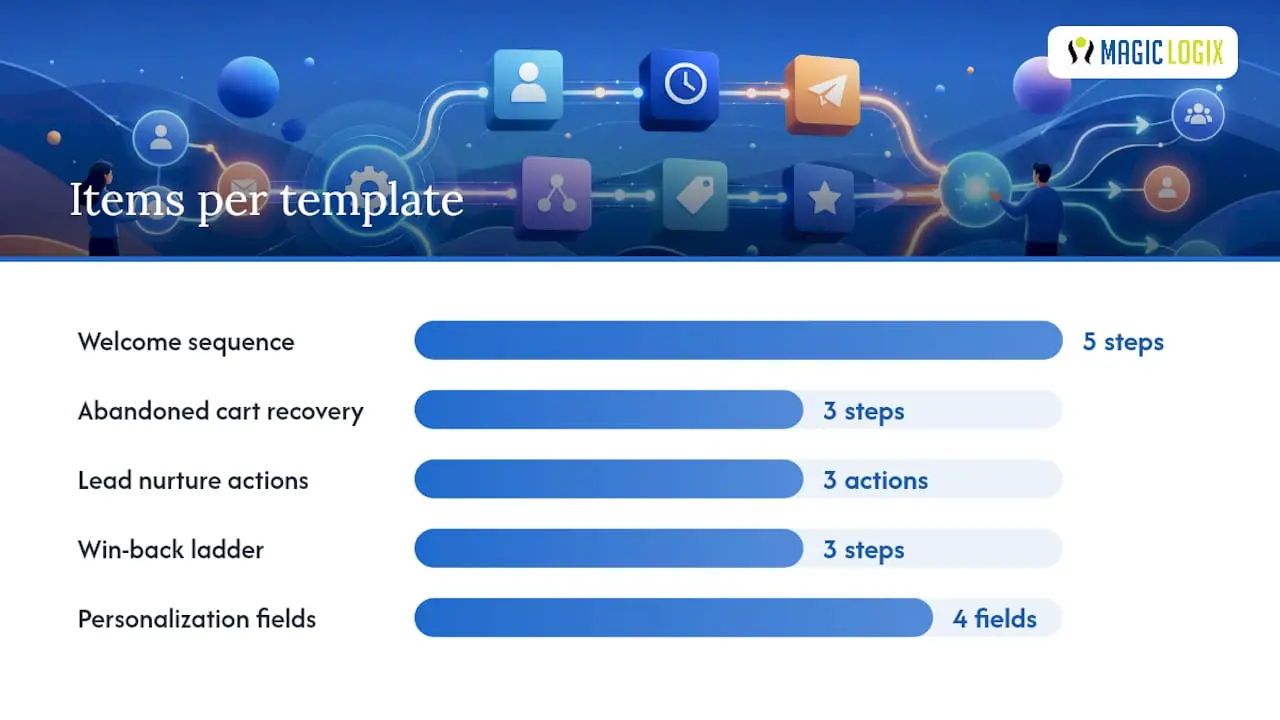
Personalization only works with clean inputs. Before launch, confirm you have: first name, last engagement date, product or service category, and a lifecycle stage tag, each with a sensible fallback (like “there” instead of a blank first-name field) so a data gap never becomes a visible embarrassment.
Your 4-Week Rollout Plan
- Week 1: Define the goal, map the journey, and gather creative assets and copy.
- Week 2: Build the workflow in your platform and run internal QA on every branch.
- Week 3: Test with a holdout group and a small live cohort before full deployment.
- Week 4: Launch to the full audience and monitor daily for the first week.
Schedule formal reviews at 30, 60, and 90 days, checking conversion data against your original goal each time. Assign one owner for QA and one for the monitoring dashboard so nothing falls into a gap between roles.
How Magic Logix Approaches Automation for Clients
Some marketing automation engagements follow a 90-day, data-first structure rather than launching every workflow at once. Phase one audits existing data and picks the two or three automations with the clearest revenue path. Phase two builds and tests those flows against a measurable goal. Phase three expands into cross-channel orchestration once the foundation proves out, layering in personalization and predictive analytics as the data supports it.
The pattern that separates a workflow that actually moves revenue from one that just runs quietly in the background is whether it was built against a specific business number from day one. Everything else, the channel mix, the copy, the branching logic, gets adjusted later.
Readers running this in-house can borrow the sequencing directly: audit first, prioritize by revenue impact, build one workflow at a time, and resist the urge to launch everything simultaneously. The full 90-day marketing automation strategy breaks down each phase in more detail for teams weighing an in-house build against a managed one.
Why Most Teams Overbuild Before They Optimize
The instinct on most marketing teams is to build coverage: one automation for every possible customer touchpoint, launched all at once. That instinct is backwards. The research consistently favors three well-maintained automations over a dozen half-built ones, and the difference isn’t subtle. A workflow nobody audits becomes a liability, not an asset, because stale logic and outdated offers erode trust faster than having no automation at all.
The conventional advice oversells the platform and undersells the goal. Teams get sold on features (branching logic, AI send-time optimization, predictive scoring) before they’ve written down what number the workflow is supposed to move. That sequencing is backwards. A goal-first approach, even with a basic tool, consistently beats a sophisticated platform aimed at nothing in particular.
If there’s one thing worth prioritizing above all else, it’s the quarterly audit. Most teams treat automation as “set and forget.” The data says otherwise: workflows decay, offers go stale, and conditions written for last year’s customer base stop matching this year’s behavior.
— Hassan
Get Automation Built Right the First Time
You’ve seen what a well-built workflow looks like: one measurable goal, clean data behind it, and a testing plan before full rollout. Building that in-house takes real time most SMB marketing teams don’t have to spare, especially while running paid campaigns and content at the same time. An audit of current lead flow is run, the two or three automations most likely to move revenue are prioritized, and a pilot workflow is built to demonstrate performance before committing to a full rollout.
That’s a different starting point than buying a platform and hoping the right workflows get built eventually. Magiclogix’s marketing automation services cover the audit, the build, and the ongoing optimization, so the quarterly pruning and A/B testing this guide recommends actually happens instead of getting skipped under deadline pressure. If your welcome sequence, cart recovery, or lead nurture hasn’t been touched in months, request a consultation and get a prioritized roadmap for what to fix first.
Sources
- Marketing Automation Workflows Guide
- How to Build and Use Marketing Automation Workflows (with Examples)
- Marketing Automation for Small Businesses: Start Simple, Scale Smart | itsdeep
- M3AAWG (messaging, malware and mobile anti-abuse working group)
FAQ
What Are Marketing Automation Workflows?
A marketing automation workflow is a sequence of automated actions triggered by a specific customer behavior, like a purchase, form fill, or period of inactivity. It chains triggers, conditions, actions, and timing together so the right message reaches the right contact without manual sending.
What Are Examples of Workflow Automation?
Common examples include welcome sequences, abandoned cart recovery, post-purchase nurture, lead nurture with scoring, and win-back campaigns for inactive contacts. Each one runs on a defined trigger and a set of timed steps, with the ten most common patterns detailed here.
What Is a Trigger in Automation?
A trigger is the specific event that starts a workflow, such as a form submission, cart abandonment, or a set number of days since last purchase. Everything downstream, the conditions, actions, and timing, only activates once that trigger fires.
What Is a Marketing Automation Strategy?
A marketing automation strategy is the overall plan for which workflows to build, in what order, and against which business goals. Small businesses generally do best starting with a handful of automations and scaling progressively rather than building every possible workflow at once. Magiclogix structures this as a phased, data-first rollout so each new automation is added once the previous one is proven.