

A marketing automation strategy is the operating layer that connects your customer data, trigger logic, workflows, and measurement into one system aimed at revenue, not just email sends. The first move is not picking software. It’s choosing one revenue linked workflow, like cart abandonment or lead nurture, and piloting it. Programs that start narrow tend to see measurable ROI within 90 days.
TL;DR:
- Starting with a narrow, revenue-linked workflow allows most programs to see measurable ROI within 90 days.
- Automation success depends on clear data ownership, integration depth, and defining entry and exit criteria for each workflow.
- Building workflows one at a time, with staged targets at 30, 60, and 90 days, helps ensure reliable results and easier scaling.
- High-impact, low-complexity touchpoints like onboarding, cart abandonment, and lead nurture should be prioritized over seasonal campaigns.
- A focus on governance, clean data, and small pilots prevents common failures like data mismatches, unclear ROI, and untrusted automation.
Table of Contents
- What Is a Marketing Automation Strategy, and Why Does It Matter Now?
- How Do You Turn Business Goals Into Automation KPIs?
- How Do You Map the Customer Journey for Automation?
- What Should You Look for in an Automation Platform?
- How Do You Design Workflows That Scale Safely?
- What Data and Privacy Controls Does Automation Require?
- How Do You Measure ROI From Marketing Automation?
- What Usually Goes Wrong When Teams Implement Automation?
- Who’s Behind This Guide, and What Can You Use From It?
- A 90-Day Pilot and Governance Checklist Worth Following
- How Magiclogix Turns This Roadmap Into a Working Program
- Sources
- FAQ
What Is a Marketing Automation Strategy, and Why Does It Matter Now?
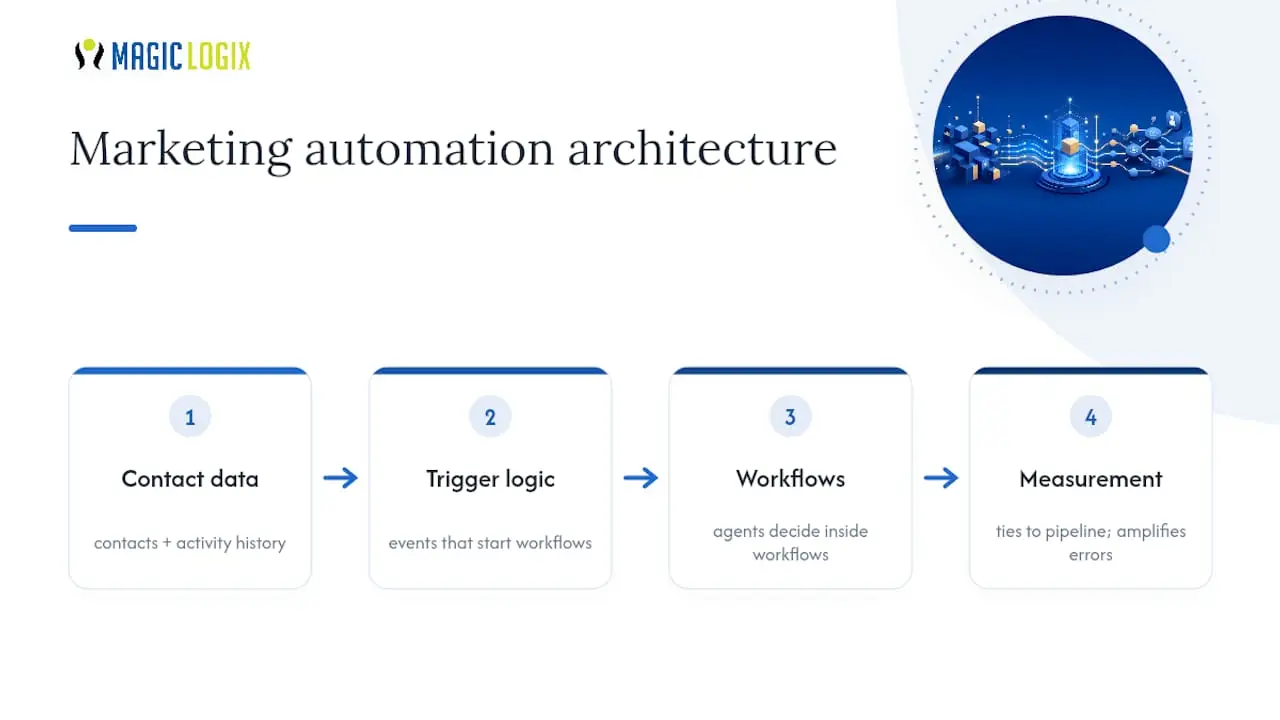
A marketing automation strategy is best understood as architecture, not a checklist of email blasts. You have a data layer (who your contacts are and what they’ve done), trigger logic (what event starts a workflow), the workflows themselves, and a measurement layer that ties activity back to pipeline. Skip any one of those and the whole thing wobbles.
Heading into 2026, the architecture matters more than ever because agentic AI is entering the stack. Nearly half of marketing teams have adopted some form of agentic automation, and agent capability is increasingly important as a criterion buyers use to pick platforms. Agents make decisions inside your workflows, which means a broken process doesn’t just run slower. It runs wrong, faster, and at scale. Strategy is what keeps automation from amplifying a mess you already had.
How Do You Turn Business Goals Into Automation KPIs?
Revenue goals don’t automate themselves. Start by picking one business objective and asking what behavior, if automated, would move it. Lead velocity ties to nurture speed. Retention ties to win-back timing. Revenue ties to conversion lift on specific segments.
From there, set staged targets instead of one big finish line:
- 30 days: Workflow is live, data is clean, and you’re tracking open, click, and conversion rates on a small test segment.
- 60 days: You have a statistically meaningful lift compared to your control group, plus early signal on revenue per contact.
- 90 days: You can point to dollars attributed to the workflow and decide whether to scale it.
That 90 day marker isn’t arbitrary. Analysis of 487 companies running automation programs found a median ROI of 341%, and 73% of them hit positive ROI inside that first quarter, largely because they kept their initial workflow sets small (three to five) instead of building sprawling automation trees before proving the concept works.
Your success criteria for scaling should be written down before launch, not decided after the fact when results are ambiguous. A simple threshold works: if the workflow beats your control group on the primary metric by a set margin, and the sample is large enough to trust, you scale it. If it doesn’t clear that bar in 60 days, you fix the trigger logic or the content, not the whole strategy.
How Do You Map the Customer Journey for Automation?
Before you build a single workflow, walk the actual path a customer takes, not the one on your org chart. Pull every touchpoint, form fill, email open, support ticket, page visit, and mark where people stall or drop off. Those stall points are where automation earns its keep.
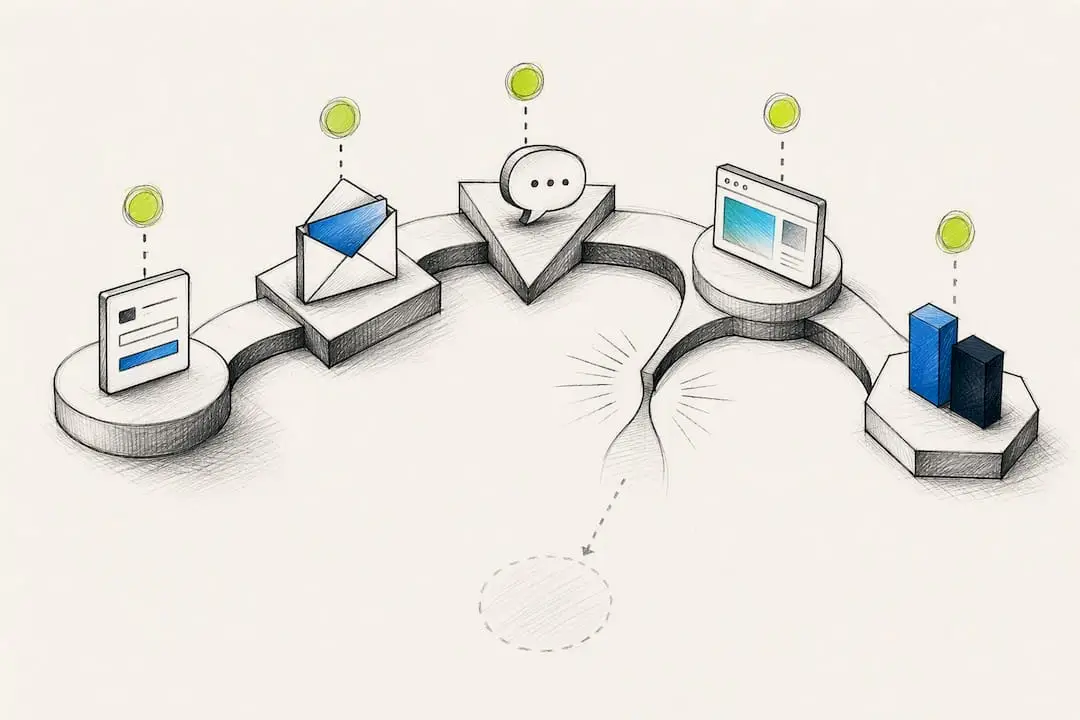
A simple prioritization formula helps you decide what to build first: multiply how often a touchpoint occurs, by its revenue impact, and divide by how complex it is to build. High frequency, high revenue, low complexity workflows win every time.
Three starter workflows consistently rank at the top of that formula:
- Welcome and onboarding sequences. They run continuously, touch every new contact, and set the tone for everything after.
- Cart or form abandonment recovery. High frequency, direct revenue link, and usually a three or four email build.
- Lead nurture for sales qualified leads. This is where personalization and contextual content matter most, since generic nurture sequences are what B2B teams cite as their biggest friction point.
Seasonal or one-off campaigns almost always score lower on this formula, even when they feel urgent. They don’t run at scale, so the payoff is capped no matter how clever the content is.
Pro Tip: Map the journey with your sales team in the room, not just marketing. The gaps salespeople complain about verbally are usually the exact leakage points your prioritization formula will surface on paper.
What Should You Look for in an Automation Platform?
Skip the feature by feature vendor shootout. It’s the wrong lens. What actually determines whether a platform works for you is whether it fits your team’s skill level and your data’s complexity, not whether it has the longest checklist of capabilities.
A few criteria matter more than the rest:
- Team fit. A lean marketing team of two or three people needs a platform with guided setup and templates, not raw API access they’ll never touch.
- Integration depth. How well does it talk to your CRM or customer data platform? Platform selection should prioritize this over feature comparisons, since a platform that can’t sync contact records cleanly will create more manual work than it saves.
- Native agent capability. If you plan to use agentic AI for lead scoring or next-best-action decisions, check whether that’s built in or bolted on through a third party.
- Audit logs and approval workflows. You need a record of every message an automated workflow sent and who approved the logic behind it.
- Clear data contracts. Know exactly which system owns which field, so your CRM and your automation platform never argue over whose version of a contact record is correct.
Get those five right and the rest, templates, reporting dashboards, design flexibility, tends to sort itself out.
How Do You Design Workflows That Scale Safely?
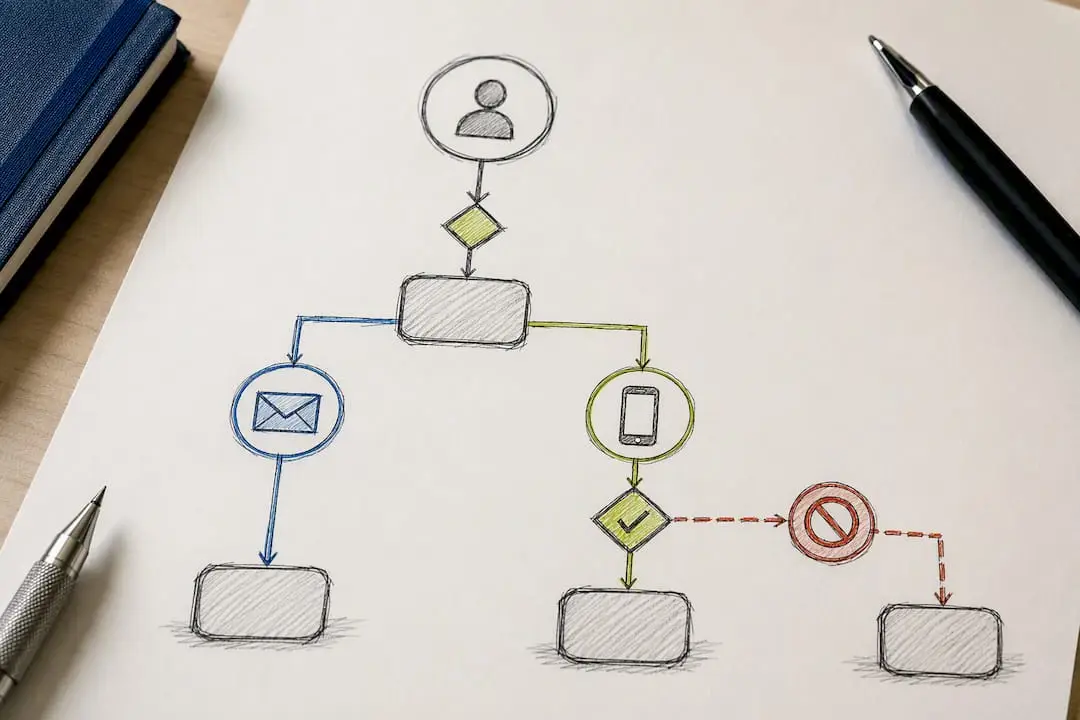
Build one workflow at a time, and give each one a single job. A workflow trying to nurture leads, recover abandoned carts, and re-engage churned customers all at once is a workflow nobody can debug when something breaks. Define clear entry and exit criteria for each: what event puts a contact in, and what event (a purchase, a reply, an unsubscribed) takes them out.
A basic nurture sequence for a mid-funnel lead might run:
- Email 1 (day 0): Confirms the resource they downloaded and sets expectations.
- Email 2 (day 3): Addresses the most common objection tied to that resource.
- Email 3 (day 7): Shares a proof point or case reference.
- Email 4 (day 12): A direct, low-pressure offer to talk or book time.
- Email 5 (day 20): A last value-add touch before moving them to a longer-term list.
That cadence, three to five touches, is deliberate. Research pool benchmarks show tighter workflow sets outperform sprawling ones, largely because every added step is another place for the sequence to feel robotic instead of useful.
Build lead scoring thresholds into the workflow so sales gets alerted at the right moment, not too early and not after the lead has gone cold. A common approach: score rises with page visits and email engagement, and once a contact crosses a set threshold, sales gets an automatic alert with the contact’s activity history attached.
Pro Tip: Test every new workflow on a segment of 200 to 500 contacts before rolling it out to your full list. It’s small enough to catch a broken trigger fast, and large enough to trust the early numbers.
What Data and Privacy Controls Does Automation Require?
Every automated workflow is only as reliable as the data feeding it, so decide early which system is the single source of truth for contact records, usually your CRM, and hold every other tool to that standard. When your automation platform and CRM disagree about a contact’s status, workflows either double message people or miss them entirely.
Before any workflow goes live, test the integration itself. Push a batch of test records through and confirm duplicates don’t multiply, fields map correctly, and unsubscribes in one system actually suppress sends in the other. This sounds basic, and it’s exactly the step most teams skip under launch pressure.
Consent and channel preference need to live inside the workflow logic itself, not as an afterthought bolted on later. If a contact opted into email but not SMS, that preference should block them from ever entering an SMS branch of a workflow, automatically, without a human remembering to check.
How Do You Measure ROI From Marketing Automation?
Track two layers of metrics, not one. Operational metrics (time saved, emails sent, workflow completion rate) tell you the machine is running. Business metrics (conversion lift, revenue attributed, retention rate) tell you whether it’s worth running.
A workable dashboard usually includes:
- Conversion rate for contacts inside a workflow versus a control group outside it.
- Revenue per contact attributed to the workflow over a fixed window.
- Time to first response for sales alerts triggered by lead scoring.
- Cost per acquisition for workflows tied directly to paid or lifecycle campaigns.
For attribution, keep it simple before you get sophisticated: compare a workflow segment against a matched control group rather than trying to build multi-touch attribution models on day one. Report progress at 30, 60, and 90 days using the same metric set every time, so leadership sees a trend line, not disconnected snapshots.
The payoff tends to arrive faster than most teams expect. Programs return a median of $5.44 per dollar spent, with top performing programs closer to $8.71, and much of that gap comes down to integration depth and how well workflows are targeted rather than sheer campaign volume. Clear ROI dashboards make the difference between a program that gets renewed and one that quietly gets cut at budget season.
What Usually Goes Wrong When Teams Implement Automation?
Three problems show up more than any others. Sales and marketing disagree about what counts as a qualified lead, so automated handoffs get ignored. Nobody can clearly state the return on the investment, so budget gets questioned every quarter. And the underlying data is dirty enough that workflows send the wrong message to the wrong person, which erodes trust in the whole system fast. These are the exact barriers B2B firms report most often.
The fix isn’t more technology. It’s ownership. Assign one person to own the lead definition sales and marketing both agree to. Assign another to own data hygiene. Run every new workflow as a small pilot with written acceptance criteria, so nobody is arguing about whether it “feels” successful.
Know when to prune versus scale. If a workflow hits its 60 day threshold, scale it and add the next one. If it stalls twice in a row after fixes, kill it rather than let it linger as a zombie workflow nobody’s monitoring. Sprawling, half maintained automation is worse than no automation at all.
Who’s Behind This Guide, and What Can You Use From It?
This guide was written by Hassan, who covers marketing automation and customer engagement strategy for Magiclogix. Our team has worked on a wide range of automation strategy and implementation projects, spanning small businesses building their first workflow to enterprise teams layering in agentic AI on top of mature CRM integrations.
Two assets from that work are worth pulling directly into your own planning: a workflow prioritization worksheet based on the frequency by revenue by complexity formula covered above, and a 90 day dashboard template for tracking the same metrics leadership actually asks about. Both are built from the same patterns behind automation playbooks Magiclogix uses with agency and enterprise clients.
A 90-Day Pilot and Governance Checklist Worth Following
If you take one thing from this guide, take the sequencing. Clean your contact data before you build anything, not after. Build one workflow, measure it against a control group for 30 days, iterate on the parts that underperform, then add a second workflow once the first is stable. Teams that reverse this order, building five workflows before validating one, are the ones who end up with automation nobody trusts six months later.
Your governance checklist should cover four things before launch: a named owner for every data object, an approval gate for anything that sends outbound, an audit log of every workflow run, and an alert system that flags errors before customers see them. Only add agentic decision making once that checklist is airtight. An agent making bad calls on clean data is a bug. An agent making bad calls on dirty data is a liability.
— Hassan
How Magiclogix Turns This Roadmap Into a Working Program
Magiclogix builds marketing automation strategy the way this guide describes it: one workflow, clean data, a governance checklist, then scale. If you’ve read this far and you’re staring at a platform license you haven’t fully activated, that’s the gap Magiclogix closes.
Our team handles the parts most in-house marketers don’t have time for: mapping your customer journey, setting up the CRM and automation platform integration correctly the first time, and building the dashboards that make ROI a five minute conversation instead of a defensive one. These playbooks have been applied across many client projects, from small businesses launching their first nurture sequence to enterprise teams introducing agentic workflows on top of established systems.
If you want a second set of eyes on where your automation strategy stands, request a pilot assessment through our marketing automation services for agencies and growing teams, or explore how a modern digital marketing strategy fits around the automation layer. Either way, the next step is a conversation, not a contract.
Sources
The B2B marketing automation study informed the barriers and personalization findings above. The 487-company ROI analysis provided the pilot benchmarks and workflow sizing guidance. The 2026 adoption and ROI statistics supplied the payback figures and agentic AI adoption trends.
- Assessing Challenges and Opportunities of Marketing Automation in B2B Firms: An Integrated Approach
- Marketing Automation ROI in 2026: Real Numbers From 487 Companies – V12 AI
- Marketing Automation Statistics 2026: Adoption, ROI & AI Trends
FAQ
What Is a Marketing Automation Strategy?
It’s the plan connecting your customer data, trigger events, automated workflows, and measurement to specific revenue or retention goals, rather than a standalone tool or a list of scheduled emails.
What’s the Difference Between an Automation Strategy and Just “Automating a Process”?
An automation strategy sets goals, priorities, and governance first, then builds workflows to serve them. Automating a single process without that framework often just speeds up a broken step instead of fixing it.
How Do You Automate a Marketing Process Step by Step?
Map the customer journey, pick the highest-priority touchpoint using a frequency, revenue, and complexity formula, build a single-purpose workflow with clear entry and exit criteria, test it on a small segment, then measure and scale.
Is Marketing Automation the Same as CRM?
No. A CRM stores and organizes contact and deal data; marketing automation uses that data to trigger workflows like nurture sequences and lead scoring. The two need to integrate tightly, but they serve different jobs.
How Long Does It Take to See ROI From Marketing Automation?
Many programs see measurable results inside 30 to 90 days when they start with one focused workflow, with 73% of companies in one analysis reporting positive ROI within that first quarter.