
CRM marketing integration connects your customer data with your marketing tools so leads get routed faster, campaigns get personalized automatically, and every touchpoint becomes measurable. The best first move is simple: map your lead lifecycle and agree on your canonical data fields before you connect a single system. Everything else, from tool selection to governance, builds on that foundation.
TL;DR:
- Use a native connector for two or three tools; once five or more systems or complex data logic are involved, choose iPaaS or custom APIs.
- Pilot one lead source and one campaign type before expanding; this catches mapping and routing errors before they affect the wider pipeline.
- Sync consent, opt out status, and suppression lists in both directions; federal rules require senders to honor opt out requests within 10 business days.
- Capture UTM parameters and campaign IDs when leads enter the CRM, then track lead to MQL, MQL to SQL, response time, and campaign influenced pipeline.
- Use one canonical email field for matching, store source system IDs, and send uncertain duplicate merges to a person for review before records combine.
Table of Contents
- What Is CRM Marketing Integration and What Types Exist?
- How Integration Improves Lead Management and Campaign Results
- Connecting Email, Automation, Analytics, Forms, and Ads to Your CRM
- A Step-by-Step Rollout Checklist for Your Integration Project
- Keeping Your Data Clean and Your Lead Scores Useful
- Choosing Between Connectors, APIs, and Middleware
- Which KPIs Prove Your Integration Is Working
- How We Approach CRM Marketing Integration Projects
- Popular CRM and Marketing Tool Pairings
- Protecting Customer Data Beyond Email Compliance
- What I’d Prioritize First
- Get Hands-On Help Implementing Your Integration
- FAQ
- Sources
What Is CRM Marketing Integration and What Types Exist?
CRM marketing integration means connecting your customer relationship management system with the tools you use for email, automation, analytics, and advertising so customer data flows both directions without manual re-entry. IBM frames CRM integration as a cross-functional capability that links sales, marketing, and service systems to share customer data and improve the customer experience.
Several integration types exist, and the right one depends on your scale and technical resources:
- Native connectors: built-in integrations between popular platforms, fastest to set up but less flexible for custom logic.
- Marketing automation connectors: purpose-built links between your CRM and automation platform, handling scoring and nurture handoffs.
- APIs: direct programmatic connections that give you full control over data flow, at the cost of development time.
- Webhooks: real-time event triggers that push data instantly when something changes, useful for time-sensitive handoffs.
- iPaaS (integration platform as a service): managed middleware that orchestrates multiple systems without heavy custom code.
- Batch ETL: scheduled bulk data transfers, often used for reporting or legacy systems that cannot handle real-time syncs.
If you are a small team with two or three tools, a native connector usually gets you running fastest. Once you have five or more systems talking to each other, or your data logic gets complicated, an iPaaS or custom API approach gives you the control you need without the fragility of stacking point-to-point connections.
How Integration Improves Lead Management and Campaign Results
Once your systems talk to each other, leads move faster and campaigns get sharper. Sales reps stop chasing spreadsheets, marketing stops guessing which campaigns actually produced revenue, and follow-up happens while a lead is still warm.
Common use cases we see work well:
- Lead capture to nurture to handoff: a form submission triggers a nurture sequence, and once the lead hits a scoring threshold, it routes automatically to the right rep.
- Re-engagement sequences: dormant contacts get flagged in the CRM and pulled back into targeted campaigns based on their last activity.
- Account-based personalization: firmographic and engagement data from the CRM shapes which content and offers an account sees.
A small staged pilot, covering one lead source and one campaign type, produces faster learning than an enterprise-wide immediate rollout. Starting narrow lets you catch mapping errors and routing mistakes before they touch your whole pipeline. Most teams see their first measurable wins (cleaner handoffs, fewer duplicate leads, faster response times) within the initial pilot cycle, which makes it easier to justify expanding the scope.
Connecting Email, Automation, Analytics, Forms, and Ads to Your CRM
Each marketing channel needs its own configuration checklist when you connect it to your CRM. Getting these details right up front saves you from cleanup work later.
- Email: sync suppression lists, opt-out status, and consent flags bidirectionally so a contact who unsubscribes in one system is honored everywhere. The FTC’s CAN-SPAM compliance guide requires every commercial email, including B2B messages, to include a clear opt-out mechanism and to honor opt-out requests within 10 business days without requiring extra steps from the recipient.
- Marketing automation: define trigger logic clearly (what field change starts a workflow), decide which engagement fields sync back to the CRM, and confirm sync direction so you are not overwriting sales-entered data with marketing defaults.
- Analytics and attribution: capture UTM parameters and campaign IDs directly into CRM records at the point of lead creation, and define which actions count as conversion events.
- Forms and lead capture: build deduplication logic before launch, tag every lead with its source, and use progressive profiling so repeat visitors are not asked for the same information twice.
- Ad platforms: sync qualified audiences from your CRM back to ad platforms so retargeting reflects actual pipeline stage rather than generic site visits.
Pro Tip: Capture campaign identifiers like UTMs and ad click IDs at the moment of lead capture, not after the fact. Reconstructing attribution later is far harder than storing it correctly the first time.
When multiple marketers appear in a single commercial email, CAN-SPAM allows one designated sender in the “from” line, provided that sender meets the law’s disclosure requirements, which matters for co-branded or partner campaigns run through shared marketing automation accounts.
A Step-by-Step Rollout Checklist for Your Integration Project
Rolling out a CRM marketing integration goes smoother when you treat it as a staged project rather than a single flip-the-switch event. Here is the order that tends to prevent the most rework:
- Map the full lead lifecycle, from first touch to closed deal, and document field definitions for every stage.
- Agree on a canonical data source for each field type (which system “wins” when there is a conflict) and set your sync cadence.
- Write down lead scoring and routing rules so they are not buried in one person’s head.
- Build your data hygiene layer: validation rules, deduplication logic, and normalization standards.
- Pilot the integration on a sample dataset, watch it closely, then expand in stages rather than all at once.
- Assign governance roles, set SLAs for sync failures, and put monitoring alerts in place before you scale.
A few supporting habits make this checklist stick:
- Keep your field mapping documentation in a shared location that both marketing and sales ops can edit.
- Review sync error logs weekly during the first month after launch.
- Revisit scoring thresholds quarterly as your lead volume and quality shift.
Clear owner roles and defined SLAs for sync failures reduce long-term integration cost and prevent the slow data drift that erodes trust in your CRM over time.
Keeping Your Data Clean and Your Lead Scores Useful
Bad data usually comes from a handful of predictable sources: duplicate form submissions, inconsistent field formatting, and manual entry errors from reps working around a clunky interface. Preventing it is mostly about building guardrails before data enters the system, not cleaning up after.
- Use a single canonical email field as your primary match key, with a secondary normalized contact key for cases where email changes.
- Store source system IDs on every record so you can reliably reconcile data when merging or splitting duplicate contacts.
- Set confidence thresholds for automatic merges and route uncertain matches to a human for review.
- Build composite lead scores that combine behavioral signals (page visits, email opens), fit signals (company size, industry), and recency (how long since the last meaningful action).
Act-On’s best-practices guidance on CRM and marketing automation integration recommends establishing accurate lead scoring, maintaining visibility into post-sales-qualified-lead activity, and eliminating duplicate records as core steps. Refresh your scores on a regular cadence, tied to actual routing rules, so a score change triggers an action rather than sitting unused in a dashboard.
Choosing Between Connectors, APIs, and Middleware
Your technical implementation choice shapes how much maintenance your team signs up for down the road. IBM’s comparison of integration methods notes that native connectors are fastest to deploy but less flexible, iPaaS platforms offer managed orchestration for multi-system environments, and custom APIs give full control at a higher development cost.
- Native connectors: lowest upfront cost and fastest setup, best for straightforward two-system connections.
- iPaaS/middleware: better suited to environments with four or more connected systems, since it centralizes error handling and monitoring.
- Custom API integration: the right call when your data logic is too specific for any off-the-shelf connector to handle well.
Whichever path you choose, build in monitoring for failed syncs, retry logic for temporary outages, and a plan for schema versioning when either platform updates its data structure. Before going live, run a sandbox sync, do a dry run with a small batch, and reconcile the results against your source system. If your in-house team does not have API development experience, a managed connector or iPaaS platform usually gets you to a stable state faster than hiring for a one-time build.
Which KPIs Prove Your Integration Is Working
A handful of metrics tell you whether your integration is actually improving marketing performance, not just moving data around.
- Lead-to-MQL conversion rate: shows whether your scoring and nurture logic are qualifying the right contacts.
- MQL-to-SQL conversion rate: reveals how well marketing and sales agree on what counts as sales-ready.
- Time-to-contact: measures how quickly a rep follows up after a lead crosses the routing threshold.
- Pipeline influenced by campaign: ties specific campaigns back to revenue using the UTM and campaign ID data captured at lead creation.
Pushing campaign identifiers into CRM records at the point of capture is what makes pipeline attribution possible later. Build a simple multi-touch view (first touch, last touch, and one or two meaningful touches in between) rather than chasing a perfect attribution model on day one.
Pro Tip: Review your core KPIs monthly for the first quarter after launch, then move to a quarterly cadence once the numbers stabilize.
How We Approach CRM Marketing Integration Projects
We treat every integration as a data problem first and a tooling problem second: before we touch a connector, we build the field map and governance plan that keeps the sync accurate long after launch. That approach comes out of our broader marketing automation work across client engagements of varying scale and complexity.
Readers working through their own integration can draw on a few of the same artifacts we use internally:
- A data-mapping template for documenting canonical fields and sync direction.
- Workflow examples drawn from our guide to marketing automation.
- A monitoring checklist for catching sync failures before they affect reporting.
Popular CRM and Marketing Tool Pairings
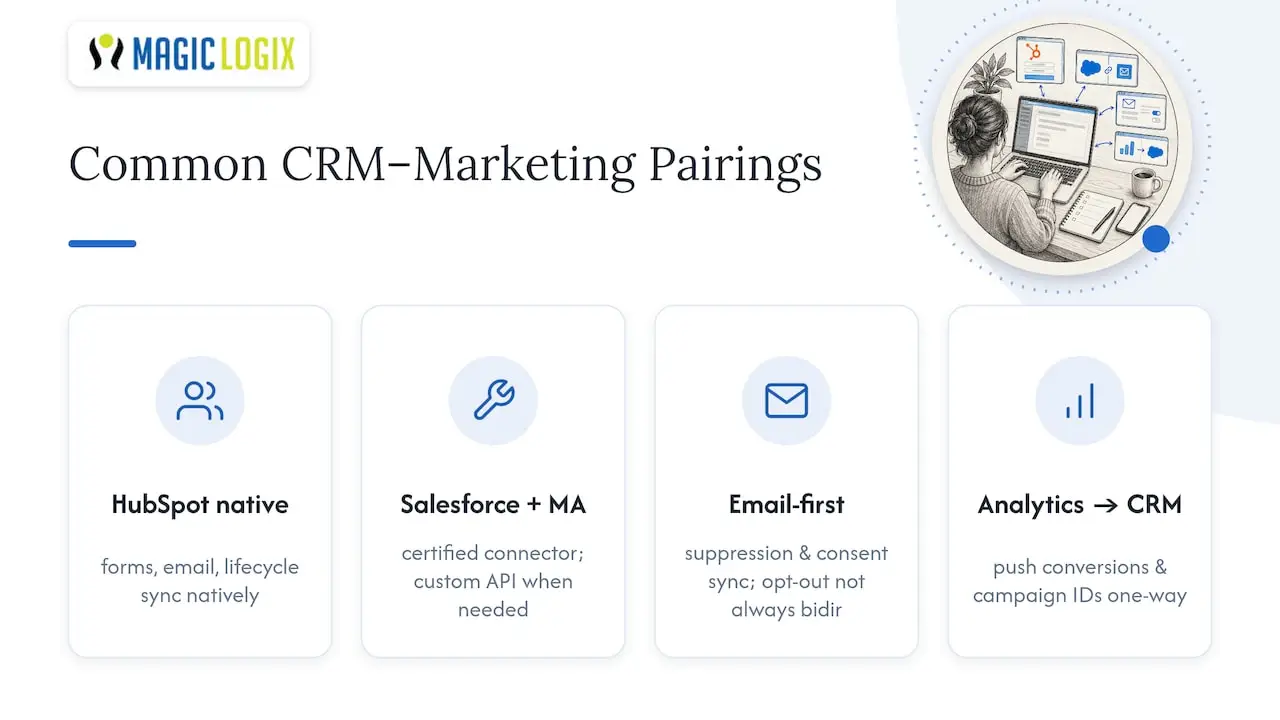
Certain CRM and marketing automation pairings come up again and again because the connectors between them are mature and well documented. HubSpot’s CRM and its own marketing hub sync natively, which means form submissions, email engagement, and lifecycle stage updates flow without custom development. Salesforce paired with a dedicated marketing automation platform typically relies on a certified connector or managed package that handles lead and campaign object mapping, though more complex field logic often requires custom API work on top of the base connector.
For teams running email-first programs, a CRM connected to a standalone email platform usually needs explicit configuration of suppression list syncing and consent field mapping, since these connectors do not always sync opt-out status in both directions by default. Analytics platforms connected to a CRM generally push conversion events and campaign IDs one way, from analytics into the CRM, rather than syncing bidirectionally.
A partner guide on CRM workflow automation walks through common patterns for connecting CRM platforms with automation layers, which is a useful reference if you are evaluating a custom build versus a managed connector for your specific pairing. Whatever combination you run, the integration specifics (what syncs, in which direction, on what schedule) matter more than the brand names involved.
Protecting Customer Data Beyond Email Compliance
CAN-SPAM covers your email obligations, but a CRM marketing integration touches far more customer data than email addresses, and that broader dataset needs its own safeguards. Contact records often include behavioral history, purchase data, and firmographic details pulled from multiple systems, all of which carry privacy obligations depending on where your contacts are located.
A few practices reduce your exposure as data moves between systems:
- Encrypt data in transit and at rest for every connection point, including middleware and iPaaS layers that temporarily hold your data.
- Limit field-level access so only the roles that need sensitive data (billing details, for example) can see it in either system.
- Build a documented process for honoring data deletion and access requests across every connected tool, not just your primary CRM.
- Audit third-party connector permissions periodically, since an integration that once needed broad access may not need it anymore.
If your contact base includes people covered by regulations like GDPR, your integration plan needs a lawful basis for processing their data in every connected system, not just the one where it was originally collected. This is a point worth confirming with legal counsel for your specific market and contact base, since the right approach depends on where your customers live and what data you hold on them.
What I’d Prioritize First
If you take one thing from this guide, make it governance before tooling. A clean lead lifecycle map and a small, well-monitored pilot will teach you more than any platform comparison. This week, pick one lead source and map its full journey from capture to handoff.
— Hassan
Get Hands-On Help Implementing Your Integration
If mapping fields, choosing connectors, and building governance sounds like more than your team has bandwidth for right now, we build these integrations for a living. Our marketing automation and digital marketing work covers the full path from data mapping to launch, so you get a working system instead of a stalled project.
Reach out through our site to talk through what your current setup looks like and where the quickest wins are.
FAQ
What does a CRM do for marketing?
A CRM gives marketing teams a central record of every contact’s history, so campaigns, scoring, and handoffs are based on real behavior rather than guesswork. It also acts as the system of record that ties marketing activity back to actual pipeline and revenue.
What are the top CRM tools marketers typically use?
The CRM platforms marketers reach for most often include Salesforce, HubSpot, and Microsoft Dynamics, each with different strengths around customization, ease of use, and native marketing features. The right choice depends on your team’s size, technical resources, and which marketing tools you already use.
What are the four types of CRM?
The commonly referenced categories are operational CRM (sales, marketing, and service automation), analytical CRM (data analysis for decision-making), collaborative CRM (sharing customer data across departments), and strategic CRM (long-term customer relationship focus). Definitions vary by source, and many modern platforms blend several of these functions into one product.
What are some examples of CRM marketing?
Common examples include triggered email nurture sequences based on CRM lifecycle stage, retargeting ads synced from CRM audience segments, and personalized content recommendations driven by firmographic data stored in the CRM. Salesforce’s guide to CRM integration highlights synchronizing marketing automation with CRM as a core use case for powering personalization and campaign tracking.
How long does a typical CRM marketing integration take to implement?
Timelines vary widely based on the number of systems involved and the complexity of your data, but a focused pilot covering one lead source and one campaign type can often go live within a few weeks. Full-scale rollouts with multiple connected tools and custom field logic generally take longer, since they involve more testing and reconciliation.
Sources
- CAN-SPAM Act: A Compliance Guide for Business | Federal Trade Commission
- What Is CRM Integration? | IBM