

A headless CMS delivers measurable business value for teams that need omnichannel content delivery, faster time-to-market, and developer-led innovation. The headline wins are quicker campaign launches, content that flows to every channel without duplicate work, and engineering teams freed to build with modern frameworks. None of that comes free: headless setups demand upfront investment and real developer capability, so the right fit depends on your team’s readiness.
TL;DR:
- Headless CMS offers significant ROI and productivity improvements for organizations managing multiple channels, with 61% reporting increased ROI after migration.
- Developers benefit from the flexibility to choose modern frontend frameworks, which accelerates deployment and improves site performance through CDN and microservice integration.
- Large enterprises use headless CMS to centrally manage content across multiple brands and regions, enhancing security and governance with structured workflows and permissions.
- Headless CMS requires higher upfront investment, skilled developers, and ongoing maintenance, making it less suitable for small teams or single-channel websites.
- Conducting a pilot project of eight to twelve weeks on one channel, with clear metrics, is essential to assess the benefits and cost-effectiveness before full adoption.
Table of Contents
- What is a headless CMS and how does it differ from a traditional CMS?
- How does headless CMS change the game for marketing and product teams?
- What advantages do developers gain from a headless architecture?
- What does headless CMS offer larger, multi-brand organizations?
- Where does headless CMS fall short, and when should you stick with a traditional setup?
- How do you measure ROI and total cost before committing to headless?
- How should you plan a headless CMS rollout?
- Is headless CMS actually worth the switch for most teams?
- Where Magic Logix fits if you’re considering a headless build
- FAQ
- Sources
What is a headless CMS and how does it differ from a traditional CMS?
A headless CMS stores and organizes your content in a backend repository, then delivers it anywhere through an API instead of tying it to a specific website template. A traditional, monolithic CMS bundles the content database with a fixed presentation layer: the system that stores your blog post is the same system that decides how it looks on the page. That coupling works fine when you only publish to one website, but it breaks down the moment you need to push the same content to a mobile app, a kiosk, or a voice assistant.
Headless architecture separates those two jobs. Your editorial team manages content in one place, and developers pull that content wherever it needs to live through API calls. Think of it like a utility company sending electricity through the grid: the power plant doesn’t care whether it’s lighting a lamp, running a refrigerator, or charging a car. The content works the same way, flowing to whatever device requests it.
Common delivery targets for headless content include:
- Websites and progressive web apps
- Native mobile apps for iOS and Android
- In-store kiosks and digital signage
- Connected devices and IoT dashboards
- Voice assistants and smart speakers
Not every setup is purely headless. Hybrid, or “head-optional,” platforms give you a built-in frontend you can use out of the box while still exposing an API for custom channels. Headless WordPress takes a different route: you keep WordPress as the content backend but strip out its default theme layer, delivering content through the WordPress REST API or GraphQL into a separate frontend framework. Each variant trades some simplicity for flexibility, and the right choice depends on how many channels you’re actually serving today.
How does headless CMS change the game for marketing and product teams?
Marketing teams feel the shift first, because headless architecture removes the duplicated effort that comes with managing separate content systems for a website, an app, and a kiosk display. Write the content once, tag it properly, and it becomes available everywhere it needs to appear.
That shows up in a few concrete ways:
- Omnichannel reach without rework: a single product description or campaign asset publishes to the website, app, and email system from one source.
- Faster campaign launches: marketing teams can test headlines, images, and offers independently of a development release cycle, since content updates don’t require a frontend deploy.
- Consistent brand experience: centralized content governance means pricing, messaging, and legal copy stay synchronized across every channel instead of drifting apart.
- Stronger localization at scale: content models built around structured fields make it easier to manage translated variants without duplicating entire pages.
The State of CMS 2024 report from Storyblok found that organizations switching to headless most commonly reported increased ROI, with 61% citing that result after migration, and 58% reporting productivity improvements. Those gains line up with what marketing teams typically describe anecdotally: less time spent re-entering the same content into multiple systems, more time spent on the campaigns themselves.
A retail brand running seasonal promotions across its website, app, and in-store displays is a typical use case. Instead of updating three separate content systems for a holiday sale, the marketing team updates one content entry and the API pushes it everywhere at once.
Pro Tip: Audit your current content for duplication before you migrate. If your team is copy-pasting the same product descriptions into three different systems, that’s the clearest signal headless will save you real time.
For teams that want to go deeper on tracking the payoff from faster content operations, our guide on digital marketing performance metrics walks through the KPIs worth watching.
What advantages do developers gain from a headless architecture?
Developers gain the freedom to choose whatever frontend framework fits the project, rather than being locked into whatever templating system the CMS vendor built. That means a team can build a fast, modern website with React, Vue, or Next.js, while a separate mobile team builds a native app, both pulling from the same content API without stepping on each other’s work.
Decoupling the backend from the frontend also changes the release rhythm. Content updates no longer require a code deployment, and frontend changes no longer require touching the CMS. That separation lets development teams ship faster and with fewer regressions, since a content fix doesn’t risk breaking the presentation layer.
Practical engineering benefits include:
- Direct integration with microservices, so content can flow alongside inventory, pricing, or customer data from other systems
- Compatibility with modern CI/CD pipelines, letting teams automate testing and deployment
- Delivery through CDNs and edge networks, which cuts load times for geographically distributed audiences
- Cleaner API contracts between content and presentation, reducing the blast radius of any single change
Jamstack ecosystem surveys have tracked a clear developer preference for decoupled architectures paired with modern frontend frameworks, largely because the separation lets engineers optimize performance without fighting a legacy templating system, according to the JAMstack survey 2022. Faster page loads and fewer deployment bottlenecks eventually show up as business outcomes: better search rankings, lower bounce rates, and development teams that can respond to product changes in days rather than weeks. For organizations building out a broader technology stack around these integrations, our breakdown of marketing technology stack flows covers how headless fits alongside analytics and personalization tools.
What does headless CMS offer larger, multi-brand organizations?
Enterprise teams managing multiple brands, regions, or microsites run into a scaling problem that headless architecture is built to solve. A single content repository can feed dozens of properties at once, so a global company doesn’t need a separate CMS instance for every country site or sub-brand.
Security improves as a side effect of the architecture itself. Isolating the presentation layer from the content repository shrinks the attack surface, since the public-facing frontend doesn’t have direct access to the database or admin panel that a traditional CMS exposes.
Governance becomes more structured, too. Enterprise headless implementations typically rely on:
- Defined content models that enforce consistent fields and formats across every team publishing content
- Release orchestration tools that schedule and sequence content pushes across multiple channels and regions
- Granular permissions that let a regional marketing team edit local copy without touching global brand assets
- Localization workflows that manage translated content as structured variants rather than duplicate pages
Large-scale adopters most often fold headless into a composable stack rather than treating it as an isolated swap, pairing it with a CDN, an API gateway, an analytics layer, and a personalization engine working together, per the State of Headless 2024 report. For a multi-region brand, that means pricing, inventory, and loyalty data can all sit alongside the content layer instead of living in disconnected silos.
Where does headless CMS fall short, and when should you stick with a traditional setup?
Headless isn’t the right call for every team, and the trade-offs deserve the same honest look as the benefits.
- Higher upfront cost and complexity: building a custom frontend from scratch costs more initially than activating a template-based CMS theme.
- Dependency on skilled engineering resources: every content-model change, new field, or frontend update typically requires a developer, which slows teams that lack in-house technical staff.
- Rougher editing experience: many headless platforms lack the visual, drag-and-drop preview that marketers get used to in page-builder tools, making it harder to see exactly how content will render before publishing.
- Ongoing maintenance overhead: decoupled systems mean two codebases (backend and frontend) to patch, update, and monitor instead of one.
Practitioner write-ups on CMS implementation document these same pain points consistently: preview limitations, steeper initial costs, and the need for dedicated developer support show up as the most common friction points teams hit during a headless build, based on the FreeCodeCamp article on building secure, fast CMS sites.
If your team is small, your content lives on a single website, and your marketers need to make quick visual edits without developer involvement, a traditional or page-builder CMS often remains the simpler, cheaper option. Headless earns its cost when you’re already managing multiple channels or expect to within the next year or two.
How do you measure ROI and total cost before committing to headless?
The adoption numbers make a strong case for at least evaluating headless: 73% of surveyed organizations were using headless web architecture as of mid-2024, a 14 percentage point increase since 2021, and among the holdouts, 98% were evaluating or planning to evaluate a headless solution within the next 12 months, according to the State of Headless 2024 report.
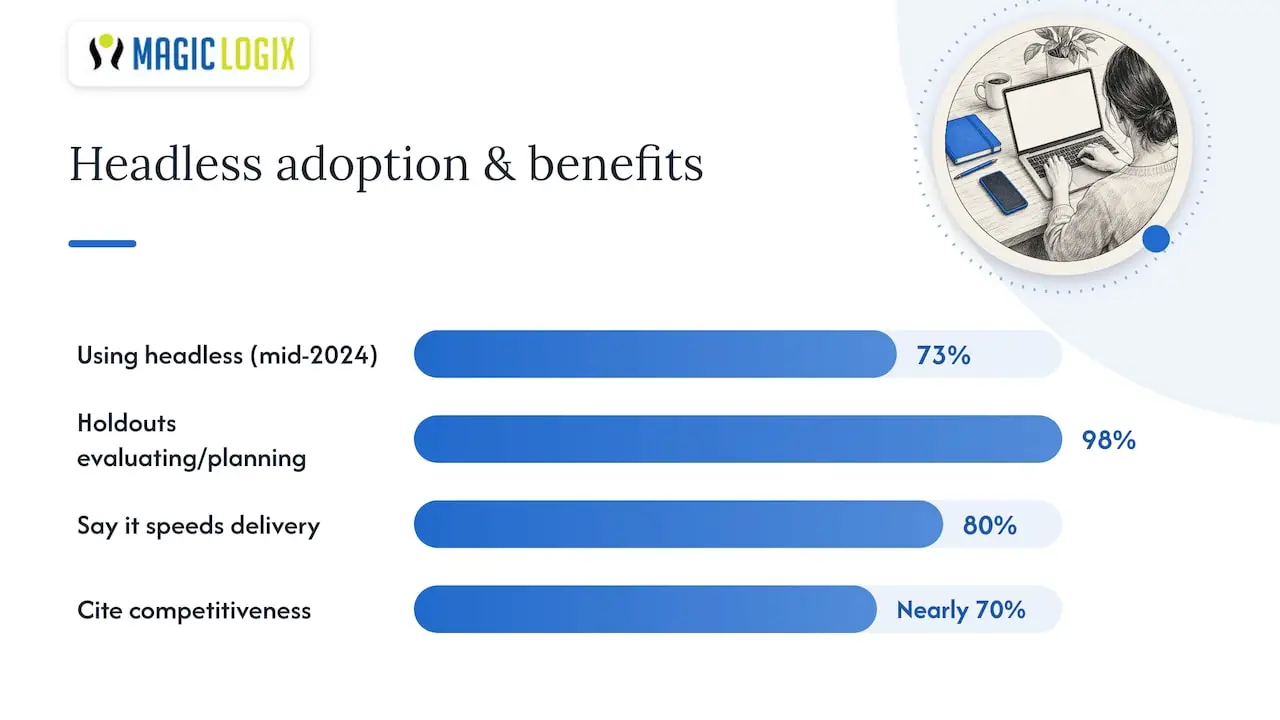
80% of businesses already using headless say it keeps them ahead when delivering new digital experiences, and nearly 70% point to competitiveness as a top benefit of the switch, per the WP Engine press release on the 2024 findings. That competitive edge is the business case in a single data point: speed to market translates directly into market position.
Before you commit budget, map out the full total cost of ownership rather than just the platform license fee. Key components include:
- Platform or licensing costs for the headless CMS itself
- Development effort to build and maintain the custom frontend
- Hosting and CDN costs for API delivery at scale
- Integration work connecting the CMS to analytics, CRM, and commerce systems
Track these KPIs during a pilot: time-to-market for new content or campaigns, deployment frequency, conversion lift on the channels you migrate first, and the change in operational cost per content update. Our guide to measuring digital marketing effectiveness offers a useful framework for structuring that kind of before-and-after comparison. Budget and organizational readiness remain the most commonly cited barriers to adoption, so a focused pilot with clear KPIs is the fastest way to find out whether those barriers apply to your team.
How should you plan a headless CMS rollout?
The teams that get headless right treat it as a phased project, not a weekend migration. A typical path runs through three stages: a small pilot on one channel, a parallel run where the old and new systems operate side by side, and a full migration once the pilot proves out.
Before any of that starts, invest time in content modeling: define the fields, relationships, and reusable content types your team actually needs, rather than copying your old page structure field for field. Release orchestration matters just as much, since multiple channels publishing from one repository need a clear process for who approves what and when.
Team readiness often gets overlooked. A successful rollout needs:
- A content strategist who understands structured content modeling, not just page layout
- Developers comfortable with API-driven architecture and your chosen frontend framework
- An editorial team trained on the new publishing workflow before launch day, not after
- A vendor or implementation partner who can support preview tooling, since that’s where editors feel the biggest adjustment
Preview UX deserves special attention during vendor selection. Some headless platforms now offer visual preview add-ons that bridge the gap with traditional WYSIWYG editing, and testing that feature with real content before you commit is worth the extra week it takes.
Pro Tip: Run your pilot on a single, measurable channel, like a product landing page or a campaign microsite, so you can compare time-to-market and conversion numbers directly against your old process.
Is headless CMS actually worth the switch for most teams?
Our honest take: headless earns its complexity when you’re already juggling more than one content channel or you can see that need coming within a year. The mistake we see most often isn’t choosing headless, it’s choosing it without a pilot. Pick one channel, measure time-to-market and conversion before and after, and let that data make the bigger decision for you.
A realistic pilot timeline runs eight to twelve weeks from content modeling to launch, assuming your team has at least one developer who can dedicate meaningful time to the frontend build. The risk isn’t the technology, it’s underestimating the training and governance work that keeps a headless setup from turning into a maintenance burden a year later.
— Hassan
Where Magic Logix fits if you’re considering a headless build
Standing up a headless CMS well takes more than picking a vendor: it takes a frontend built to perform, integrations that actually connect your content to your commerce and analytics systems, and a team that has done the migration before. That’s the gap our web development work is built to close, alongside ecommerce development support for brands running headless commerce stacks and digital marketing services that connect your new content architecture to the campaigns running on top of it.
If you’re weighing a pilot, a short discovery workshop is the fastest way to find out whether your content, team, and timeline line up with a headless build before you commit a full budget to it. Reach out through Magiclogix to start that conversation.
FAQ
What are the cons of headless CMS?
The main drawbacks are higher upfront development cost, a dependency on skilled engineers for changes that a page-builder CMS would let marketers handle directly, and a rougher content preview experience for editors. Ongoing maintenance also grows, since you’re now managing two separate systems, the backend and the custom frontend, instead of one bundled platform.
Is headless CMS worth it for a small business?
It depends on how many channels you publish to today. If your content only lives on one website and your team needs quick visual edits without developer help, a traditional CMS usually stays simpler and cheaper, while headless pays off once you’re managing a website, an app, and other digital touchpoints at the same time.
What is the difference between headless and decoupled CMS?
A headless CMS has no built-in frontend at all, delivering content purely through an API for developers to build against. A decoupled CMS still ships with a default frontend you can use, but also exposes an API, giving you the option to build custom experiences without losing the out-of-the-box presentation layer.
How is headless WordPress different from traditional WordPress?
Traditional WordPress bundles your content with its theme system, so the same platform renders the pages you see. Headless WordPress keeps WordPress as the content backend but removes the theme layer, delivering content through the WordPress REST API or GraphQL into a separate frontend framework like React or Next.js.
What industries use headless CMS the most?
Retail and ecommerce brands are common adopters because they need to sync product content across websites, apps, and in-store displays, and media and publishing companies use headless to push the same articles across web, mobile, and syndication partners. Enterprise organizations managing multiple brands or regional sites also lean on headless to centralize content governance across properties.