

To maximize inbox placement, authenticate your domains with SPF, DKIM, and DMARC, keep user-reported spam rates under 0.10%, and combine confirmed opt-in with routine list hygiene and a gradual warm-up schedule. These five controls form the backbone of modern deliverability, and mailbox providers now check for all of them before deciding whether your message reaches the inbox or the junk folder. Skip one, and the rest start to lose their effect.
TL;DR:
- Start DMARC at p=none, review reports for a few weeks, then tighten enforcement; align the visible From domain with the SPF or DKIM domain.
- Warm new domains with engaged subscribers, doubling volume every two to three days; if repeated 4xx deferrals persist, halve daily volume for 48 hours.
- Remove hard bounces promptly, then run reengagement campaigns for subscribers inactive for 90 to 180 days and suppress those who do not respond.
- Install a single click unsubscribe option through the List Unsubscribe header and process requests within 48 hours, since friction can prompt spam complaints.
- Check spam rates daily at volume, investigate sudden authentication drops, and combine seed list placement tests with production dashboards before major sends or infrastructure changes.
Table of Contents
- Authenticate your mail: SPF, DKIM, and DMARC and reporting
- Warm up sending domains and IPs: practical ramp schedules and allocation guidance
- List hygiene and opt-in quality: double opt-in, bounce management, and suppression
- Sending cadence, segmentation, and content quality to keep engagement high
- Monitor reputation and mailbox-provider tools: Postmaster Tools, CFLs, and alerts
- Unsubscribe and compliance: List-Unsubscribe header, CAN-SPAM obligations, and timing
- Analyze and fix deliverability problems: bounce codes, throttling, and escalation
- Practical deliverability checklist: prioritized actions you can run today
- How an agency operationalizes deliverability controls
- Managing and optimizing engagement metrics (open rates, click rates)
- Inbox placement testing and monitoring tools
- Impact of email client rendering on deliverability and user experience
- Why deliverability needs cross-team governance
- How Magic Logix can help with audits, authentication, and ongoing monitoring
- FAQ
- Sources
Authenticate your mail: SPF, DKIM, and DMARC and reporting
Authentication tells mailbox providers that you are who you say you are. Each protocol does a slightly different job, and together they form the foundation. Gmail’s sender guidelines require for anyone sending 5,000 or more messages a day.
- SPF lists which mail servers are allowed to send on your domain’s behalf, checked against your DNS record.
- DKIM signs each message with a cryptographic key so receivers can confirm it wasn’t altered in transit.
- DMARC tells receivers what to do when SPF or DKIM fails, and asks them to send you aggregate reports.
The most common mistake we see is a From header that doesn’t align with the authenticated domain. If your SPF passes for one domain but your visible From address is another, DMARC alignment fails even though the individual checks pass. Start your DMARC record at p=none so you collect rua reports without affecting delivery, then review those reports for a few weeks before tightening the policy to quarantine or reject.
A few operational habits keep this system healthy: use a DKIM key length of at least 1,024 bits, audit your SPF record so every legitimate sending service (your email platform, your CRM, your transactional provider) appears in the include list, and route rua reports to a mailbox someone actually checks. Many teams set up a dedicated inbox or a reporting tool just for this, since the raw XML reports are hard to read by hand but reveal misconfigurations fast. Google’s Postmaster Tools and DKIM visibility depend on this authentication layer being correct, so it’s worth getting right before you touch anything else.
Warm up sending domains and IPs: practical ramp schedules and allocation guidance
A brand-new domain or IP has no reputation yet, and mailbox providers treat unfamiliar sources with caution. Shared IPs borrow reputation from other senders on the same pool, which works well for smaller volumes. A dedicated IP gives you full control over your own reputation, but only once you send enough consistent volume to build a track record; otherwise it sits idle and looks suspicious.
A typical ramp schedule looks like this:
- Days 1 to 3: Send to your most engaged subscribers only, starting with a few hundred messages a day.
- Days 4 to 10: Double volume every two to three days, watching open and click rates closely.
- Days 11 to 21: Expand to broader segments as engagement holds steady, scaling toward full volume.
- Days 22+: Resume normal sending cadence across your full list.
During warm-up, feed the new sending path with your highest-engagement recipients first rather than a cold or unverified list, since early positive signals build reputation faster than raw volume. Watch your spam complaint rate and bounce behavior daily during this period. If you see deferrals or rejections, slow down rather than pushing through.
Pro Tip: If a warm-up stalls with repeated 4xx deferrals, cut your daily volume in half for 48 hours before trying to resume the ramp.
List hygiene and opt-in quality: double opt-in, bounce management, and suppression
Clean lists are the cheapest deliverability investment you can make. A double opt-in process, where a new subscriber confirms their email address before entering your active list, filters out typos, fake addresses, and spam traps before they ever cause damage.
- Remove hard bounces from your sending list promptly; they signal a dead or invalid address.
- Apply a retry policy for soft bounces, generally no more than two or three attempts before suppression.
- Run re-engagement campaigns for subscribers inactive for 90 to 180 days, then sunset those who don’t respond.
- Verify your list periodically against known spam-trap indicators and role-based addresses.
A partner resource on list hygiene and hard-bounce repair outlines automated approaches to this kind of ongoing cleanup, which matters because stale lists accumulate risk quietly until a single bad send tanks your reputation.
Pro Tip: Schedule list verification quarterly rather than only before a big campaign, so problems surface before they affect a high-stakes send.
Sending cadence, segmentation, and content quality to keep engagement high
Consistency matters almost as much as content. A sudden volume spike, even to a clean list, looks like compromised credentials to a mailbox provider’s filters. Keep your cadence steady and predictable.
- Segment by recency and engagement so your most active subscribers get your most frequent sends.
- Avoid large, unannounced volume jumps; ramp any increase gradually.
- Keep subject lines honest and skip spam-trigger phrases and excessive punctuation or capital letters.
- Balance image and text content, since image-heavy emails with little readable text draw spam-filter scrutiny.
- Offer a preference center where subscribers can adjust frequency instead of unsubscribing outright.
Creative elements can help engagement when done well. Our guide to email animation covers how to use motion and design to hold attention without overloading the message. Preference centers in particular tend to lower complaint rates while keeping more subscribers on your list than a binary unsubscribe option would.
Monitor reputation and mailbox-provider tools: Postmaster Tools, CFLs, and alerts
You cannot fix what you cannot see, and mailbox providers give you free visibility into exactly how they view your sending domain. Google Postmaster Tools reports spam rate, authentication pass rates, delivery errors, and TLS encryption rates for your domain. Yahoo’s Sender Hub offers a similar view for its mailbox ecosystem.
- Check your spam rate daily if you send at volume; weekly is reasonable for smaller lists.
- Watch authentication pass rates for sudden drops, which usually signal a DNS change gone wrong.
- Set alerts on spam-rate and bounce-rate spikes so you catch problems within hours, not weeks.
- Enroll in a Complaint Feedback Loop (CFL) where available so you see which specific messages triggered complaints.
Gmail recommends keeping your user-reported spam rate under 0.10%, and treats a rate of 0.30% or higher as a serious deliverability risk. That gap between 0.10% and 0.30% is narrow, and once you cross it, inbox placement can degrade within days.
Reputation data also depends on authentication being set up correctly in the first place. Postmaster dashboards track DKIM-authenticated traffic specifically, so an unsigned message effectively sends blind, with no visibility into how it performed. When your spam rate climbs, remediation typically takes one to two full sending cycles of clean behavior before mailbox providers restore full trust, so patience matters as much as the fix itself.
Unsubscribe and compliance: List-Unsubscribe header, CAN-SPAM obligations, and timing
A fast, frictionless opt-out protects both your subscribers and your sender reputation. Mailbox providers now expect a RFC 8058 List-Unsubscribe header that lets recipients unsubscribe with a single click, directly from their inbox interface, without hunting through your email for a tiny footer link.
- Implement the List-Unsubscribe header and confirm it triggers an immediate, one-click opt-out.
- Process unsubscribe requests within 48 hours and remove the address from all marketing sends.
- Treat every subscriber as covered under CAN-SPAM, including people who opted in; consent does not remove the opt-out requirement.
- Recognize that unsubscribe friction, like broken links or multi-step forms, pushes frustrated recipients to hit “report spam” instead, which hurts your reputation far more than a clean unsubscribe would.
The FTC’s compliance guidance has led to real enforcement action against companies that omitted or broke their opt-out mechanisms, with settlements reaching into the hundreds of thousands of dollars. Fast, working unsubscribe links are a legal requirement and a deliverability safeguard at the same time.
Analyze and fix deliverability problems: bounce codes, throttling, and escalation
When delivery drops, work through a structured troubleshooting flow rather than guessing.
- Classify the bounce code. A 4xx code is temporary (mailbox full, greylisting); a 5xx code is permanent (invalid address, blocked sender). Permanent bounces get suppressed immediately.
- Check whether you need to throttle. A sudden run of 4xx deferrals from one provider usually means you’re sending too fast for their current trust level in you; cut volume and reintroduce it gradually over several days.
- Pull diagnostic data. Review your DMARC rua reports and Postmaster Tools dashboard together, along with any Feedback-ID or CFL data, to identify whether the issue is authentication, content, or volume related.
- Fix the root cause before resuming full volume. Reintroducing your previous send rate before the underlying issue is resolved usually repeats the same failure.
- Escalate to the mailbox provider only after fixes are in place. Most providers offer a sender support or reconsideration form, but submitting a request before correcting the problem rarely helps and can delay resolution.
Practical deliverability checklist: prioritized actions you can run today
Some fixes matter more urgently than others. Here’s how to sequence them.
- Confirm SPF, DKIM, and DMARC are all passing and aligned.
- Add the List-Unsubscribe header and test the one-click flow.
- Remove hard bounces from your active sending list.
- Check your current spam rate in Postmaster Tools.
| Priority | Action | Timeframe |
|---|---|---|
| Immediate | Verify SPF/DKIM/DMARC alignment | Today |
| Immediate | Confirm one-click unsubscribe works | Today |
| Short-term | Segment by engagement, pause risky sends | This week |
| Follow-up | Enable DMARC rua reporting, enroll in CFL | This month |
| Follow-up | Plan a warm-up schedule for any new domain or IP | Before next launch |
Short-term fixes buy you breathing room; follow-up steps build the monitoring layer that catches the next problem before it grows.
How an agency operationalizes deliverability controls
We treat deliverability as an ongoing program rather than a one-time setup. A typical engagement starts with an audit of existing authentication records, sending history, and list quality, followed by a structured authentication rollout across every subdomain and third-party sending tool a client uses.
From there, we build governance around the send itself: pre-send QA checks, a preference center designed to reduce complaints instead of just offering an unsubscribe link, and suppression rules that remove risky addresses automatically rather than waiting for a manual review. Our email marketing and analytics capabilities apply predictive analytics and automation to flag rising spam rates before they cross a threshold that triggers a filtering penalty, which keeps the monitoring layer active between campaigns rather than only after something breaks.
Managing and optimizing engagement metrics (open rates, click rates)
Open and click rates tell you whether your content and targeting are working, but they also feed directly into how mailbox providers score your reputation. A declining open rate over several sends often precedes a spam-rate increase, since disengaged subscribers are more likely to delete without reading or, worse, mark a message as spam.
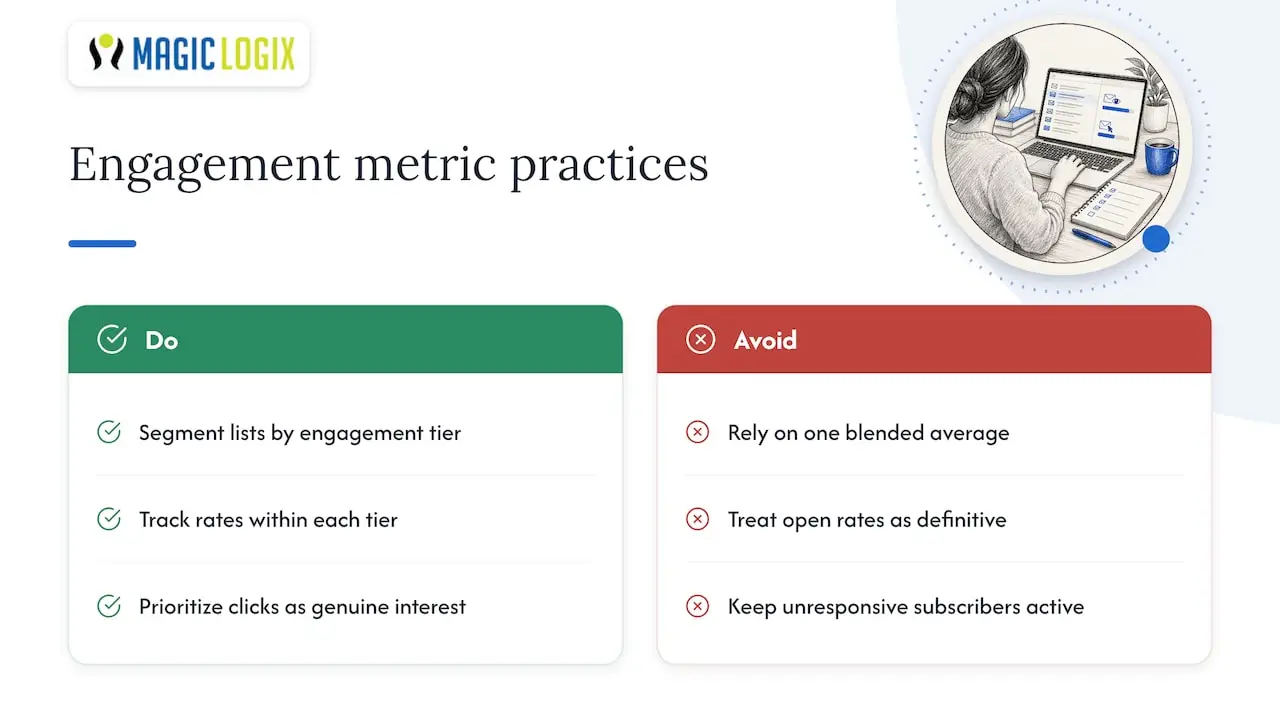
Segment your list by engagement tier and track open and click rates within each tier separately rather than as one blended average. A list with a strong engaged core and a large dormant tail can hide a serious problem behind a deceptively average overall number.
Click rate matters more than open rate for gauging genuine interest, since open tracking depends on image loading and can be inflated by privacy features in some email clients. When click rates drop across an engaged segment, that’s a stronger signal to revisit subject lines, send times, or content relevance than an open-rate dip alone. Re-engagement campaigns aimed at subscribers who haven’t opened in 60 to 90 days can recover some of that audience, but subscribers who remain unresponsive after a dedicated win-back attempt are better suppressed than kept on the active list, since their presence drags down your aggregate engagement and, eventually, your reputation.
Inbox placement testing and monitoring tools
Delivery and inbox placement are not the same thing, and the gap between them is where most deliverability problems hide. A message can be accepted by a receiving server (delivered) and still land in the spam folder (not placed in the inbox), so testing placement directly matters.
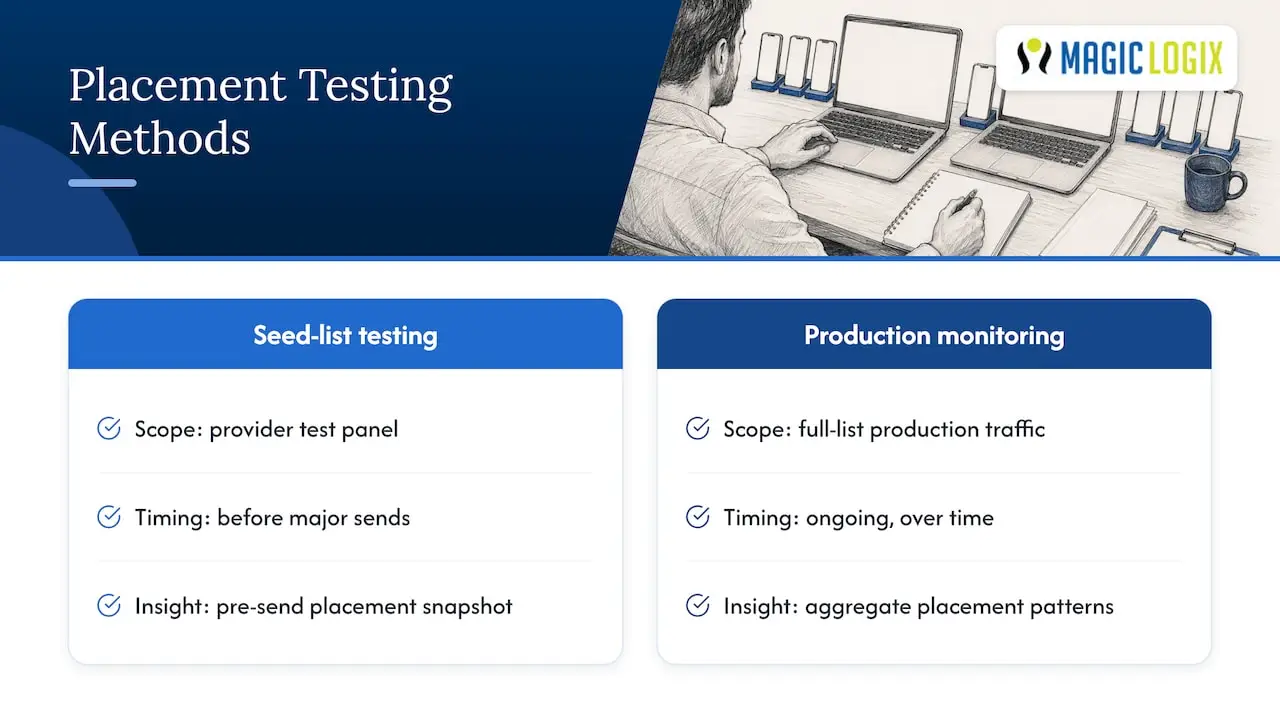
Seed-list testing, where you send to a panel of test addresses across major providers and check where each message lands, gives you a snapshot before a real campaign goes out. Combine that with ongoing monitoring through Google Postmaster Tools and Yahoo’s Sender Hub, which report on your actual production traffic rather than a test sample.
Neither method replaces the other. Seed testing catches problems before they reach real subscribers, while production dashboards show you the aggregate pattern across your full list over time. Run placement tests before major sends or after any change to your sending infrastructure, such as a new IP, a new domain, or a change in your email service provider.
Impact of email client rendering on deliverability and user experience
How your email renders once it reaches the inbox affects more than aesthetics. Different email clients, Gmail, Outlook, Apple Mail, and others, interpret HTML and CSS inconsistently, and a message that renders broken often gets deleted unread or reported as spam simply because it looks untrustworthy.
Heavy reliance on images without readable text raises spam-filter scrutiny and also fails subscribers using clients that block images by default. A balanced image-to-text ratio keeps your message both filter-friendly and readable. Test your templates across the major clients before sending at volume, since a rendering failure in one client can quietly tank your engagement metrics for the segment of your list using that client, without any obvious cause showing up in your overall numbers.
Why deliverability needs cross-team governance
Deliverability touches marketing, IT, and legal at once, and treating it as a marketing-only concern is where most programs break down. IT controls your DNS records and authentication setup; legal owns your consent language and compliance posture; marketing drives the content and cadence that determine engagement. A simple role checklist, who owns DNS changes, who reviews unsubscribe compliance, who monitors spam rate, prevents the gaps that cause outages. Measure the revenue these emails generate, not just opens, since a healthy inbox rate that doesn’t convert isn’t the win it looks like on a dashboard.
— Hassan
How Magic Logix can help with audits, authentication, and ongoing monitoring
If reading through SPF records and DMARC reports isn’t how you want to spend your week, we built our email marketing and analytics services to handle exactly that. We can run the authentication audit, set up monitoring dashboards, and manage the ongoing governance so your sending reputation stays healthy without pulling your team away from the work that actually grows your business.
Our digital marketing team can start with a deliverability audit of your current setup and show you exactly where authentication, list hygiene, or engagement patterns need attention. Reach out through Magiclogix to request one.
FAQ
How do I get better email deliverability?
Authenticate your domain with SPF, DKIM, and DMARC, keep your spam complaint rate under 0.10% as Gmail recommends, and maintain a clean list through double opt-in and regular bounce removal. Combine that with a gradual warm-up for any new domain or IP and a working one-click unsubscribe link.
What hurts email deliverability?
The most common culprits are missing or misaligned authentication, a spam complaint rate that creeps toward or past 0.30%, stale lists full of hard bounces, and sudden volume spikes that look like compromised sending behavior. A broken or hidden unsubscribe link also drives recipients to report spam instead, which compounds the damage.
What is the difference between email delivery and email deliverability?
Email delivery means the receiving server accepted your message, while deliverability describes whether that message actually reached the inbox instead of the spam folder. A high delivery rate with poor inbox placement usually points to a reputation or engagement problem rather than a technical sending failure.