
Google’s Performance Max can generate qualified B2B leads, but only when your conversion signals are clean enough for the algorithm to learn what a real lead looks like. The short verdict: if you have offline conversion data tied to sales-qualified leads (SQLs) or pipeline events, and you’re generating a sufficient number of conversions per month at that event, you’re ready to test. If you don’t, fix your measurement architecture first. Running PMax on raw form fills without downstream CRM data is how you end up paying for contact submissions from people who will never buy from you.
According to Search Engine Land’s analysis, PMax works for B2B when you have meaningful downstream signals, a sufficiently large addressable market, and the patience to let automation learn. That last part matters more than most teams expect.
Before you launch anything, run this one-line test: do you have CRM events or offline conversions tied to revenue or SQLs, and are you hitting a minimum monthly conversion volume at that event? If yes, design a focused pilot. If no, stop and audit your conversion tracking setup before spending another dollar on PMax.
-
Measurement-ready: Offline conversion imports active, CRM integrated, downstream events flowing daily
-
Volume-ready: Roughly 30+ monthly conversions at the optimization event
-
Account-ready: Brand exclusions set, account-level negative keywords in place, Final URL expansion reviewed
-
Team-ready: Sales and marketing aligned on lead definitions and SQL criteria
Key Takeaways
Performance Max works for B2B when offline conversion data, sufficient monthly volume, and cross-functional alignment are in place before the campaign launches.
| Point | Details |
|---|---|
| Fix measurement first | Offline conversion imports and CRM integration must be active before launching PMax. |
| Hit the volume threshold | Aim for roughly 30 conversions per month at your optimization event before switching to tCPA. |
| Pair PMax with Search | Use account-level negatives and brand exclusions so PMax and Search complement rather than compete. |
| Respect the learning phase | Avoid bid, budget, or asset changes in the first 4 weeks; early changes reset the algorithm’s learning. |
| Magiclogix pilot approach | Magiclogix runs 60-day structured pilots with defined KPIs, weekly reporting, and a clear scale-or-pause recommendation. |
Table of Contents
- When does Performance Max actually work for B2B?
- What you need before testing PMax for B2B
- How to measure the right thing and feed PMax the signals it needs
- How to build audience signals and structure your asset groups
- Which bidding strategy fits your B2B PMax campaign?
- Creative and landing page practices that lift B2B lead quality
- Practical tactics to reduce spam and improve lead quality
- How to read PMax reports and run a repeatable optimization cadence
- When to use AI Max for Search or standard Search instead
- How Magiclogix runs Performance Max for B2B
- Sources
- FAQ
When does Performance Max actually work for B2B?
PMax rewards scale and signal. It performs best when your total addressable market is broad enough for the algorithm to find buyers across multiple channels, and when your conversion data is rich enough to teach it what a good lead looks like. Search Engine Land’s B2B best-practices guide confirms that guiding the AI with the right inputs, strong audience signals, and quality creative is what separates successful B2B deployments from wasted spend.
Scenarios where PMax tends to succeed
PMax fits well when you’re selling to a broad professional audience (think cloud software, HR tech, logistics services, or financial tools for mid-market companies), where thousands of potential buyers exist across industries and job titles. It also works when you want to discover demand pockets you haven’t targeted yet with Search, since the algorithm will find audiences your keyword lists never reached. Multi-stakeholder buying groups are another natural fit: PMax can serve different creative to different personas across YouTube, Display, Gmail, and Search simultaneously, which mirrors how complex B2B decisions actually get made.
Where PMax tends to fall short
Small named-account ABM programs are the clearest counterexample. If your sales team is working a list of 200 target accounts, PMax’s broad reach is a liability, not an asset. The same applies when your monthly conversion volume is too low to give the algorithm a learning signal, when you have no CRM integration and can’t import downstream events, or when your brand-safety requirements demand placement-level control that PMax’s reporting doesn’t fully provide. Tight-niche verticals with a handful of buyers are better served by standard Search with precise keyword targeting.
The core tradeoff is reach and discovery versus per-query control. PMax can also cannibalize your existing Search campaigns if you don’t set account-level negative keywords and brand exclusions. PaidSignal’s guidance recommends running PMax for discovery alongside Search for high-intent capture, not instead of it.
What you need before testing PMax for B2B
Think of this as your pre-flight checklist. Skipping any item here means the algorithm learns from bad data, and bad data produces bad leads at scale.
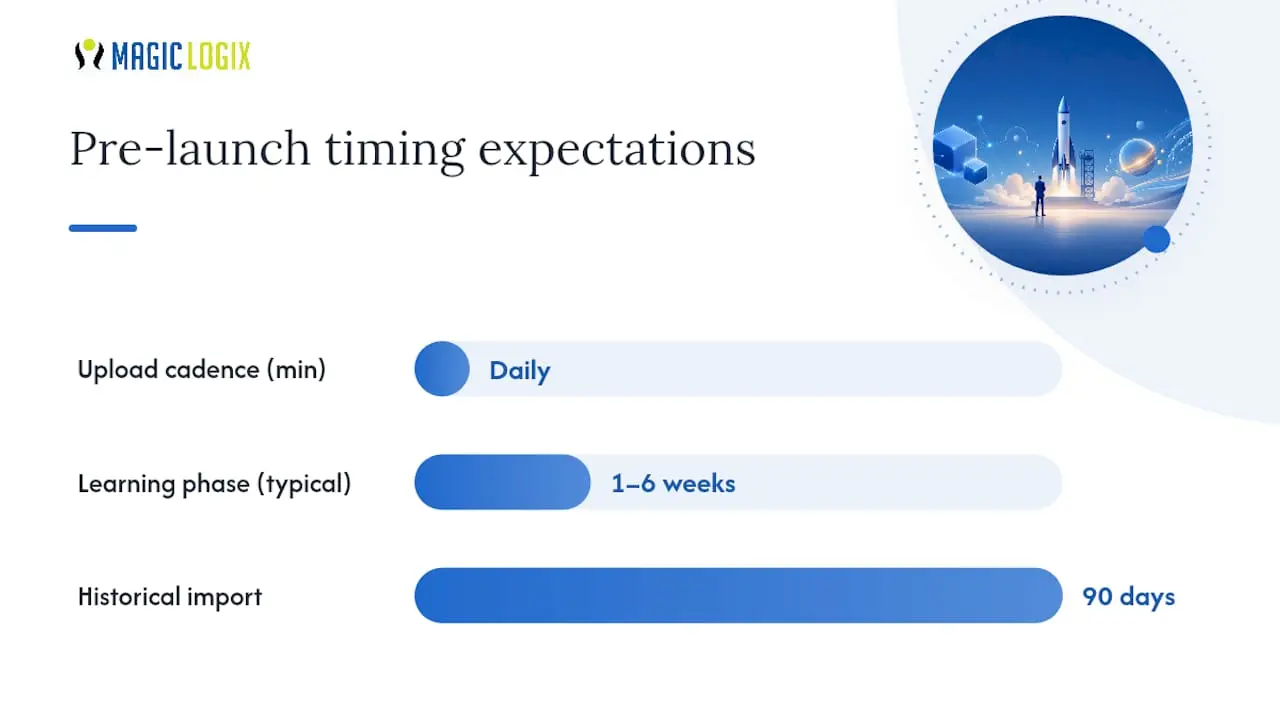
- Activate offline conversion tracking (OCT). Connect your CRM (Salesforce, HubSpot, or equivalent) to Google Ads and import downstream events like MQL, SQL, opportunity created, and closed-won. Daily upload cadence is the minimum; real-time or near-real-time is better.
- Enable enhanced conversions for leads. This fills gaps in your web-based conversion data by hashing first-party data from form submissions, giving the algorithm more signal even before offline events flow back.
- Set account-level negative keywords. Protect your branded queries and high-intent Search terms from PMax cannibalization before the campaign goes live.
- Configure brand exclusions. Use the brand exclusion list in PMax campaign settings to prevent your ads from appearing on branded queries that Search already handles.
- Review Final URL expansion. For most B2B accounts, limit or disable Final URL expansion to prevent PMax from sending traffic to pages you haven’t optimized for lead capture.
- Confirm conversion volume. Practitioners recommend aiming for a sufficient number of conversions per month at your optimization event. Below that threshold, the algorithm lacks enough signal to exit the learning phase reliably.
- Align sales and marketing on lead definitions. Agree on what constitutes an MQL, SQL, and disqualified lead before launch, so the feedback loop between sales and paid media is clean from day one.
- Set a separate test budget. Ring-fence your PMax pilot budget from your existing Search budget so you can evaluate performance independently.
Google’s official Performance Max guidance notes that the learning phase typically runs 1–6 weeks, with longer windows for low-volume setups. Plan your evaluation timeline accordingly and resist the urge to make changes during that window.
Pro Tip: The single most effective pre-launch fix is importing at least 90 days of historical CRM data as offline conversions before you turn the campaign on. This gives the algorithm a head start on what your best leads look like, shortening the learning phase significantly.
How to measure the right thing and feed PMax the signals it needs
The algorithm optimizes for whatever conversion event you tell it to. Without downstream value signals, Pixis’ practitioner analysis shows it will scale the cheapest conversions it can find, which in B2B usually means low-intent form fills from Display or Gmail placements. Importing CRM outcomes changes that behavior entirely.
Start with the nearest downstream event that correlates with revenue. For most B2B teams, that’s the SQL or opportunity stage. If your sales cycle is long and SQL volume is low, optimize to MQL while importing SQL and closed-won events as secondary value signals. This gives the algorithm a high-frequency optimization target while still teaching it what downstream value looks like.
Conversion event mapping
Use relative values when you don’t have exact revenue data. The ratios matter more than the absolute numbers because the algorithm uses them to prioritize which leads to pursue. If you have predicted lifetime value data, use it: predictive LTV modeling lets you assign conversion values that reflect long-term customer worth rather than just the initial deal size.
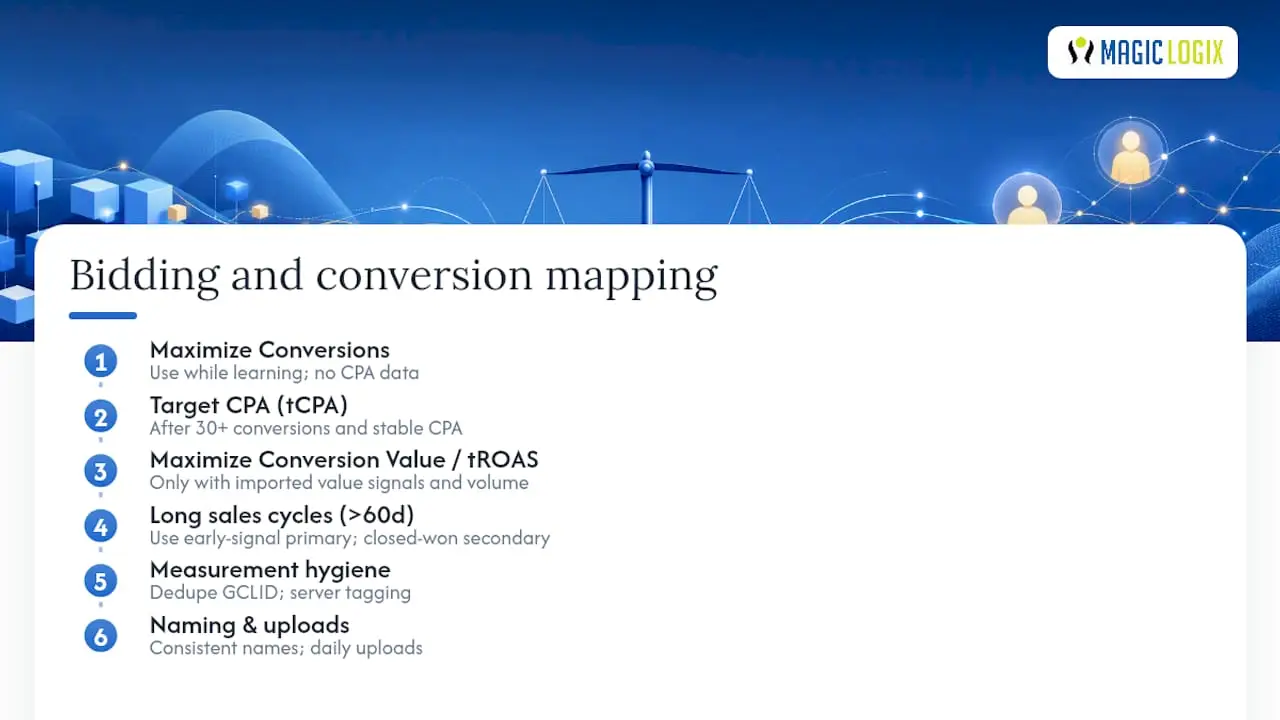
For bidding strategy, the decision is straightforward. Start with Maximize Conversions when you’re in the learning phase and don’t yet have reliable historical CPA data. Move to target CPA (tCPA) once you have at least 30 conversions at your optimization event and a stable cost-per-conversion baseline. Use Maximize Conversion Value or target ROAS (tROAS) only when you’re importing differentiated conversion values and have enough volume to make value-based optimization meaningful.
Pro Tip: For sales cycles longer than 60 days, set up a “correlated early signal” event, such as a demo booked or a pricing page visit combined with a form fill, as your primary optimization target. Import closed-won revenue as a secondary value signal. This keeps conversion volume high enough for the algorithm to learn while still anchoring it to revenue outcomes.
Measurement hygiene matters as much as the events themselves. Deduplicate conversion events using consistent GCLID-based matching, use server-side tagging to reduce browser-based data loss, and maintain a consistent naming convention across your CRM and Google Ads so events map cleanly. A daily upload cadence closes the feedback loop fast enough for the algorithm to act on fresh data. For a deeper look at measuring digital marketing effectiveness and choosing business-aligned KPIs, that framework applies directly here.
How to build audience signals and structure your asset groups
First-party data is the most powerful input you can give PMax. The algorithm uses your audience signals as a starting point, not a hard constraint, but the quality of those signals shapes where it looks first and how quickly it finds buyers who convert.
Which lists to upload and how to segment them
- Closed-won customers: Upload segmented by company size, vertical, and revenue band. These are your highest-quality signal because they represent actual buyers.
- SQLs and opportunities: Upload separately from closed-won so the algorithm can distinguish between “expressed serious interest” and “paid us money.”
- MQL lists: Useful as a broader signal layer, but weight them lower than SQLs in your signal hierarchy.
- Website visitors by behavior: Segment by high-intent pages (pricing, demo request, case studies) rather than uploading all visitors as a single list.
- Lookalike expansion: Customer Match in Google Ads uses your uploaded lists to find similar users. The better your seed list, the more relevant the expansion.
For B2B audience segmentation that actually sharpens signals, segment by job function, company size, and buying stage rather than treating all prospects as one audience.
Asset group structure
One asset group per campaign is the fastest path to poor lead quality. Segment asset groups by product line, persona, or funnel stage, and align each group to a dedicated landing page. A VP of Operations searching for supply chain software should see different creative and land on a different page than an IT Director evaluating cybersecurity tools.
Use search themes (introduced in 2025) to guide PMax toward the query categories you want without locking it into exact-match keywords. Aim for 3–5 search themes per asset group, focused on the buyer’s job-to-be-done rather than product features. Keep creative and landing pages tightly aligned within each group: mismatched messaging between ad and landing page is one of the most common reasons PMax generates high volume but low-quality leads.
Which bidding strategy fits your B2B PMax campaign?
Bidding strategy choice depends on what you’re optimizing for and how much data you have. The table below maps common B2B objectives to the right bid type.
| Objective | Bid Strategy | Minimum Data Requirement | Notes |
|---|---|---|---|
| Maximize lead volume | Maximize Conversions | Learning phase (no min.) | Use during pilot; switch once CPA stabilizes |
| Control cost per lead | Target CPA | 30+ conversions/month | Set tCPA above historical CPA to avoid impression loss |
| Optimize for lead value | Maximize Conversion Value | Differentiated values imported | Requires value-mapped offline conversions |
| Scale on ROAS | Target ROAS | 50+ conversions/month with values | Only viable with consistent value signals |
Targets set too tight restrict the algorithm’s ability to explore and reduce impression share faster than you’d expect. Loosen the target first, let volume stabilize, then tighten gradually over 2–3 weeks.*
A few campaign-level settings materially change outcomes for B2B. Location targeting should use “Presence” rather than “Presence or interest” to avoid serving ads to people researching your target geography from elsewhere. Final URL expansion should be limited or off unless you’ve audited every page the algorithm might send traffic to. Channel-level reporting, now available at the account level, lets you see where your budget is actually going across Search, YouTube, Display, Gmail, and Discovery, which is the first place to look when lead quality drops unexpectedly.
Creative and landing page practices that lift B2B lead quality
Creative is where most B2B teams underinvest in PMax. The algorithm needs variety to test across channels, and without it, Google will auto-generate assets that may not reflect your brand or your buyer’s expectations.
Video is the highest-leverage asset to upload. YouTube inventory is a significant portion of PMax’s reach, and without a video asset, the algorithm either skips YouTube entirely or auto-generates a video from your images and headlines. Auto-generated videos are rarely appropriate for B2B audiences. Upload at least one 15–30 second video per asset group, focused on a specific buyer pain point rather than a generic brand overview. Google’s guidance notes that improving ad strength to “Excellent” produces measurable conversion uplifts, and video is one of the fastest ways to get there.
For text assets, provide the maximum allowed count: 15 headlines and 4 descriptions per asset group. Write headlines that qualify the audience explicitly (“For Operations Teams at Mid-Market Companies,” “Built for B2B Finance Leaders”) rather than generic benefit statements. Qualifying language in headlines deters low-intent clicks before they reach your landing page, which reduces noise in your conversion data.
Landing pages carry as much weight as the ads themselves. Match the asset group’s message to the landing page headline, use a single clear call to action, and add qualifying questions to your form (company size, role, timeline) to filter out leads who don’t fit your ICP. Server-side validation and reCAPTCHA v3 reduce bot submissions without adding friction for real buyers. Keep the page fast: slow load times on mobile are a consistent source of drop-off that inflates your cost per qualified lead.
Practical tactics to reduce spam and improve lead quality
Lead quality is the most common complaint B2B teams have about PMax, and most of it is fixable at the account and site level.
Form-level controls:
- Add 2–3 qualifying questions (company size, role, current solution) to filter out non-ICP submissions
- Use conditional logic to route or disqualify responses that don’t meet minimum criteria
- Implement reCAPTCHA v3 (invisible, score-based) to block bot submissions without adding friction
- Add a honeypot field (a hidden form field that bots fill but humans don’t) as a secondary spam filter
- Use server-side form validation to reject submissions with invalid email domains or disposable addresses
Account-level controls:
- Set account-level negative keywords to block irrelevant query categories (job seekers, students, competitors)
- Use content suitability settings to exclude sensitive categories and low-quality placements
- Review placement reports weekly and add exclusions for sites that generate volume but no downstream conversions
- Maintain brand exclusions to prevent PMax from bidding on your own branded terms
Feed-forward controls:
- Upload offline conversions daily, including a “disqualified lead” event so the algorithm learns which form fills not to pursue
- Build a lead verification step into your CRM workflow: sales reviews every inbound lead within 24 hours and marks it as qualified, unqualified, or invalid
- Connect your AI-assisted outbound qualification process to your lead verification workflow so that inbound PMax leads get rapid follow-up and accurate disposition data flows back to Google Ads
The operational piece is often overlooked. Assign a named owner for lead verification on the sales side and a named owner for offline conversion uploads on the paid media side. Without that accountability, the feedback loop breaks within weeks and the algorithm reverts to optimizing for cheap form fills.
How to read PMax reports and run a repeatable optimization cadence
PMax reporting is less granular than Search, but it gives you enough signal to make good decisions if you know where to look. The goal is a repeatable weekly cadence, not constant intervention.
Key reporting surfaces
Search term insights show the query categories driving traffic, grouped by theme rather than individual keywords. Use this to identify irrelevant themes and add them as account-level negative keywords, and to spot high-performing categories worth reinforcing with search themes.
Asset-level reporting shows which headlines, descriptions, images, and videos are rated “Best,” “Good,” or “Low.” Replace “Low”-rated assets every 2–3 weeks, but don’t change more than one or two assets at a time or you’ll restart the learning phase.
Placement reports show where your Display and YouTube ads are running. Review weekly and exclude placements that generate impressions but no conversions. Placement-level transparency is more limited in PMax than in Search, so proactive exclusion is necessary for brand safety.
Auction Insights show which advertisers are competing for the same impressions. Use this to understand competitive pressure and adjust bids if you’re consistently losing to the same competitors on high-value placements.
Channel-level reporting (account level) breaks down spend and conversions by channel.
Optimization cadence
Daily: Check for anomalies in spend, conversion volume, or cost per conversion. Don’t change settings; just flag issues.
Weekly: Review search term insights and add negative keywords. Check asset ratings and swap out “Low” performers. Review placement report and add exclusions. Verify offline conversion uploads are processing correctly.
Monthly: Evaluate channel-level performance and adjust budget if one channel is consistently underperforming. Review audience signal performance and refresh CRM lists. Assess whether tCPA or tROAS targets need adjustment based on the past 30 days of data.
For a structured PPC optimization workflow that applies across campaign types, that framework maps well to the PMax cadence above.
The most damaging pattern in B2B PMax accounts is making changes during the learning phase. Search Engine Land’s analysis identifies repeated early changes as the single most common reason PMax underperforms for B2B teams. Set a rule: no bid, budget, or asset changes in the first 4 weeks unless something is clearly broken (zero conversions, runaway spend).
When to use AI Max for Search or standard Search instead
Not every B2B account needs PMax. The right channel depends on your control requirements, conversion volume, and how much of your budget you can afford to put into an exploratory mode.
- Run a single-asset-group PMax pilot first. Choose one product line or persona, build one asset group with full creative assets, set a separate budget, and run for at least 60 days. Use search-category reports and offline conversion imports to judge performance. This is the lowest-risk entry point.
- Use AI Max for Search when you want AI-driven query expansion but need to stay on Search inventory. AI Max for Search (Google’s 2025/2026 feature) applies broad match and AI-driven query matching within the Search network only, giving you more reach than exact-match keywords without the cross-channel exposure of PMax. It’s the right choice when placement control matters or when your conversion volume is too low for PMax to learn effectively.
- Keep standard Search for high-value, high-intent keywords. Branded terms, competitor terms, and bottom-of-funnel queries with strong conversion history belong in standard Search campaigns with tight keyword control. PMax should never replace these.
- Run PMax and Search in parallel, not in competition. Use account-level negative keywords and brand exclusions to prevent PMax from cannibalizing Search. The paired structure (PMax for discovery, Search for capture) is the most common successful configuration for B2B accounts.
- Evaluate at 60 days using these criteria: Is cost per SQL within 30% of your Search benchmark? Is offline conversion volume growing week-over-week? Are search-term insights showing relevant query categories? If yes to all three, expand budget. If no to two or more, pause and diagnose before scaling.
For small named-account ABM programs, standard Search with precise keyword targeting and audience layering almost always outperforms PMax. The algorithm needs breadth to learn; ABM programs deliberately constrain it.
How Magiclogix runs Performance Max for B2B
Magiclogix approaches B2B PMax as a structured pilot program, not a set-and-forget campaign type. The methodology starts with an account readiness audit: reviewing existing conversion tracking, CRM integration status, historical conversion volume, and current Search campaign structure. That audit determines whether a client is ready to test PMax or needs measurement fixes first.
The Magiclogix B2B PMax checklist:
Measurement:
- Offline conversion imports active with daily upload cadence
- Enhanced conversions for leads enabled
- CRM (Salesforce or HubSpot) integrated and events mapped to Google Ads
- Deduplication and server-side tagging confirmed
Audiences:
- Closed-won, SQL, and MQL lists uploaded and segmented
- Customer Match enabled
- Remarketing lists built by high-intent page behavior
Creative:
- At least one video per asset group (15–30 seconds, persona-specific)
- 15 headlines and 4 descriptions per asset group
- Qualifying language in headlines
- Landing pages matched to asset group messaging
Bidding and settings:
- Maximize Conversions for pilot phase
- Brand exclusions and account-level negative keywords set
- Final URL expansion limited
- Location targeting set to “Presence”
Lead quality controls:
- reCAPTCHA v3 and server-side validation on all forms
- Qualifying questions on lead forms
- Placement exclusion list seeded from Search campaign history
- Lead verification workflow assigned to a named sales owner
Reporting:
- Weekly search-term insight review scheduled
- Asset-level reporting reviewed bi-weekly
- Offline conversion upload verification in daily checklist
The pilot phase runs for 60 days minimum, with no bid or budget changes in the first four weeks. At day 60, Magiclogix evaluates cost per SQL against the Search benchmark, channel-level spend distribution, and search-term category quality before recommending scale, iteration, or pause.
[Insert author Hassan’s professional background and credentials here.]
[Insert proprietary data or case studies authored by Hassan here.]
What the data tells me about running PMax for B2B clients
The B2B accounts where PMax works best share three traits: a broad addressable market, a functioning offline conversion loop, and a marketing team willing to leave the campaign alone during the learning phase. That last trait is rarer than you’d think. The instinct to intervene when early numbers look off is understandable, but it’s also the fastest way to reset the learning phase and extend your time-to-signal by weeks. The accounts that succeed are the ones where the team trusts the process long enough to get real data.
The accounts where I’d hold off on PMax are those running tight ABM programs with fewer than 50 target accounts, those with no CRM integration and no plan to build one, and those where the sales team can’t commit to a lead verification cadence. Without that feedback loop, you’re flying blind. The automation is only as good as the data you feed it.
Cross-functional readiness matters as much as technical setup. If sales and marketing aren’t aligned on what a qualified lead looks like before launch, the offline conversion data you import will reflect that misalignment, and the algorithm will optimize for the wrong thing.
Magiclogix can run your B2B PMax pilot
Magiclogix’s paid media team specializes in B2B performance marketing that connects ad spend directly to pipeline. For B2B teams considering PMax, the starting point is a no-obligation account audit: Magiclogix reviews your current conversion tracking, CRM integration, and Search campaign structure, then delivers a clear readiness assessment and a pilot design with defined KPIs.
The pilot includes measurement setup (offline conversion imports, enhanced conversions, CRM mapping), asset group structure, bidding configuration, and a 60-day optimization cadence with weekly reporting. You get a cost-per-SQL target, a channel-level spend breakdown, and a clear recommendation at day 60: scale, iterate, or reallocate budget. No guesswork, no vague “awareness” metrics.
To request an assessment, visit Magiclogix’s digital marketing services page and describe your current lead-gen setup. The team will respond within one business day.
Sources
- Performance Max best practices for lead generation – Google Ads Help
- Why Performance Max looks different for B2B in 2026
- Why Performance Max fails for B2B (and what to do instead) | Pixis
- Google Performance Max B2B Lead Generation: Controls and When to Use It
FAQ
Does Performance Max work for B2B lead generation?
Yes, but only when offline conversion data from your CRM is flowing into Google Ads and you’re generating roughly 30 or more conversions per month at your optimization event. Without downstream signals, the algorithm optimizes for cheap form fills rather than qualified leads.
How long does the PMax learning phase take for B2B?
Google’s guidance puts the typical learning phase at 1–6 weeks, with longer windows for low-volume setups. Plan for at least 4 weeks before evaluating performance, and avoid changing bids, budgets, or assets during that window.
What’s the minimum conversion volume needed for PMax to work?
Practitioners recommend roughly 30 conversions per month at your primary optimization event. If your SQL volume is below that, optimize to an earlier correlated event (such as MQL or demo booked) while importing SQL and closed-won data as secondary value signals.
How do you prevent PMax from cannibalizing Search campaigns?
Set account-level negative keywords and use PMax’s brand exclusion list before launch. PaidSignal recommends running PMax for discovery and breadth while keeping standard Search campaigns for high-intent and branded queries, with clear budget separation between the two.
When should you use AI Max for Search instead of Performance Max?
Use AI Max for Search when you want AI-driven query expansion but need to restrict spend to Search inventory, particularly when your conversion volume is too low for PMax to learn effectively or when placement-level control is a hard requirement. It gives you broader reach than exact-match keywords without the cross-channel exposure that PMax introduces.