
Server-side tagging moves tag execution from the user’s browser to a server you control, giving your team direct authority over what data gets collected, shaped, and forwarded to vendor endpoints. If your organization faces consent obligations under GDPR or CCPA, relies on more than a handful of third-party scripts, or is watching attribution erode as browsers tighten cookie policies, this approach deserves serious evaluation now.
The three scenarios where server-side tagging delivers the clearest return:
- Performance pressure: Too many client-side scripts slow page load and hurt Core Web Vitals scores.
- Privacy and consent control: You need to redact PII, shape payloads, or enforce consent signals before data leaves your infrastructure.
- Data quality gaps: Ad blockers, browser restrictions, and ITP are dropping events before they reach your analytics platform.
Key Takeaways
Server-side tagging gives marketing teams direct control over data routing, privacy enforcement, and event quality, but it requires proper consent wiring, infrastructure investment, and ongoing governance to deliver those benefits reliably.
| Point | Details |
|---|---|
| Two-container model | A web container collects browser events; a server container processes, shapes, and forwards them to vendors. |
| Consent is still required | Server-side tagging enables enforcement of consent signals but does not remove legal obligations under GDPR or CCPA. |
| Start with a narrow POC | Test one vendor and one event type end-to-end before migrating your full tag inventory. |
| Infrastructure cost is real | Cloud Run and App Engine billing scales with traffic; budget and monitor GCP costs from week one. |
| Magiclogix for implementation | Magiclogix provides full server-side measurement builds, consent integration, and production monitoring for teams ready to migrate. |
Table of Contents
- How server-side tagging architecture actually works
- Why server-side tagging benefits your measurement stack
- Setting up your server container step by step
- Hosting and production deployment considerations
- Consent Mode and privacy controls in a server-side setup
- Testing, debugging, and monitoring your server container
- Client-side vs. server-side tagging: how to decide what moves
- Rollout checklist and governance for your team
- What practitioners get wrong about server-side tagging
- Magiclogix can build and manage your server-side measurement stack
- Sources
- FAQ
How server-side tagging architecture actually works
The two-container model is the foundation. A web container lives in the browser and collects user interactions, just like a standard GTM setup. A server container runs on infrastructure you provision and receives HTTP requests from the web container, then processes and routes them to downstream vendors.
The lifecycle looks like this:
- A user triggers an event in the browser (a click, a purchase, a page view).
- The web container fires a request to your server container’s URL instead of directly to Google, Meta, or any other vendor.
- Inside the server container, a client claims the incoming request and transforms it into a standardized event object.
- Tags in the server container fire based on triggers, forwarding the shaped event to vendor endpoints.
Clients are the adapters that make this work. Without a client claiming a request, the server container does nothing with it. Google Tag Manager ships with GA4 and Measurement Protocol clients pre-installed, which simplifies the most common setup considerably.
| Responsibility | Web container | Server container |
|---|---|---|
| Collecting browser events | Yes | No |
| Firing vendor pixels directly | Yes (client-side only) | No |
| Receiving and claiming HTTP requests | No | Yes (via clients) |
| Validating, redacting, enriching data | No | Yes |
| Forwarding to vendor endpoints | No | Yes (via tags) |
| Running on user’s device | Yes | No |
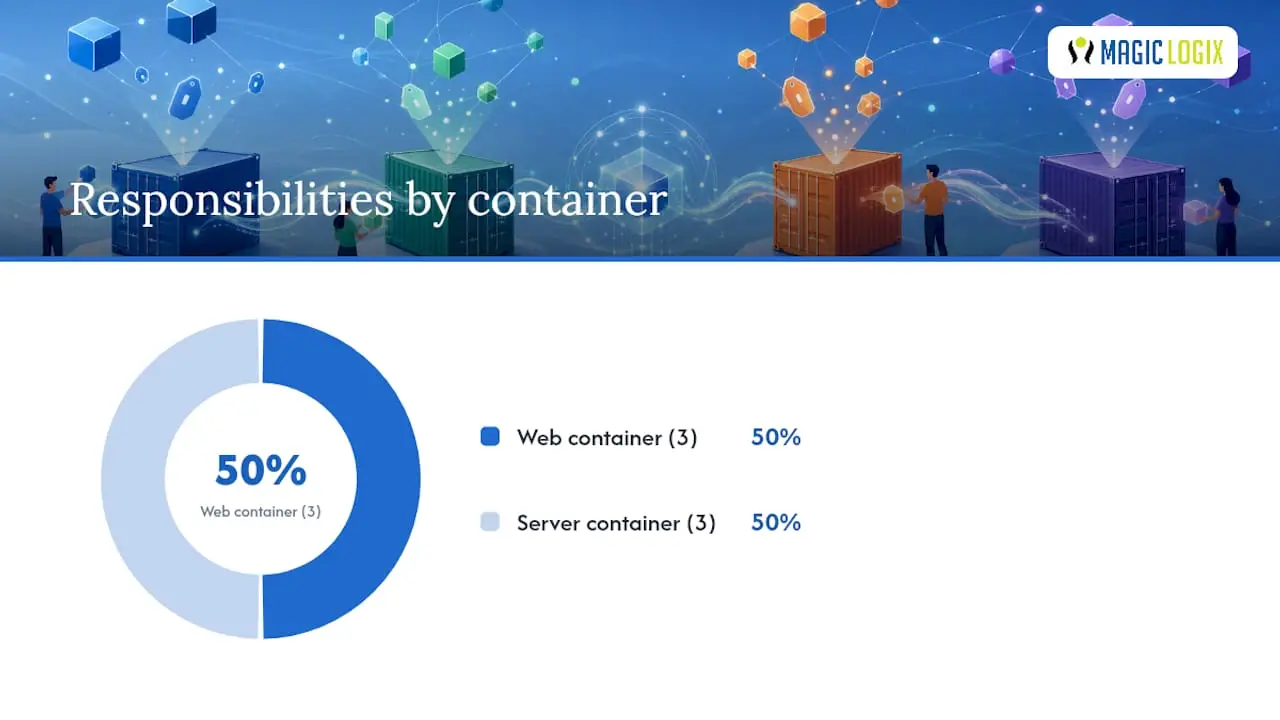
One practical note for engineering teams: diagram the full request flow before you write a single line of configuration. Knowing which events originate in the browser, which clients claim them, and which tags forward them downstream prevents a class of debugging problems that are painful to untangle later.
Why server-side tagging benefits your measurement stack
Google’s own fundamentals documentation identifies three core reasons to adopt server-side tagging: improved privacy controls, better website performance, and higher data quality. Each deserves a concrete look.
Performance is the most immediately visible gain. Every third-party script loaded in the browser costs the user a DNS lookup, a TCP handshake, and execution time. Moving tag logic to the server reduces the number of outbound HTTP requests the browser makes and cuts the JavaScript payload the page must parse. For sites with ten or more vendor tags, this reduction can meaningfully improve Time to First Byte and Largest Contentful Paint.
Privacy controls become granular in ways that client-side setups simply cannot match. On the server, you intercept the raw request before it reaches any vendor. That means you can strip IP addresses, remove query parameters that carry PII, or block entire payloads when a user has denied consent. Apple’s Intelligent Tracking Prevention and similar browser protections have shortened the lifespan of third-party cookies significantly; a first-party server endpoint lets you set cookies in a first-party context with longer, more durable expiration windows.
Data quality is where many analytics teams find the most lasting value. The server container lets you validate that required fields are present, normalize inconsistent event schemas, and enrich events with server-side data (order totals, user tiers, product categories) before forwarding them. As Google’s documentation explains, you can inspect, validate, redact, and enrich HTTP requests before they reach vendor endpoints, which means cleaner data flowing into GA4, your CRM, and your ad platforms.
Statistic callout: According to Didomi’s practical guide, server-side tagging helps transition away from third-party cookies by enabling first-party contexts and more durable cookies, but it does not remove consent obligations under privacy law. The privacy gain is real; the legal obligation remains.
Setting up your server container step by step
A working proof-of-concept follows a clear sequence. Here is the ordered path from zero to a testable server-side setup.
-
Confirm prerequisites. You need a Google Cloud Platform project, GTM admin access to both a web and server container, a consent management platform (CMP) or consent layer already in place, and a rough infrastructure plan (Cloud Run is the simplest starting point).
-
Create the server container. In GTM, create a new container and select “Server” as the target platform. GTM will provision a tagging server URL (a
*.uc.r.appspot.comaddress) for preview and testing. This is yourserver_container_url. -
Configure your web container or gtag.js to send to the server. In your web container’s Google tag configuration, set the
server_container_urlparameter to point to your server endpoint. If you use gtag.js directly, add theserver_container_urlfield in the config call:gtag('config', 'G-XXXXXXXXXX', { 'server_container_url': 'https://your-server-endpoint.example.com' }); -
Verify the GA4 client is active. The server container includes a GA4 client by default. Confirm it is enabled and that it is the first client in the claim order for GA4 traffic.
-
Add a Conversion Linker tag. Create a Conversion Linker tag in the server container and fire it on all requests. This preserves click IDs (gclid, fbclid) across the server hop, which is critical for paid media attribution.
-
Create your GA4 event tag and triggers. Add a GA4 event tag in the server container, point it to your GA4 Measurement ID, and set triggers to fire on the events your GA4 client claims.
-
Test in preview mode. Enable GTM preview for the server container. Open your site with the web container in preview, trigger an event, and verify the request appears in the server container’s event log with the expected parameters.
-
Move to production. Once validated, configure a custom domain (your own subdomain, e.g.,
metrics.yourdomain.com) and switch the container to production mode.
Pro Tip: Use a consistent naming convention for server-side tags from day one. Prefix all server tags with SS_ and all client-side tags with CS_ so any team member can read the container at a glance and know where execution happens.
For a detailed walkthrough with additional code examples, Analytics Mania’s server-side guide covers the POC sequence in depth and is worth bookmarking alongside Google’s official docs.
Hosting and production deployment considerations
Getting the server container into production involves three decisions: where to host it, how to configure your domain, and how to manage cost and scale.
First-party domain setup is non-negotiable for the privacy benefits to hold. If your server container runs on a Google-owned subdomain, browsers may still treat cookies as third-party. Move the container behind a subdomain you own (metrics.yourdomain.com or data.yourdomain.com) and configure your DNS accordingly. Google’s documentation lists App Engine and Cloud Run as the two primary hosting options for GTM server containers.
| Hosting option | Best fit | Key trade-off |
|---|---|---|
| Cloud Run | Most teams; auto-scales to zero | Cold start latency on low-traffic sites |
| App Engine | Teams already on GCP standard environment | Less flexible scaling configuration |
| Docker on managed infra | Teams with existing container orchestration (e.g., GKE) | Higher operational overhead; most control |
Scaling and cost are the two variables teams most often underestimate. Cloud Run charges per request and per CPU/memory second. A high-traffic e-commerce site sending every page view and interaction through the server container can accumulate meaningful GCP costs. Batch events where possible, set minimum instance counts to reduce cold starts on critical paths, and monitor request quotas in the GCP console from week one.
Security hardening at the server layer covers several entry points. Enforce HTTPS with a valid TLS certificate on your custom domain. Add authentication headers or shared secrets to prevent spoofed requests from injecting fabricated events into your data stream. Review your Content Security Policy to ensure the server endpoint is explicitly allowed. Reducing the headers and IP data forwarded to third-party vendors also shrinks the device fingerprinting surface area available to those vendors.

Consent Mode and privacy controls in a server-side setup
Server-side tagging and Consent Mode are complementary tools, not substitutes for each other. Consent Mode adjusts tag behavior when a user denies consent; server-side tagging gives you the routing and payload control to enforce that behavior reliably. Most production implementations need both.
Google’s documentation on implementing Consent Mode with server-side Tag Manager explains the signal flow clearly:
- The CMP fires consent signals in the browser via the web container.
- The web container passes those consent states as part of the event payload to the server container.
- Tags in the server container read the consent state and fire (or do not fire) accordingly.
Basic vs. advanced Consent Mode behavior:
- Basic Consent Mode: Tags do not fire at all until the user grants consent. No modeling data is collected for denied users.
- Advanced Consent Mode: Tags fire with consent signals attached even when consent is denied. Google’s modeling uses the signal to fill gaps in conversion reporting. This requires more careful implementation to avoid sending PII for non-consenting users.
Practical enforcement checklist:
- Confirm your CMP pushes
gtag('consent', 'update', {...})calls before any measurement tags fire. - In the server container, verify that
ad_storageandanalytics_storageconsent states arrive with each event. - Set up a test case where you deny all consent and confirm no vendor tags fire on the server side.
- Document which tags require which consent states, and review that mapping with your legal team.
One point that practitioners sometimes miss: server-side tagging does not remove the legal obligation to obtain user consent under GDPR or CCPA. Moving processing to your server changes the technical architecture, not the regulatory requirement. Privacy review must happen before you go live, not after.
Testing, debugging, and monitoring your server container
GTM’s preview mode works for server containers much as it does for web containers, with a few differences worth knowing.
In preview mode, the server container event log shows each incoming request, which client claimed it, what event object was produced, and which tags fired. Look for:
- Requests that arrive but are not claimed by any client (check client claim order).
- Events missing required parameters (e.g.,
client_id,session_id). - Tags that fire when they should not (consent state mismatch).
Monitoring in production requires more than GTM’s built-in tools. Set up GCP Cloud Logging to capture server container request logs. Define alerting on error rates and latency percentiles. A sudden spike in 4xx responses from the server container often signals a misconfigured client or a broken server_container_url in the web container.
Common failure modes and fixes:
- Spoofed or malformed requests: Add request validation in a custom client or use a shared secret header to reject requests that did not originate from your web container.
- Missing
client_id: Confirm the GA4 client is reading the_gacookie correctly and that the cookie is set on the first-party domain. - Container claim conflicts: If you have multiple clients, the first client to claim a request wins. Review claim order carefully when adding non-GA4 clients.
- Cold start latency: Set a minimum instance count of at least one in Cloud Run for production traffic to avoid latency spikes on the first request after idle periods.
Pre-production sign-off checklist:
- All consent paths tested (granted, denied, partial).
- Attribution parameters (gclid, fbclid) confirmed present in Conversion Linker tag.
- Load test run at expected peak traffic volume.
- GCP quotas reviewed and increased if needed.
- Logging and alerting configured and verified.
Client-side vs. server-side tagging: how to decide what moves
Server-side tagging is not a wholesale replacement for client-side instrumentation. You still need JavaScript in the browser to capture user interactions. The decision is about where processing and forwarding happen, not whether the browser is involved at all.
What server-side tagging gives you:
- Control over which data reaches third-party vendors.
- Longer-lived, first-party cookies less vulnerable to ITP.
- Reduced third-party script execution on the page.
- A single point to validate and normalize event data before it fans out.
What it does not solve:
- You cannot bypass consent obligations. The legal requirement to obtain consent exists regardless of where your tags run.
- Attribution gaps caused by users who block all tracking are not recovered by moving to the server.
- Some vendor features (e.g., auto-event detection, certain remarketing pixels) require client-side code and cannot be fully replicated server-side.
- Infrastructure cost and technical complexity increase. Expect ongoing maintenance, GCP billing, and the need for engineering involvement in what was previously a marketer-managed workflow.
Decision guidance:
- Hybrid approach (recommended for most teams): Keep event collection in the web container; move vendor forwarding and data shaping to the server container. This balances control with manageable complexity.
- Full server-side migration: Appropriate for teams with dedicated engineering support, high compliance requirements, and the budget for ongoing infrastructure management.
- Stay client-side for now: If your tag load is light, your consent obligations are simple, and your data quality is acceptable, the cost-benefit math may not favor migration yet.
Fallback strategy: If your server container becomes unavailable, events sent to the server_container_url will fail silently unless you build a fallback. One approach is to configure your web container to send directly to vendor endpoints as a secondary trigger, activated only when the server endpoint returns an error. Test this path explicitly.
For a broader view of how Consent Mode and server-side tagging work together, the sequencing recommendation is consistent: implement Consent Mode first for modeling, then layer in server-side routing for control.
Rollout checklist and governance for your team
Running server-side tagging as a measured project rather than an ad-hoc experiment requires clear roles, a phased timeline, and a short list of pitfalls to avoid.
Project roles to assign before kickoff:
- Analytics lead: owns tag audit, event schema, and GA4 configuration.
- Developer: provisions GCP, configures DNS, deploys the server container.
- Privacy/legal reviewer: approves consent wiring and data flows before production.
- Ops/DevOps: owns monitoring, alerting, and GCP cost governance.
Migration checklist:
- Audit all existing tags in the web container and categorize by vendor and data sensitivity.
- Map each vendor’s server-side endpoint requirements and confirm a GTM template exists (check the GTM template gallery or community sources; verify license before production use).
- Build and test server-side templates in a staging environment.
- Wire CMP consent signals through the web container to the server container and test all consent paths.
- Validate attribution: confirm gclid and other click IDs survive the server hop.
- Run parallel tracking (client-side and server-side simultaneously) for at least two weeks before cutting over.
- Decommission redundant client-side tags after validation.
Common pitfalls:
- Overpromising attribution recovery. Server-side tagging improves durability for users who do not actively block tracking, but it does not recover data from users who do.
- Missing consent wiring. The most common production failure is a server container that fires tags regardless of consent state because the consent signal was never mapped correctly.
- Multi-container consent conflicts. If you run multiple web containers on the same page, consent signals from one may not reach the server container fired by another. Audit container interactions carefully.
Sample timeline:
- Weeks 1–2 (POC): Create server container, configure gtag.js, test GA4 client in preview.
- Weeks 3–4 (Staging): Add Conversion Linker, wire consent, run parallel tracking.
- Weeks 5–6 (Production): Configure first-party domain, harden security, enable monitoring.
- Week 7+ (Ongoing): Review GCP costs, audit tag performance, validate campaign tracking integrity against UTM parameters.
Pro Tip: Keep a running audit log of every server-side tag, its consent dependency, and its last validation date. A simple shared spreadsheet prevents the “who added this tag and why?” conversation six months after launch.
What practitioners get wrong about server-side tagging
Server-side tagging is often sold as a privacy fix. It is more accurate to call it a privacy enabler. The architecture gives you the tools to enforce consent, redact data, and reduce vendor exposure, but none of that happens automatically. Teams that deploy a server container and assume the privacy work is done are in a worse position than teams that never started, because they have a false sense of compliance.
The sequencing mistake is equally common. Many teams jump straight to migrating all vendor tags to the server before they have a working Consent Mode implementation. The right order is the opposite: get consent signals flowing correctly first, validate that tags respect denial states in the existing client-side setup, and then migrate to server-side routing. Consent Mode and server-side tagging together create a genuinely privacy-respecting measurement stack. Either one alone leaves gaps.
The other underestimated factor is ongoing cost, both financial and operational. GCP billing for a busy site is real. So is the engineering time required to maintain server templates, update vendor endpoints, and respond to incidents. Teams that treat this as a one-time project rather than an ongoing practice tend to end up with stale configurations and data quality regressions that are harder to diagnose than anything they faced with client-side tagging.
Start narrow. Pick one vendor, one event type, and prove the architecture works end-to-end before expanding. That discipline pays off every time.
Magiclogix can build and manage your server-side measurement stack
Getting server-side tagging right the first time requires measurement architecture expertise, GTM server container builds, consent integration, and production monitoring working together from day one.
Magiclogix delivers exactly that. The team handles the full implementation: auditing your existing tag setup, designing the server container architecture, wiring Consent Mode for GDPR and CCPA compliance, and configuring GCP monitoring so you catch issues before they affect your data. For teams focused on digital marketing growth, clean and durable first-party data is the foundation everything else depends on. Magiclogix has completed over 35,000 projects across industries, and server-side measurement architecture is a core part of the analytics and data practice. If you want a technical audit of your current setup or a scoped proposal for a server-side migration, contact Magiclogix to get started.
Sources
- Client-side tagging vs. server-side tagging – Tag Manager Help
- Server-side Tag Manager – Google for Developers
- Server-side tagging: 10 essential questions (and their answers)
FAQ
What is server-side tagging?
Server-side tagging moves tag execution from the user’s browser to a server you control. A web container collects browser events and forwards them to a server container, which processes, validates, and routes data to vendor endpoints.
Is server-side tagging mandatory?
No. Server-side tagging is optional but strongly recommended for teams with consent obligations, heavy third-party script loads, or data quality problems caused by ad blockers and browser tracking protections.
How does server-side tagging work with Consent Mode?
The web container collects consent signals from your CMP and passes them to the server container with each event. Tags in the server container read those signals and fire or withhold based on whether the user granted ad_storage or analytics_storage consent, following either basic or advanced Consent Mode behavior as documented by Google.
Why is server-side tracking needed if you already have GA4?
GA4 alone still relies on client-side JavaScript that ad blockers and ITP can interrupt. Server-side tracking routes events through your own infrastructure, reducing data loss from browser-level blocking and enabling first-party cookie durability that GA4’s standard implementation cannot provide on its own.
Does server-side tagging eliminate the need for user consent?
No. As Didomi’s guide makes clear, server-side tagging changes where data is processed, not whether consent is legally required. GDPR and CCPA obligations apply regardless of your tag architecture.