SEO site architecture is all about how you organize your website's pages. The goal? Make it dead simple for both real people and search engine crawlers to find their way around.
Think of it as the foundational blueprint for your entire digital presence. Get it right, and every other SEO effort you make becomes that much more effective.
Why Site Architecture Is Your SEO Blueprint
Ever seen a house built without a blueprint? It’s chaos. You’d get hallways leading to nowhere, rooms missing doors, and a layout that makes no sense to anyone trying to navigate it.
Your website is exactly the same. When pages are slapped together without a plan, you create a frustrating maze for visitors. Even worse, you make it nearly impossible for search engines like Google to figure out what your site is actually about.
Good SEO site architecture cuts through that chaos by creating a clear, logical hierarchy. Every page has a purpose and a clear path connecting it back to the rest of the site. This isn't just some technical box-ticking exercise; it's a core strategy that directly impacts user experience, rankings, and your bottom line.
The Bedrock of Digital Success
A solid architecture makes your website intuitive. Users find what they need with just a few clicks, which means they stick around longer and are more likely to become customers.
For search engines, that same clarity makes their job a whole lot easier.
- Better Crawlability: Search engine bots can discover and index all your content efficiently. No more important pages getting lost in the digital clutter.
- Stronger Context: A logical structure helps Google understand how your pages relate to each other. This gives it the context needed to rank your content for the right keywords.
- Smarter Authority Flow: It strategically passes "link juice" from powerful pages (like your homepage) down to more specific, important pages, giving them a serious ranking boost.
Before diving deeper, it's helpful to have a grasp of the foundational SEO basics for small businesses, as architecture is a key part of that puzzle.
To put it simply, a great website structure tells a story to search engines.
It says, "This is our most important content, here’s how it’s all related, and this is why you should show it to users."
You're essentially building a strong foundation before you start adding the furniture (your content). This foresight ensures every article and landing page you create has a proper home and contributes to a more powerful online presence.
If you skip this step, even the most brilliant content can get buried and fail to perform. You can often spot these kinds of structural weaknesses with a professional review, which is why it's worth understanding the value of a regular SEO audit for your business.
Core Principles of a Winning Site Structure
Think about the last time you walked into a well-organized supermarket. The aisles are clearly labeled, the bread is near the butter, and you can find exactly what you need without a frustrating treasure hunt. That’s what a great SEO site architecture does for your website—it creates a common-sense layout so both your visitors and search engines can find things effortlessly.
These aren't just technical boxes to check off. Getting these principles right from the beginning saves you from massive headaches and costly redos down the line. They are the foundational rules that transform a random collection of pages into a powerful, organized digital storefront.
The Three-Click Rule
One of the oldest and most valuable guidelines in web design is the "Three-Click Rule." It’s simple: a user should be able to land on your homepage and find any important piece of information within three clicks.
While it’s more of a strong suggestion than a rigid law, it’s a fantastic benchmark for measuring how user-friendly and crawlable your site is. If your most valuable product or service pages are buried four or five levels deep, you’re making it harder for both people and search engine bots to ever find them. Keep your best stuff close to the surface.
Flat vs. Deep Architecture
This idea leads us straight into the difference between flat and deep site structures. A deep architecture is like a skyscraper with a slow, single elevator—it forces everyone to go through countless floors (or clicks) to get where they need to go. This structure often dilutes your SEO authority and hides your best content in the basement.
A flat architecture, in contrast, is more like a sprawling single-story warehouse with wide, clear aisles. Almost every page is just a short walk from the entrance (the homepage), which is exactly what you want for SEO.
- Flat Structure: This setup helps spread your PageRank (or link authority) more effectively, making it much easier for search engine bots to crawl and index your entire site.
- Deep Structure: This can create "orphan pages" that get no link love and traps authority at the top levels, starving your important, specific pages.
Simply put, a flatter structure ensures the "link equity" flowing from your powerful homepage gets distributed more evenly across your site. This helps more of your pages show up higher in search results.
Create Logical Hierarchical Paths
Just like that supermarket organizes everything from broad aisles ("Dairy") down to specific products ("Organic 2% Milk"), your website needs a logical hierarchy. You want to start with broad categories in your main navigation and get progressively more specific.
For instance, a digital marketing agency’s website might flow like this:
- Homepage -> Services (Top-Level Category)
- Services -> SEO Services (Sub-Category)
- SEO Services -> Local SEO for Small Businesses (Specific Service Page)
This clear, predictable path makes it a breeze for users to navigate. At the same time, it sends strong contextual signals to search engines, helping them understand how all your pages are related to each other.
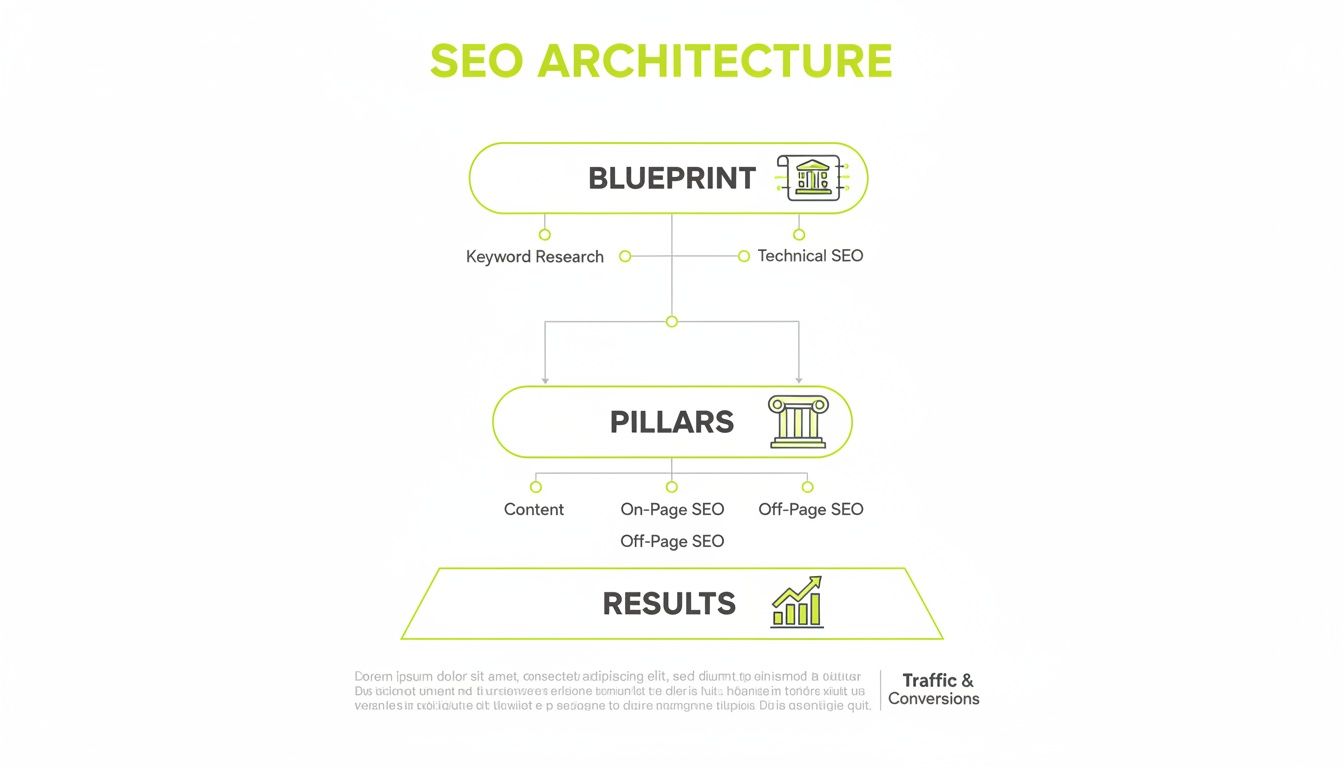
This visual hierarchy shows how you build from a blueprint to create solid pillars that deliver real results. Following this model ensures every piece of your content is working together to support your overall SEO goals.
Design for Scalability
Finally, a truly winning site structure is built to last. Your business isn't static—you’ll add new products, launch new services, and expand your blog. A scalable architecture is designed to handle that growth without forcing you to tear everything down and start over.
Think ahead when you plan your categories and subcategories. Avoid painting yourself into a corner with an overly rigid setup. For example, creating a general "Services" category makes it easy to add new service pages down the road. Hardcoding every individual service into your main navigation, however, will quickly become a messy problem.
Building with scalability in mind from day one ensures your SEO foundation stays solid as your business grows. When complex issues inevitably pop up during expansion, working with a specialized technical SEO agency can provide the expert guidance you need to keep your architecture robust and effective.
The Building Blocks of Your Site Architecture
If your site’s structure is the blueprint, then its individual components are the bricks, mortar, and beams that bring that plan to life. These are the tangible things—like your URLs and navigation menu—that both users and search engines interact with directly.
Getting these elements right is what separates a strong, crawlable, and user-friendly website from one that just floats around in cyberspace. The principles we've covered are the rules of construction, but these building blocks are the actual materials you'll be using. Each piece has a specific job, and they all have to work together to create a powerful SEO site architecture.
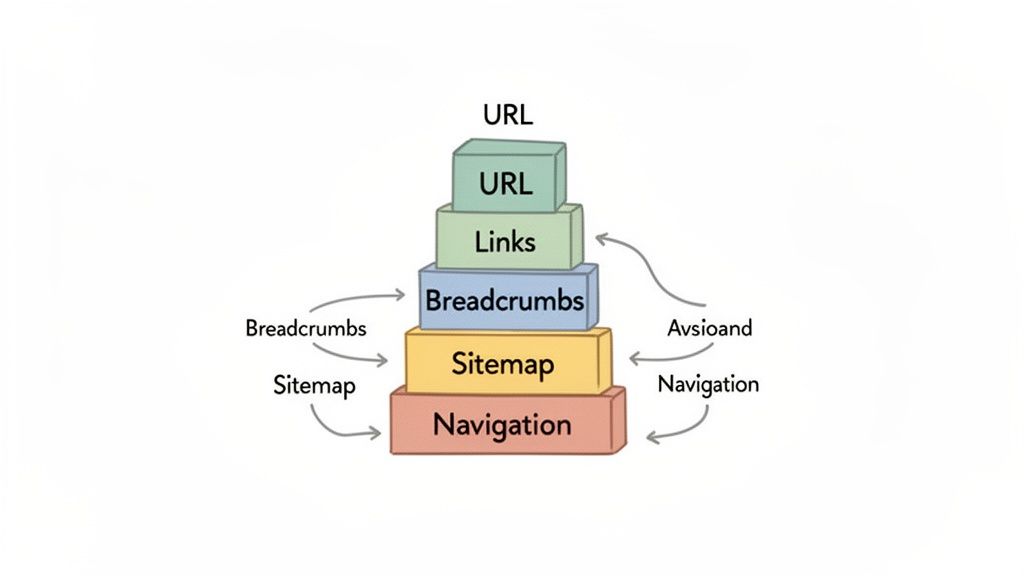
Let's dig into what these core components are and how each one contributes to the big picture.
Crafting a Clean URL Structure
Think of a URL as the street address for a specific page on your site. Just like in the real world, a clean, simple address is easy for people to read and for search engines to understand. It should tell you exactly what you'll find on the page before you even get there.
A well-optimized URL is:
- Readable: It uses actual words, not a jumble of random numbers and symbols.
- Keyword-Rich: It includes the page's primary keyword.
- Concise: It's as short as possible without losing its descriptive power.
Let's look at two examples for a page about local SEO services. The difference is night and day.
| Good URL Example | Bad URL Example |
|---|---|
yourwebsite.com/services/local-seo | yourwebsite.com/index.php?id=83&cat=4 |
The first URL clearly communicates the page’s topic and its place within the site’s hierarchy. The second one? It provides zero context, which confuses users and offers no SEO value whatsoever. A clean URL structure is a fundamental signal that helps search engines correctly categorize your content.
Weaving a Web of Internal Links
Internal links are the hallways connecting the different rooms of your website. They guide both users and search engine crawlers from one page to another, establishing clear relationships between your content and spreading authority throughout your entire site.
Honestly, strategic internal linking is one of the most powerful—and most overlooked—SEO tactics out there. When you link from one page to another using descriptive anchor text (the clickable words), you’re explicitly telling Google what the destination page is about.
This is absolutely essential for building topic clusters, a structure where a main "pillar" page on a broad topic links out to several more specific "cluster" pages. This setup is a massive signal of expertise and authority on a subject. You can dive deeper into the technical side of connecting site structure and functionality with a solid web development strategy.
Providing Clear Paths with Breadcrumbs
Ever heard the story of Hansel and Gretel? That's exactly what breadcrumbs do for your website. They're a secondary navigation system that shows users their current location within the site's hierarchy, leaving a clear trail back to where they started.
You'll usually see them at the top of a page, looking something like this:Home > Services > SEO Services > Local SEO
Breadcrumbs are fantastic for both user experience and SEO. For users, they offer an easy way to navigate back to higher-level pages without mashing the "back" button. For search engines, they reinforce your site structure and create even more internal links, helping crawlers build a better map of how your pages are all connected.
Guiding Crawlers with Sitemaps
While human users get around with your navigation menu, search engines need a more direct map. This is where sitemaps come in, and there are two main types you need to know about.
- XML Sitemap: This is a file written specifically for search engines. It lists every important URL on your site, acting as a direct roadmap for crawlers to find, crawl, and index your content as efficiently as possible.
- HTML Sitemap: This is a user-facing page that lays out a simple, organized list of all the pages on your website. It's a great backup navigation tool for any visitors who might get lost.
Think of the XML sitemap as the delivery route for the mail carrier (Googlebot) and the HTML sitemap as the helpful directory in a shopping mall lobby. Both are vital for making sure nothing gets missed.
Indeed, a well-structured architecture is key for optimizing what is known as your "crawl budget." Flat site architectures, where pages are close to the homepage, can help search engines discover new content up to 50% faster than deep, complex structures. On a medium-sized site, poor architecture could leave 20-30% of your content unindexed, making it invisible to searchers. You can explore more about how site architecture impacts crawling and indexing on ClickRank.ai.
Okay, let's move from the "what" and "why" to the "how." Actually building a solid SEO site architecture isn't some mystical art; it's a methodical process. You wouldn't build a house without a detailed blueprint, right? The same logic applies here. This isn't a guessing game.
Taking the time to plan ensures your website is built on a rock-solid foundation from day one. By starting with research and moving through to visualization and content mapping, you create a logical framework that serves both your visitors and Google, setting yourself up for long-term success.
Start with Research and Discovery
First things first: you have to understand the landscape. This means diving deep into what your audience is actually searching for and seeing how your competitors organize their own content. This research phase is non-negotiable. It's where you get the hard data to back up your structural decisions.
Your goal is to build a hierarchy that mirrors how your users think and search. Keyword research is your best friend here. When you identify broad "head" terms and more specific "long-tail" keywords, you'll start to see natural categories and groupings emerge. Peeking at competitor sites shows you what’s working, what isn't, and where you might find a gap to exploit.
Create a Visual Sitemap
Once your research is done, it's time to get visual. A visual sitemap is basically a flowchart that maps out every page on your site and how they all connect. To be clear, this is not the same as an XML sitemap for search engines. This is a strategic blueprint for you and your team.
Creating this map forces you to think through the user journey and the logical flow of your site. It’s the perfect way to spot potential dead ends or confusing paths before they ever get coded. You can see at a glance if you're sticking to the three-click rule and making sure every page has a clear path back to the homepage.
Here’s an example of what a simple visual sitemap might look like in a planning tool.
This kind of diagram clearly outlines the page hierarchy, showing how top-level pages branch into more specific subpages, which is exactly what you need for organized planning.
Map Your Content to the Structure
With your visual blueprint in hand, the next move is content mapping. This is where you assign a specific piece of content—an existing blog post, a service page you need to write—to each box in your sitemap. The whole point is to make sure every single page has a distinct purpose and that you aren't creating duplicate or overlapping content.
Content mapping helps you identify:
- Existing Content: What assets do you already have that can slot right into the new structure?
- Content Gaps: Where are the holes? What new pages or articles do you need to create to flesh out your topic clusters?
- Content to Consolidate: Do you have several weak, thin pages that could be combined into one powerhouse resource?
This process ties your content strategy directly to your SEO site architecture. Every piece of content gets a home, and every piece contributes to your site's overall authority.
Address Important Technical Considerations
Finally, rolling out a new or updated site structure involves a few technical steps you absolutely cannot afford to mess up. Getting these right ensures a smooth transition and prevents you from torpedoing all the SEO value you've already built.
Planning your technical implementation is just as crucial as the strategic design. A single missed step, like forgetting to set up redirects, can undo all your hard work by creating widespread 404 errors that harm user experience and tank your search rankings.
Here are the key technical items you need to manage:
- Plan 301 Redirects: If you change any existing URLs, you must implement 301 redirects. This is non-negotiable. It permanently tells search engines that a page has moved and passes most of its ranking power to the new URL.
- Check CMS Settings: Some content management systems have their own ideas about SEO. Your CMS might automatically generate page titles in a format that isn't optimized, for instance. You'll need to dig into the settings and make sure they align with your plan.
- Configure Robots.txt: Your
robots.txtfile is the bouncer for search engine crawlers, telling them which parts of your site are off-limits. Double-check that you aren't accidentally blocking important category pages or other resources you want Google to index.
By meticulously planning each of these stages—from the initial research to the final technical checks—you can build a powerful site architecture that acts as the engine for your SEO success.
Common Architecture Mistakes and How to Fix Them
Even the most carefully planned SEO site architecture isn't set in stone. Over time, as your website grows, content gets added, and business priorities shift, small cracks can start to form. These little errors can quietly sabotage your SEO efforts.
Think of it like finding hidden weaknesses in a building's foundation; they might not be obvious from the street, but they can seriously compromise the entire structure. Spotting and fixing these common blunders is essential for keeping your site healthy and performing at its peak.
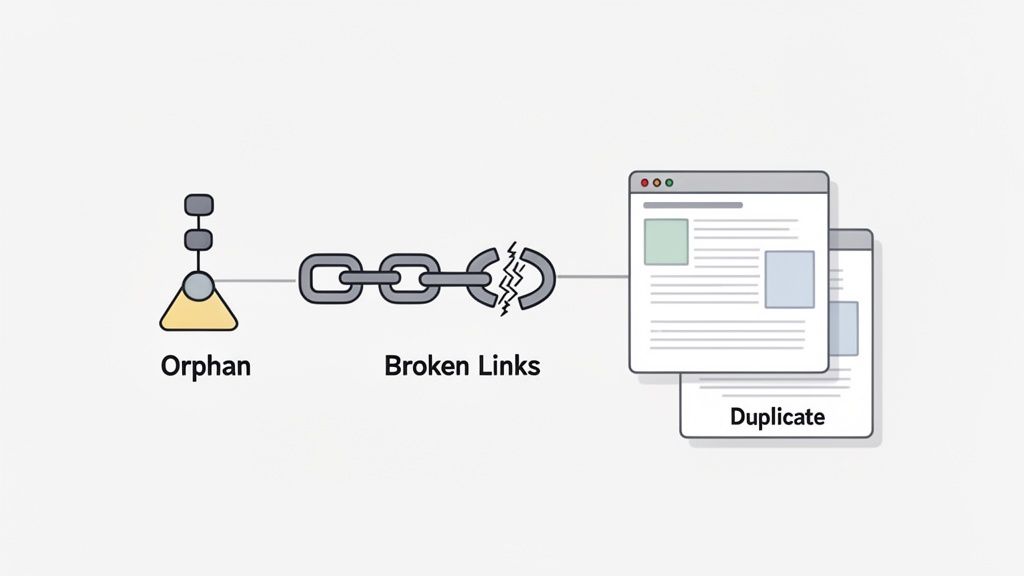
Let's walk through some of the most frequent mistakes I see and cover clear, actionable ways to get your site back on solid ground.
Uncovering and Rescuing Orphan Pages
Orphan pages are the digital equivalent of a room with no doors. They exist on your site, but with zero internal links pointing to them, they’re practically invisible to both users and search engines trying to navigate your content. This usually happens when new pages are published but never properly linked from a menu or another relevant page.
These pages are just floating in cyberspace, complete SEO dead ends. Any authority or value they might have is totally wasted because it’s cut off from the rest of your site.
The Fix:
Fire up a website crawler like Screaming Frog or use the Semrush Site Audit tool. These tools will scan your entire site and compare the URLs they find against your sitemap, quickly flagging any pages that are completely isolated.
Once you have a list of orphan pages, the solution is straightforward: build some bridges. Find relevant, high-traffic pages on your site and add internal links pointing to these lost pages. For instance, if you find an orphaned blog post on "small business tax tips," it's a no-brainer to link to it from your main "small business resources" category page.
Taming Duplicate Content from URL Parameters
Duplicate content is a massive red flag for search engines, and one of the sneakiest culprits is messy URL parameters. This happens when the exact same content can be reached through multiple URLs, often created by filters, tracking codes, or session IDs.
For example, these two URLs could easily show the identical page:
yourstore.com/shoes/running-shoesyourstore.com/shoes/running-shoes?sort=price_high
To Google, these look like two distinct pages with the same content, which dilutes your ranking signals and just plain confuses the crawlers.
The canonical tag is your best friend for solving duplicate content issues. It's a simple line of HTML code that tells search engines, "Hey, out of all these similar pages, this is the one I want you to index and rank." It consolidates all your ranking signals into that single, preferred URL.
By placing a canonical tag on the filtered page that points back to the main category page, you’re telling Google which one is the master copy. It's a simple fix that cleans up your site's index and focuses your SEO power where it counts.
Repairing Broken Internal Links
Broken internal links are like dead-end streets. They create a terrible experience for users and bring the flow of link equity to a screeching halt for search engines. Someone clicks a link expecting more info, only to get slapped with a 404 error.
This doesn't just erode user trust; it also stops search engine bots in their tracks, preventing them from discovering and indexing your other pages.
The Fix:
Run a site crawl regularly to hunt down any 404 errors. Tools like Google Search Console or any third-party crawler will give you a list of every broken link and where it lives. From there, you have a few options:
- Update the link to point to the correct, live page.
- Remove the link entirely if the page is gone and there’s no good replacement.
- Set up a 301 redirect from the broken URL to a new, relevant page.
Beyond these common issues, big algorithm shifts can also force you to rethink your site's structure. It's a good idea to stay current by learning about things like recovering from Google's helpful content update and how it affects site quality.
A clunky architecture also drags down your site speed, which is a huge ranking factor. You can learn more in our guide on how you can increase your page speed. Poor structure has a direct impact on Core Web Vitals, with some projections showing it could contribute to 60% of websites delivering a bad user experience by 2026. Deep, complicated hierarchies can slow load times by 2-4 seconds—which is why Google rewards sites that pass Core Web Vitals, something only 40-47% of sites currently manage.
Your Site Architecture Questions, Answered
Even with the best plan in hand, you’re bound to hit a few questions once you start digging into your site’s structure. Getting clear, practical answers is what separates a smooth process from a series of frustrating technical dead-ends.
This section tackles the most common questions we hear about SEO site architecture, giving you the straightforward answers you need to move forward with confidence.
How Often Should I Audit My Site Architecture?
A full-blown architectural audit isn't a monthly task—think of it more like a major annual health checkup. For most businesses, a deep-dive audit makes the most sense once a year or right before a significant change.
You’ll definitely want to schedule one during these key moments:
- A major website redesign or migration to a new platform.
- The launch of a brand-new product line or service category.
- A massive content expansion, like adding a whole new blog or resource hub.
But that doesn’t mean you can set it and forget it for the other 11 months. Smart SEOs and marketers perform quarterly "mini-audits." These are quick check-ins focused on fresh issues like new broken internal links, recently orphaned pages, or crawl errors that just popped up in Google Search Console. This kind of regular maintenance stops tiny problems from snowballing into massive structural headaches.
What Is the Difference Between Site Architecture and Information Architecture?
This is a classic point of confusion, and it’s an important one to clear up. While they're closely related, "site architecture" and "information architecture" (IA) aren't the same thing.
Imagine you're building a massive library. Information Architecture (IA) is the grand blueprint for the entire library system. It’s about organizing, structuring, and labeling all the content—the books, magazines, digital files—so that it all makes logical sense to the people using it. IA answers the big question: "How do we categorize all our knowledge?"
SEO site architecture, on the other hand, is a specialized slice of IA. It's the specific layout of the library's aisles, shelves, and signs. Its main job is to help both the librarians (search engines) and the visitors (users) find a specific book as quickly and easily as possible. It gets into the technical weeds of things like URL patterns, internal linking, and crawlability, all to boost search engine performance.
In short, IA is about organizing information for human brains. SEO site architecture takes those principles and applies them to a website to make both people and search engine bots happy.
Can I Improve My Site Architecture Without a Full Redesign?
Absolutely. The idea that you have to tear down your whole website to fix its structure is a complete myth. You can drive huge, positive changes without a massive overhaul by focusing on high-impact tasks that don’t require a ton of effort.
This lets you chip away at architectural issues over time, racking up small wins without the cost and chaos of a full redesign. It's all about making smart, strategic improvements, not starting from a blank slate.
Here are a few powerful changes you can make right away:
- Fix Broken Internal Links: Run a site crawl, find every 404 error, and update those links. This is easily one of the quickest and most effective fixes you can make.
- Add or Improve Breadcrumbs: Implementing breadcrumb navigation is a low-effort way to reinforce your site’s hierarchy and give users a much better experience.
- Strengthen Internal Linking: Pinpoint your most important pillar pages. Now, go find opportunities on related blog posts and service pages to link back to them. This is how you funnel authority right where you need it most.
- Update Your XML Sitemap: Make sure your sitemap is current, error-free, and properly submitted to Google Search Console. It's a direct line to telling Google what's important on your site.
- Restructure a Single Section: You don’t have to boil the ocean. Just cleaning up the URL structure and internal linking for one key service category can produce very real SEO results.
How Does Site Architecture Affect Mobile SEO?
Now more than ever, site architecture is absolutely critical for mobile SEO. This is almost entirely due to Google's mobile-first indexing, which means Google primarily uses the mobile version of your site for indexing and ranking. If your site structure is a mess on mobile, your rankings are going to suffer—period.
A flat, simple architecture is a massive advantage here. Mobile users simply don’t have the patience to tap through endless levels to find what they need. A shallow click depth, where your key pages are only a click or two away from the homepage, is non-negotiable for a good mobile experience.
A logical hierarchy also makes responsive design work better. It helps your navigation menus and page layouts adapt cleanly to smaller screens without becoming a cluttered, confusing mess. On top of that, a well-organized structure usually means less page complexity, which helps your pages load faster on mobile connections—a huge ranking factor and just plain good for users.
At Magic Logix, we build powerful digital strategies on solid foundations. If you're ready to transform your website's structure into an engine for growth, our team of experts is here to help. Discover how our data-driven approach can elevate your online presence by visiting us at https://www.magiclogix.com.