

The most reliable way to allocate a PPC budget is to work backward from the customers you need. Set a lead or sales target, estimate the clicks required to reach it, multiply by your expected cost per click, then divide the money between proven campaigns and a smaller testing pool. After that, you check pacing every week and move spend toward what earns its keep.
This guide walks through that process in order: setting the total, splitting it, handling thin data and seasonality, and monitoring. The numbers in the worked examples are illustrations, not benchmarks, so swap in your own.
TL;DR
- Start from your goal: required clicks = target leads ÷ conversion rate, and budget = required clicks × average CPC.
- Add management fees and tool costs to reach your true total cost.
- A common rule of thumb is to put about 70% on proven campaigns and 30% on testing.
- Google divides your average daily budget into a monthly cap of 30.4 times that figure, so plan monthly and set daily.
- Review pacing weekly and document every reallocation.
Table of Contents
- Start with the goal, not the platform
- How to calculate your initial PPC budget
- What a reasonable PPC budget looks like
- Turn the monthly total into daily budgets
- How to split budget across campaigns and platforms
- Plan with little data or seasonal demand
- Monitor pacing and reallocate
- Our perspective
- Getting help with your plan
- A PPC budget checklist
- FAQ
- Sources
Start with the goal, not the platform
Many owners begin by asking how much they can afford. That is a fair constraint, but it is the wrong starting point. A better first question is what a customer is worth to you and how much of that you can spend to win one.
Search Engine Land notes that bottom-up planning, built on performance data and KPIs, is often more grounded than a top-down number set by leadership. It also warns that when impression share is already near 100%, asking for more spend rarely buys meaningful extra volume. Money only helps when there is demand left to capture.
Gather these inputs before you open a spreadsheet:
- Average revenue (or gross profit) per customer.
- Your lead-to-sale closing rate.
- Your website conversion rate from click to lead or purchase.
- The most you can pay to acquire one customer and still profit.
- Expected CPC for your keywords.
If you do not know your allowable cost per customer yet, our guide on how to calculate cost per acquisition covers the arithmetic.
How to calculate your initial PPC budget
The projection math is short. Search Engine Land’s guide to PPC projections gives the core formulas: required clicks equal target leads divided by conversion rate, and ad spend equals required clicks times average CPC.
A worked example
Say a home services company wants 30 leads a month. These figures are assumptions for illustration only.
| Input | Assumed value | Result |
|---|---|---|
| Target leads per month | 30 | |
| Click-to-lead conversion rate | 5% | 30 ÷ 0.05 = 600 clicks |
| Average CPC | $4.00 | 600 × $4.00 = $2,400 ad spend |
| Closing rate | 20% | 30 × 0.20 = 6 customers |
| Cost per customer | $2,400 ÷ 6 = $400 |
Now compare $400 per customer with what a customer is worth. If the average job brings $2,000 in revenue and a healthy margin, the plan holds. If the job brings $450, it does not, and you need a higher conversion rate, a lower CPC or a different offer before spending anything.
Why conversion rate matters as much as CPC
WordStream’s PPC formulas show that cost per acquisition equals CPC divided by conversion rate. At a fixed click price, a lower conversion rate raises what each customer costs you. In the example above, lifting the conversion rate from 5% to 6% cuts the clicks needed from 600 to 500, saving $400 a month at the same CPC.
That is why budget planning and landing page work belong together. Our piece on website conversion optimization explains where to look first.
Add the costs people forget
The National Apartment Association’s walkthrough of a PPC budget works backward through closing rate, conversion rates, traffic and CPC, and then adds management fees to arrive at total cost. Do the same. Your true budget includes media spend, agency or freelancer fees, and any reporting or bidding tools. If you are weighing management costs, see how we convert PPC management pricing into one monthly cost.
What a reasonable PPC budget looks like
There is no standard number. Google says the right budget depends on your goals, your industry and how much you are willing to spend per customer, and its estimator offers a benchmark daily budget based on industry and location. Use it as a sanity check against your own calculation, not a replacement for it.
Google also states that Search Ads have no flat fee or monthly subscription and are generally priced per click. You control spending through an average daily budget or a campaign total budget. In practice, three things move your number most:
- Industry and keyword competition. Legal, home improvement and healthcare terms usually cost far more per click than restaurants or entertainment.
- Location. A national campaign and a single-county campaign have very different click volumes and prices.
- Margin. Higher-margin products can bear a higher cost per customer, which lets you bid for more of the market.
Minimum budget for useful data
Google recommends a campaign budget large enough to acquire 5 to 15 times your target CPA, according to Search Engine Land’s reporting on paid media budgets. With a $400 target CPA, that points to a budget in the range of $2,000 to $6,000. A budget far below that range often starves the algorithm of data, so a very small account is usually better off with fewer campaigns, each funded properly.
Turn the monthly total into daily budgets
Google Ads thinks in daily terms, and the arithmetic has quirks. Google Ads Help says that for most campaigns, daily spend can reach twice your average daily budget, while monthly spend is capped at 30.4 times that average. So a day may overspend and another may underspend, but you will not pay more than the monthly cap.
Search Engine Land’s guidance is to divide the monthly budget by 30.4 to get a daily figure. With our $2,400 plan, that is about $78.95 a day.
If a campaign does not run every day, the same source suggests multiplying active days per week by 4.3 and dividing the monthly budget by that product. A campaign running five weekdays gives 5 × 4.3 = 21.5 active days, so $2,400 becomes roughly $111.63 a day.
How to split budget across campaigns and platforms
Once you have a total, the allocation question begins. Think of it like a household budget: fixed essentials first, then a smaller amount for experiments that might become essentials.
The 70/30 starting point
A common rule of thumb, cited by Shopify, is to give about 70% of funds to proven, evergreen campaigns and 30% to testing new ads and audiences. On a $3,000 month, that is $2,100 for what already works and $900 for tests.
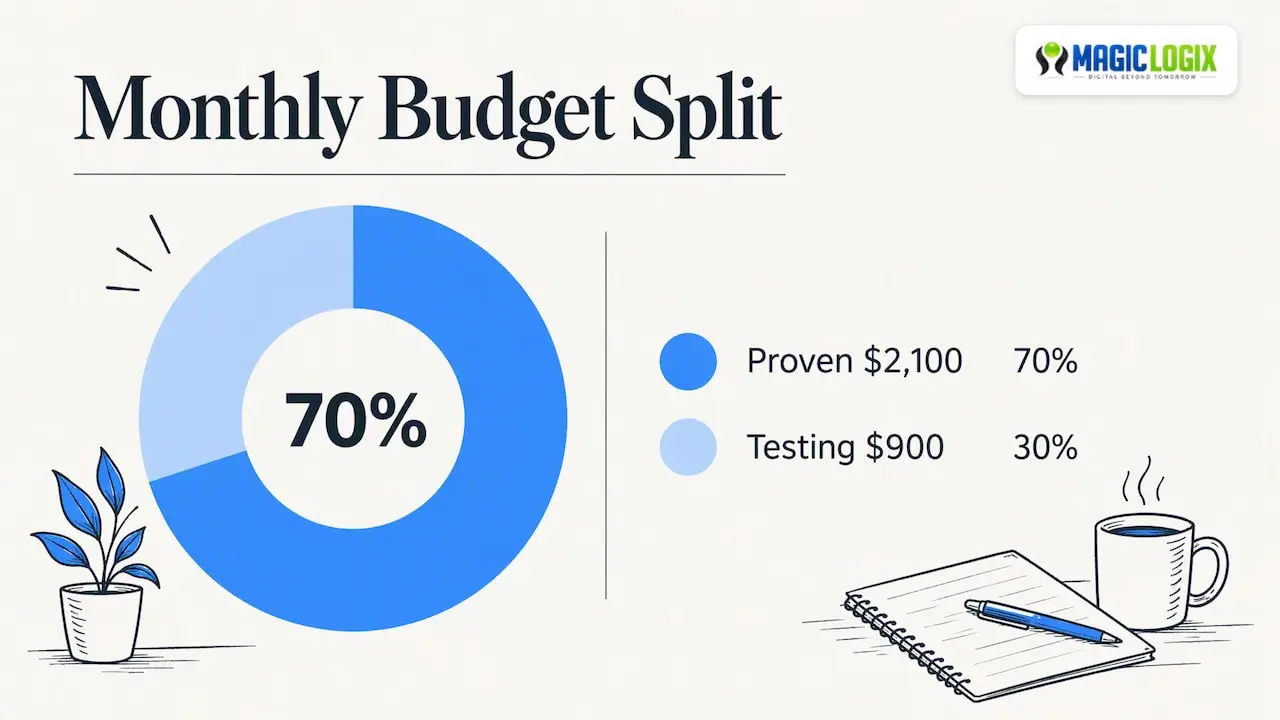
Treat it as a starting ratio, not a law. A brand-new account has nothing proven yet, so more of the budget will go to discovery at first. A mature account with stable returns might shrink the testing share to 10 or 20%.
Search Engine Land’s Menachem Ani adds that the most profitable campaign, the evergreen moneymaker, should receive the bulk of the budget, especially with algorithmic bidding.
Criteria for ranking where money goes
Use a simple scorecard. For each campaign, platform or keyword group, record:
- Cost per acquisition against your allowable cost.
- Conversion volume (is there enough data to trust it?).
- Impression share and lost share due to budget.
- Lead quality, such as close rate from sales.
- Strategic value, such as a new product line.
Then fund in this order: campaigns under your target CPA and limited by budget, then steady performers, then tests. Campaigns above your allowable cost with enough data should be fixed or paused.
Channel mix
For most B2B and local service businesses, search is the base because it captures people already looking. Add other channels when search is saturated or when you need to create demand rather than capture it. Shopping ads suit ecommerce, and social or community platforms suit visual products or audience building. If you are considering a community platform, our guide to advertising on Reddit shows how to test it without a large commitment.
Within search, your keyword research drives both reach and cost. Our walk-through of keyword research for SEM helps you separate high-intent terms from expensive curiosity clicks.
An allocation example
Here is a hypothetical $3,000 monthly plan for a regional ecommerce store. The percentages are illustrative.
| Bucket | Share | Amount | Purpose |
|---|---|---|---|
| Brand search | 10% | $300 | Protect branded queries |
| Non-brand search, proven | 35% | $1,050 | Core revenue |
| Shopping, proven | 25% | $750 | Product-level sales |
| Testing (new keywords, audiences, creative) | 30% | $900 | Find next winners |
The proven buckets add up to 70%, matching the rule of thumb above. Set a floor and ceiling for each bucket so a hot campaign cannot quietly consume the testing pool, an approach also suggested in the Shopify piece on PPC budgets.
Plan with little data or seasonal demand
When you have no history
New accounts do not have conversion rates to plug in. Search Engine Land recommends using account history when it exists and otherwise estimating from similar verticals and brand maturity. Be honest about the uncertainty. Write down your assumed conversion rate and CPC, run for four to six weeks, then replace the guesses with real figures.
Goal choice affects data too. Google’s documentation explains that optimizing for lower-funnel goals like purchases can mean less data and longer conversion delays, while upper-funnel goals supply more data points. If you sell a high-ticket service with few conversions, a lead form goal may teach the system faster than a closed sale.
When demand rises and falls
The same projection guide advises planning around seasonality and reallocating unused budget to key sales periods. A simple method: divide the annual budget by 12, look at last year’s conversions by month, and scale each month up or down by its share of conversions. A florist might put heavy spend into the weeks before Valentine’s Day and Mother’s Day and keep summer light.
Two cautions apply. Do not cut spend so deeply in slow months that you lose learning, and do not raise it in peak months beyond what your site and team can handle.
Monitor pacing and reallocate
A plan is only useful if you compare it with reality. Search Engine Journal recommends comparing actual spend against planned monthly figures and moving underspent funds to high-performing campaigns or to future months, with each transfer documented and approved.
A weekly routine that fits in an hour:
- Check month-to-date spend against where you should be (for example, 50% of budget by day 15).
- Flag campaigns limited by budget that are beating target CPA.
- Flag campaigns spending but not converting.
- Move funds, note the reason and date, and set the next review.
- At month end, compare plan with actual and update your assumptions.
For deeper tuning once spend is flowing, see our guide to optimizing PPC campaigns for ROI. To read results in context, paid search intelligence explains which signals deserve attention.
Decision rules you can write down
Rules prevent emotional reallocation. Examples to adapt:
- If a campaign beats target CPA by 20% or more for two weeks and is limited by budget, raise its budget by a modest step.
- If a test spends its allotted amount with no conversions after enough clicks to expect some, pause and review the landing page before blaming the keywords.
- If impression share is near its ceiling, shift the money to a new channel or keyword set rather than raising bids.
These thresholds are examples. Choose numbers that fit your volumes and risk tolerance.
Our perspective
At Magic Logix, our brand promise is Digital Beyond Tomorrow, and for budgets that means treating ad spend as one part of a connected system. We see budget problems that begin outside the ad account: a slow landing page, a form that loses leads, or tracking that miscounts conversions. Raising spend on top of those problems only raises the cost of the same leak.
We also encourage owners to keep the plan simple. A clear target cost per customer, a modest testing pool and a weekly review beat an elaborate split that nobody maintains. Where you can, pair paid search with a paid search management approach that ties spend to profit rather than clicks.
No one can promise a ranking or a return in advance, and platform behavior changes. Treat every figure above as a hypothesis until your own data confirms it.
— Hassan Bawab
Getting help with your plan
If you would rather not build the model alone, our Marketing & Growth Systems team can review your goals, tracking and current spend, and help you set an allocation you can defend. Start with a conversation about what a customer is worth to you.
A PPC budget checklist
- Define allowable cost per customer from margin or lifetime value.
- Estimate conversion rate and CPC, and label them as assumptions.
- Calculate clicks and spend, then add fees and tools.
- Check the result against Google’s budget estimator.
- Convert to a daily figure using 30.4 days.
- Split roughly 70/30 between proven and testing, with floors and ceilings.
- Adjust for seasonality using last year’s conversion pattern.
- Review pacing weekly and log every move.
FAQ
How much should I spend on PPC per month?
There is no universal figure. Calculate it from your target leads, conversion rate and expected CPC, then add management costs. Google’s own budget estimator can give a benchmark daily budget by industry and location to compare with your result.
What is the 70/30 rule for PPC budgets?
It is a rule of thumb that puts about 70% of spend on proven, evergreen campaigns and 30% on testing new ads and audiences. It is a starting point rather than a requirement. Adjust it based on how much reliable data your account already has.
How do I convert a monthly PPC budget to a daily budget?
Divide the monthly amount by 30.4. Google may spend up to twice your daily average on a given day, but monthly spend is capped at 30.4 times the average daily budget. For campaigns that run only some days, multiply active days per week by 4.3 and divide the monthly budget by that number.
How should I budget if I have no PPC history?
Estimate conversion rate and CPC from similar industries or brand maturity, write the figures down as assumptions, and run a test period. Replace the estimates with actual numbers as soon as you have them, and re-run your calculation.
Sources
- PPC budget planning: Aligning business goals, ad spend, and performance (Search Engine Land)
- A guide to effective PPC projections (Search Engine Land)
- Apt Marketing Pay-Per-Click Campaigns: What to Spend (National Apartment Association)
- 3 Simple PPC Formulas Proven to Lower Your Costs (WordStream)
- Google Ads Cost Tool
- How much does Google Ads cost? (Google Ads)
- About average daily budgets (Google Ads Help)
- How to manage a paid media budget (Search Engine Land)
- How To Set a PPC Budget (Shopify)
- Defining your goals and choosing a bid strategy (Search Ads 360 Help)
- PPC And Paid Media Budget Planning Tips (Search Engine Journal)