Getting alt tags for images right is a non-negotiable SEO task. Why? Because it’s how you make your visual content understandable to search engines and accessible to every single user.
Think of an alt tag as a short, descriptive label. It explains what an image is about when it can't be seen, which directly impacts your ability to rank in Google Images and improves the keyword relevance of your entire page.
What Alt Tags Are and Why They Are Critical for SEO
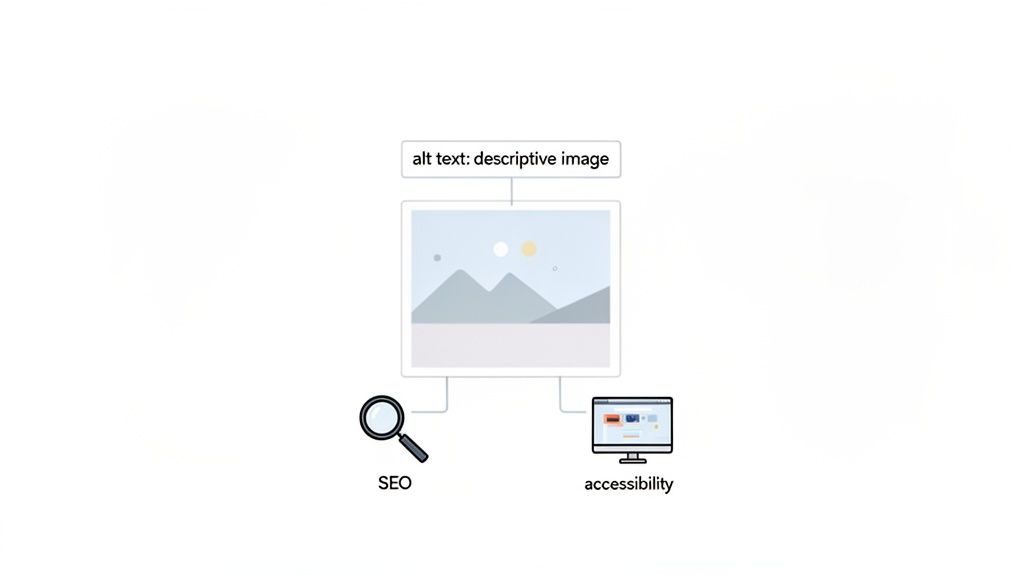
Here's a thought experiment: try navigating a website with your eyes closed. For millions of people who depend on screen readers, this is a daily reality. Alt text, short for alternative text, is the HTML attribute that provides a text description of an image for these assistive tools to read aloud.
But this is about more than just accessibility. Alt tags are a foundational piece of effective alt tags for images seo. Search engine crawlers like Googlebot can’t "see" images the way we do. They rely entirely on your alt text to figure out what an image shows and, just as importantly, how it relates to the rest of the content on the page.
The Dual Role of Alt Text in SEO and Accessibility
A well-crafted alt tag works for two different audiences at the same time. For SEO, it’s another signal to Google about your page's topic, reinforcing your keywords and boosting your chances of ranking in image search. And for many businesses, image search is a huge source of traffic.
For example, we recently saw an e-commerce client generate 12% of their total organic traffic from Google Image Search after we optimized their product photos. In contrast, a commercial HVAC company we work with only saw a 0.3% contribution, which shows just how critical image SEO is for product-heavy industries. You can dig into more data in this comprehensive SERP Monsters research.
Think of it this way: Your image is the picture, but the alt tag is the caption that tells Google what the picture is of and why it matters. Neglecting it is like hanging a priceless painting in a dark room.
This dual purpose makes optimizing alt tags a clear win. You build a more inclusive web for users with visual impairments while simultaneously making your site more visible in search. It's a key part of a solid SEO site architecture strategy that ties all your on-page elements together.
Who Benefits from Well-Written Alt Tags
To really get why this matters, let's break down who benefits from descriptive alt text and how. The impact is wider than you might think.
This quick guide shows how three different groups are directly helped by good alt text.
Quick Guide to Alt Tag Impact
| Beneficiary | Primary Benefit | Example Impact |
|---|---|---|
| Search Engines | Context & Relevancy | Google understands an image of a "red Nike running shoe" and can rank it for relevant queries, driving targeted traffic. |
| Screen Reader Users | Accessibility | A user with low vision hears "A bar chart showing a 30% increase in Q3 sales" instead of just "image." |
| All Users | User Experience | If an image fails to load due to a slow connection, the alt text appears in its place, preventing information gaps. |
As you can see, what starts as a simple text description creates a ripple effect, improving everything from keyword rankings to the basic user experience when things go wrong. It’s a small effort with a big payoff.
How to Write Perfect Alt Text Every Time
Alright, let's move from the "what" and "why" to the "how." It's one thing to know alt text is important; it's another to write it well consistently. We need a clear framework, not just guesswork.
The best advice I ever got on this was simple: Describe the image as if you're explaining it to someone over the phone.
This little mental trick is pure gold. It forces you to be clear and focus on what’s actually important in the picture. It helps you cut through the noise and provide genuine value, which leads directly to better alt tags for images seo. Why? Because it prioritizes the exact things search engines and users need—clarity and context.
One hard rule to follow: keep it under 125 characters. This isn’t a random number. It’s the cutoff point where most screen readers simply stop reading, so anything longer is lost to your user. Brevity matters.
The Core Components of Good Alt Text
Writing great alt text is an art, but it’s one you can master. It's about blending specificity with purpose. You're not just listing objects; you're conveying the context and function of the image on that specific page.
To get this right every time, just think about these three elements.
- Object: What's the main subject? Is it a person, a product, a building?
- Action: What is the subject doing? Are they running, sitting, or being assembled?
- Context: What extra detail is critical for understanding the image's role on the page? Things like "on a white background for an e-commerce store," or "during a company charity event."
When you combine these, you leave generic descriptions in the dust. Instead of just "dog," you get "golden retriever catching a red frisbee in a park." You’ve now covered the object, action, and context, creating alt text that truly serves both accessibility and SEO.
Good vs Bad Alt Text Examples
There's no faster way to learn than by seeing it in action. Let's look at a few common scenarios to see what separates weak alt text from strong, effective descriptions.
1. E-commerce Product Image
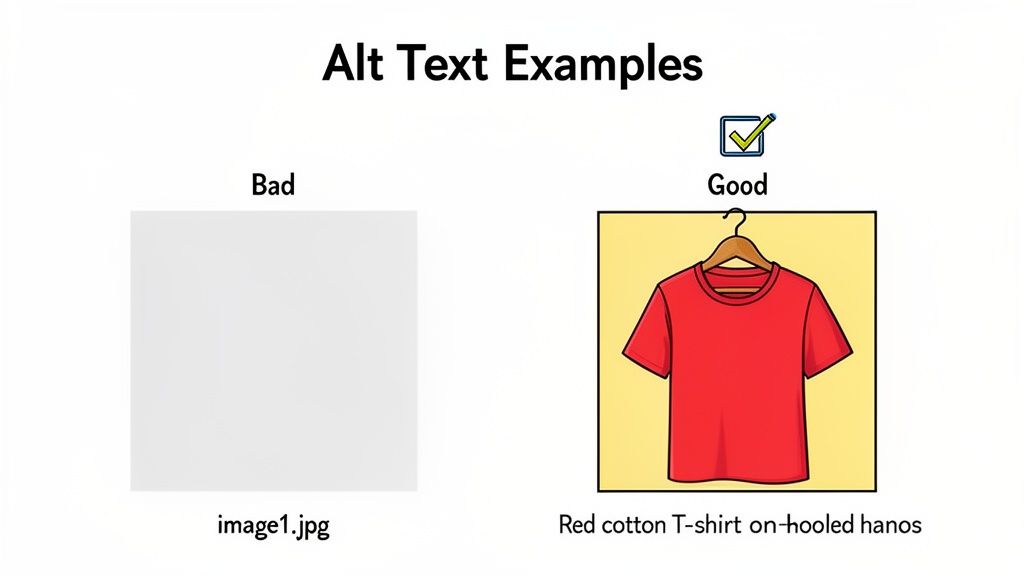
- Bad:
alt="shoe" - Good:
alt="Men's red Nike Air Max running shoe, side view" - Why it works: The good example is incredibly specific. It includes the product name, color, and describes the angle, which is hugely helpful for visually impaired shoppers and Google’s own product understanding. A great product photo is everything, so it’s worth investing in a professional social media photoshoot to get stunning images you can describe well.
2. Informational Chart or Graph
- Bad:
alt="graph of sales data" - Good:
alt="Bar chart showing a 30% increase in Q4 sales compared to Q3" - Why it works: The good version doesn't just say what it is; it explains what it shows. It gives the most important takeaway, providing the same core information to someone who can’t see the chart.
Your alt text should be a stand-in for the image, not just a label. If the image were to break and only the text appeared, would the user still understand the point? If the answer is yes, you've written great alt text.
3. Blog Post Hero Image
- Bad:
alt="woman working on laptop" - Good:
alt="Content strategist smiling while outlining an article on a whiteboard" - Why it works: This is all about context. The good version describes an action ("outlining an article") that reinforces the article's theme. It makes the image an active part of the content, not just a pretty placeholder.
These examples show how being specific, contextual, and brief makes your alt text far more powerful. Of course, alt text is just one piece of the puzzle. To really get ahead, you also need to know how to optimize website images to improve site speed and the overall user experience.
Common Alt Tag Mistakes That Hurt Your Rankings
Knowing the theory behind good alt text is one thing; putting it into practice is another. The other half of the battle is knowing exactly what not to do. I’ve seen countless well-meaning site owners sabotage their own SEO and accessibility by making a few common, easily avoidable mistakes.
Think of this as a quick diagnostic check-up for your website's images. These slip-ups can confuse search engines, create a frustrating dead-end for users with screen readers, and leave valuable ranking potential sitting on the table.
Fortunately, once you learn to spot these errors, they're incredibly simple to fix. Let's walk through the most frequent offenders so you can audit your own content and get your images working for you, not against you.
Mistake 1: Keyword Stuffing
This is the big one. Keyword stuffing is the most common and damaging mistake I see. It's what happens when you cram every possible keyword variation into the alt tag, desperately hoping to game the system and boost your rankings.
Instead, it just makes your content look spammy to Google and creates a nonsensical experience for anyone using a screen reader. It’s the digital equivalent of a salesperson shouting a list of buzzwords in your face.
- Problematic Example:
alt="blue running shoe nike runner best running shoes for sale cheap running shoes" - Optimized Solution:
alt="Blue Nike Air Zoom Pegasus running shoe on a white background"
The optimized version is natural and descriptive. It still includes valuable keywords like "Nike running shoe," but it does so in a way that provides genuine value by accurately describing the image.
Mistake 2: Using Vague or Useless Descriptions
Another frequent error is writing alt text that’s too generic to be helpful. Descriptions like "image" or "picture" are completely useless. Equally bad is leaving the default file name (like IMG_8472.jpg) as the alt text—a massive missed opportunity.
Your alt tag’s primary job is to stand in for the image, providing an equivalent description if the image can’t be seen. If your alt text is just “graph,” you’ve failed that core mission. It tells the user what the element is, but not what it means.
Imagine you have a chart showing website traffic growth.
- Problematic Example:
alt="chart" - Optimized Solution:
alt="Line chart showing organic website traffic increased by 45% in Q2"
The second example gets the job done. It communicates the essential information, making the content accessible even without the visual.
Mistake 3: Leaving Alt Tags Empty on Important Images
While purely decorative images should have an empty alt attribute (alt=""), forgetting to add alt text to an informative image is a critical error.
For a screen reader user, it’s like a gaping hole on the page; they know an image is there but have no clue what it contains or why it's important. For search engines, it's a blank space where valuable context and ranking signals should be.
To help you spot these issues in the wild, I’ve put together a quick comparison table. It's a great cheat sheet for auditing your own site.
Common Alt Tag Errors vs. Optimized Solutions
| Common Mistake | Problematic Example | Optimized Solution |
|---|---|---|
| Keyword Stuffing | alt="red dress summer dress buy red dress online" | alt="Woman in a red sundress walking on a beach" |
| Vague Description | alt="team photo" | alt="The Magic Logix marketing team posing in the Dallas office" |
| Empty on Info Image | alt="" (on a product photo) | alt="Close-up of a hand-stitched leather wallet" |
By avoiding these three common pitfalls—keyword stuffing, vague descriptions, and leaving important tags empty—you can drastically improve both your SEO and your site's accessibility.
A quick audit of your key pages for these issues is one of the fastest ways to get some immediate, noticeable wins for your website. It’s a small effort for a significant reward.
The Future of Alt Tags in an AI-Driven World
The world of search is getting smarter. With AI that can "see" images, like the tech behind Google Lens, it’s fair to ask: are alt tags still on the menu for SEO? If a machine can tell there’s a dog in a photo, do we still need to write alt="dog"?
The answer is a definite yes. But the relationship has changed. Think of it less as a replacement and more as a new partnership.
AI is great at the literal stuff. It can analyze an image and identify objects, people, and basic settings. It knows a picture contains a car, a road, and a blue sky. What it usually misses is the why—the context and the reason you chose that specific image for your page. That’s where you come in.
Why Your Words Still Beat the Machine
AI can identify what's in your image, but it struggles to understand why it's there. A well-written alt tag gives search engines the specific, strategic information that a machine simply can't guess. For search engines, alt text is still a direct and powerful signal for ranking.
And while AI models have gotten incredibly advanced, our 2026 data shows that alt text has become more than just an SEO box to tick. It’s now a critical piece of the accessibility and user experience puzzle. Search engines lean on it as a dedicated ranking factor for figuring out an image's relevance. You can see a great breakdown of how these pieces fit together in this guide to modern image SEO.
This also means that the best alt tag in the world can’t save a bad image. With visual search on the rise, having high-quality, clear, and relevant photos is more important than ever. The two have to work together.
How to Make AI and Alt Text Work for You
The future isn't about AI taking over alt text. It’s about combining smart AI, great visuals, and your own human expertise. To get the best results, you need to tackle all three.
High-Quality Images: Always start with clear, relevant, and visually appealing images. Visual search algorithms reward quality. A blurry or poorly shot photo is going to be left behind, no matter how perfect its alt text is.
Descriptive File Names: This is your first chance to add context. Before you even upload, name your file something useful.
blue-nike-running-shoe.jpgtells a search engine way more thanIMG_1234.jpg.Strategic Alt Text: This is the final layer. Don't just describe what's in the picture. Connect it to your content's purpose, use your keywords naturally, and add the essential context that a machine can't figure out on its own.
Think of it like a movie. The image is the scene itself. The file name is the scene number in the script—a basic label. The alt text is the director's note, explaining the scene's purpose and why it’s important to the story.
When you line up these three elements, you get a powerful combination that works for search engines, AI tools, and—most importantly—your actual users. This is how you build an image SEO strategy that lasts.
Your Step-by-Step Alt Tag Audit Workflow
Staring down a list of hundreds, or even thousands, of images that need fixing can feel overwhelming. If you're feeling that way, you're not alone. A big alt tag project seems like a mountain, but the right workflow breaks it down into a series of small, manageable hills.
This isn't about trying to fix every single image on your site by tomorrow. It’s about being smart, prioritizing what matters most, and building a system that makes good alt text a part of your daily routine.
Finding Your Starting Point with an Image Audit
First things first: you need to find out where the problems are. You can't fix what you can't find. The goal is to get a complete list of images that are missing alt text, have weak descriptions, or are just stuffed with keywords.
Thankfully, there are some powerful tools that make this discovery process pretty straightforward.
Free Browser Tools: For a quick spot-check on a specific page, your browser's "Inspect" tool works just fine. Right-click on any image and choose "Inspect." The developer console will pop up and show you the image's HTML, where you can see the
alt=" "attribute and what’s inside—or if it's missing entirely. This is great for one-off checks, but it's not practical for your whole site.Professional SEO Crawlers: To do this right, you need a site-wide audit. Tools like Screaming Frog or Semrush’s Site Audit tool are built for this. They will crawl every page on your site and spit out a report that specifically lists every single image with a missing or empty alt attribute. This is your master to-do list.
Remember, this kind of image audit is a critical piece of any complete website SEO audit checklist. The health of your images is a key part of your site's overall technical foundation.
How to Prioritize Your Fixes for Maximum Impact
When your audit tool hands you that massive list of images, it's easy to get discouraged. Here’s the key: do not simply start at the top of the list and work your way down. You need to be strategic.
Start with the pages that bring the most value to your business. This approach ensures your efforts get you the biggest bang for your buck, fast.
- Homepage and Core Service Pages: Think of these as your digital storefront. Every image here needs to be perfectly optimized to tell both users and search engines what you're all about.
- Top-Performing Blog Posts: Fire up Google Analytics and find the posts that get the most organic traffic. Improving the images on these pages can help you climb even higher in the rankings and pull in more traffic from image searches.
- Key Product or Landing Pages: If you run an e-commerce store or a lead generation site, these pages are where the magic happens. Great alt text improves accessibility for potential buyers and can directly impact their understanding of your products.
This simple framework turns a giant, intimidating task into a focused project. Fixing the alt text on your 10 most visited pages will almost always be more valuable than fixing it on 100 pages that nobody ever sees.
Integrating Alt Text into Your CMS Workflow
Fixing old mistakes is one thing, but you have to stop the bleeding. To keep this problem from coming back, you need to bake good alt text habits right into your content creation process.
This workflow is about making it a standard step inside your Content Management System (CMS).
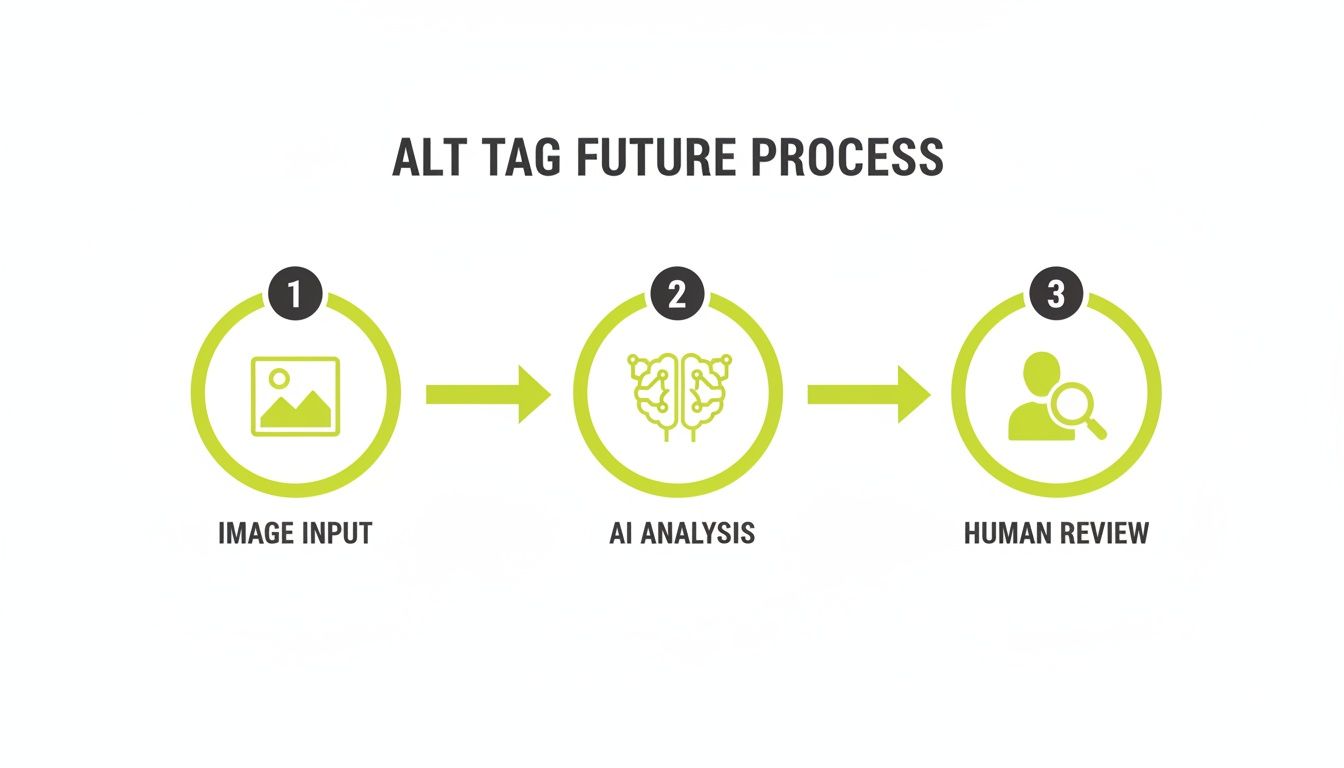
The diagram shows a modern approach that uses AI to get a first draft, followed by a human who refines it for accuracy, context, and brand voice. This combination of tech and human touch is becoming the standard.
No matter what platform you use, the goal is the same: make adding alt text a non-negotiable step.
Make this a rule for your content team: an image is not "done" until its alt text is written. Treat it with the same importance as a headline or a meta description.
Most modern platforms make this pretty easy to enforce:
- WordPress: Both the Media Library and the block editor have a dedicated "Alt Text" field that's impossible to miss when you upload or click on an image.
- Shopify: When adding product images, there’s a clear "Add alt text" option for each one. This is absolutely crucial for product SEO.
- Webflow: Just like WordPress, Webflow's asset manager has a settings panel for every image that includes a clear field for alt text.
By turning this audit and implementation into a real system, you'll shift from constantly playing catch-up to proactively building a more accessible and SEO-friendly website. This change in process is vital for long-term success, especially if you're thinking about a major site update. You can learn more about how this fits into the bigger picture as you redesign a website.
When to Automate Alt Text with AI
Let's be realistic. If your e-commerce store has 10,000 product shots or you're managing a massive digital library for an enterprise, the idea of writing every single alt tag by hand is a non-starter. The sheer volume makes it impractical, if not impossible.
This is where AI-powered automation comes into the picture.
These tools can analyze an image and spit out a description in seconds. It’s an incredible efficiency boost for any large-scale operation, turning a project that would take months into one that can be wrapped up in a few days. For businesses with thousands of similar images, like product photos against a white background, automation is a lifesaver.
Weighing the Pros and Cons
But hold on—is just flipping the AI switch for all your alt tags for images seo the right move? Not quite. While the tech is impressive, it's not a complete solution. You have to balance the incredible speed against the very real downsides in quality.
The main benefit is obvious: speed at scale. An AI can tear through a backlog of missing alt text faster than any human ever could.
But the drawbacks are just as significant.
- No Contextual Nuance: AI is very literal. It sees a "woman smiling" but completely misses that she's a "lead software engineer demonstrating our new dashboard." It doesn't get the story.
- No Strategic Keywords: An AI tool has no idea that "ergonomic mesh office chair" is the keyword you're targeting. It will almost certainly just generate "black chair."
- Generic Brand Voice: AI-generated descriptions are often sterile and flat. They lack the unique personality and tone that make your brand yours.
AI is a fantastic assistant, but it's not the creative director. It excels at describing the 'what' but often fails to capture the 'why'—the strategic reason the image exists on the page.
For your most important, high-impact images, a human touch is still absolutely essential.
Adopting a Hybrid Approach
So, the most effective strategy isn't manual or automated; it's a smart blend of both. A hybrid model lets you get the best of both worlds, balancing raw efficiency with thoughtful quality. This is similar to how you’d evaluate any set of tools in a marketing automation platform comparison—you pick the right tool for the right job.
Here’s what that hybrid workflow looks like in practice:
- Automate for Volume: Start by using an AI tool to generate alt text for your large, uniform image sets. Think product catalogs or user-generated photos. This gets the bulk of the work done fast.
- Manually Refine High-Priority Images: Next, your content team can focus their valuable time where it really counts. They can manually write or edit the alt text for:
- Homepage hero images
- Key landing page visuals
- Informational graphics and charts
- Images in your top-performing blog posts
This two-step approach ensures you have 100% coverage for accessibility while dedicating your human talent to the images that most directly impact your business goals. It's a smart, scalable, and powerful way to manage alt text.
Frequently Asked Questions About Alt Tags
Even after you get the hang of writing alt text, a few specific questions always seem to pop up. It's completely normal. Let's run through some of the most common ones to clear up any lingering doubts you might have.
Think of this as your final check-in to make sure you're applying these best practices with confidence.
Does Every Single Image Need an Alt Tag?
Not quite. This is a common point of confusion. Images that are purely for decoration—things like stylistic background patterns, fancy divider lines, or abstract shapes—should actually have an empty alt attribute (alt="").
This little bit of code is a signal to screen readers to just skip right over the image. It prevents them from announcing "decorative line" or "blue swirl," creating a much cleaner, less cluttered experience for the user.
However, if an image adds any value at all—if it shows a product, illustrates a point, or acts as a link—it absolutely must have a descriptive alt tag. No exceptions.
What Is the Ideal Length for Alt Text?
You should always aim for under 125 characters. This isn't some arbitrary number. It's a critical best practice because most popular screen reader tools simply stop reading after that point. Anything longer will get cut off mid-sentence.
The goal is to be descriptive, but ruthlessly concise. You need to zero in on the image's most important information and purpose without writing a novel. Brevity is everything here.
This character limit forces you to be disciplined. It makes you focus only on what truly matters, which almost always results in better, more effective alt text for both SEO and accessibility.
Can I Use the Same Keyword in All My Alt Tags?
Absolutely not. This is a classic SEO mistake called keyword stuffing, and search engines are smart enough to spot it from a mile away. It can actively hurt your rankings.
Your alt text has to be a unique and honest description of each specific image. While you should definitely use relevant keywords when they fit naturally, every tag needs to be distinct.
For instance, on a product page, don't just spam the product name. Describe what each photo shows:
- Good:
alt="Front view of the blue running shoe" - Good:
alt="Side view showing the textured sole of the blue running shoe" - Bad:
alt="blue running shoe buy blue running shoes"
Are Image File Names and Alt Text the Same Thing?
No, they are two completely different things, but both are important for good alt tags for images seo. The file name is what you call the image on your computer before you even upload it (like blue-running-shoe.jpg). The alt text is the HTML attribute you add to the image tag later inside your website's CMS.
For the best results, you need to optimize both. Give your file a descriptive, keyword-rich name before uploading it. Then, write a more detailed, conversational alt text that truly explains the image's context on the page.
Ready to elevate your entire digital strategy beyond just images? Magic Logix combines data, technology, and creativity to drive real business growth. Learn more about our solutions at https://www.magiclogix.com.