
A website redesign process works in phases: audit, goals, information architecture, content, design, build, QA and SEO migration, launch, then 30/60/90 optimization. Before any of that design work starts, lock four things: your baseline metrics, a finalized content and IA plan, a complete 301 redirect map, and a measurement plan wired into GA4. Skip any of the four and you’re gambling with traffic you already earned.
TL;DR:
- A full redesign is necessary only when multiple signals, such as a rebrand, conversion stagnation, or significant technical debt, combine to justify a structural overhaul.
- Critical pre-redesign data includes a comprehensive site crawl, performance metrics, and Core Web Vitals, which help demonstrate improvements and protect existing traffic.
- Setting clear KPIs tied to revenue before launch, like conversion rate and form completions, ensures measurable success and accurate ROI assessment within 90 days.
- Information architecture must be finalized before visual design to avoid costly rework, focusing on content inventory, sitemap, and user journey optimization.
- A detailed, sign-off redirect map and technical QA plan, including canonical tags and tracking verification, are essential for preserving search rankings and traffic during migration.
Table of Contents
- When Do You Actually Need a Full Redesign?
- What Data Should You Capture Before the Redesign Audit Begins?
- How Do You Set KPIs That Tie Back to Revenue?
- Why Should Information Architecture Come Before Visual Design?
- How Do You Plan Content Migration Without Losing Search Rankings?
- What Makes a Design System Actually Speed Up a Redesign?
- What Technical Requirements Should Development Meet Before Launch?
- What Does a Complete Migration QA Checklist Look Like?
- How Should You Handle the First 90 Days After Launch?
- What Should the Project Plan and Governance Structure Include?
- How Magic Logix Approaches Website Redesigns
- How Magic Logix Maps to Every Phase of Your Redesign
- Primary Sources and Further Reading
- Sources
- FAQ
When Do You Actually Need a Full Redesign?
Not every complaint about your website calls for a rebuild. A slow checkout page or an outdated hero image is a refresh problem. A refresh touches visuals and copy on the existing platform. A redesign restructures the information architecture, navigation, and often the templates underneath it. A replatform swaps the underlying system entirely, moving from one CMS or e-commerce engine to another, and it carries the highest risk of the three because you’re changing the foundation and the surface at the same time.
You know it’s time for a full redesign when several signals stack up at once, not just one bad quarter of traffic.
- A rebrand changes your visual identity, messaging, or product line in a way the old templates can’t accommodate.
- Conversion rate has plateaued even after you’ve run individual fixes like faster load times or clearer calls to action.
- Technical debt makes every small change expensive because the CMS, templates, or code base fight you at every turn.
- You’ve added product lines, service categories, or business units the current navigation was never built to hold.
Turn vague complaints into measurable objectives before you scope anything.
What Data Should You Capture Before the Redesign Audit Begins?
Before a single wireframe gets drawn, you need a full inventory of what exists and how it performs. Skip this step and you’ll spend the post-launch period arguing about whether traffic dropped because of the redesign or because of something else entirely.
- Crawl the entire site with a tool that produces a full URL inventory, then cross-reference it against Google Search Console’s indexed-page report and your current XML sitemap. Discrepancies between these three lists usually flag orphaned pages, duplicate content, or pages search engines have quietly dropped.
- Export page-level performance for organic sessions, conversions by page, and referring backlinks. This tells you which URLs are carrying the most equity and which ones nobody would miss.
- Pull Core Web Vitals samples from Google Search Console’s Core Web Vitals report for a real-world read on how visitors actually experience load speed and interactivity today.
A disciplined process here pays off directly. Teams that respect the full phase sequence, starting with a real audit, ship 4 to 12 weeks faster and protect 60 to 90% of organic traffic compared with teams that skip discovery and migration steps and rebuild on instinct.
Pro Tip: Save every export with a timestamp in a shared folder before design work begins. Six months from now, when someone asks “was this page always this slow,” you’ll have the receipt instead of a guess.
That baseline is what makes the difference between a redesign you can defend and one you can only hope worked. Without it, there’s no way to prove the new site outperformed the old one. With it, every KPI conversation has a fixed starting line.
How Do You Set KPIs That Tie Back to Revenue?
Pick two or three primary KPIs, no more, and tie each one to a business outcome your leadership team already tracks. A lead-gen business should watch form completion rate and demo requests. An e-commerce brand should watch conversion rate and average order value. Vanity metrics like total pageviews tell you almost nothing about whether the redesign is working.
Document your baseline snapshot before launch and store it somewhere permanent, not in a Slack thread that scrolls away in a week.
- Screenshot your current GA4 conversion events and note their configuration.
- Export 90 days of pre-launch traffic and conversion data by landing page.
- Record your current form completion rate, checkout abandonment rate, and any e-commerce revenue-per-session figure.
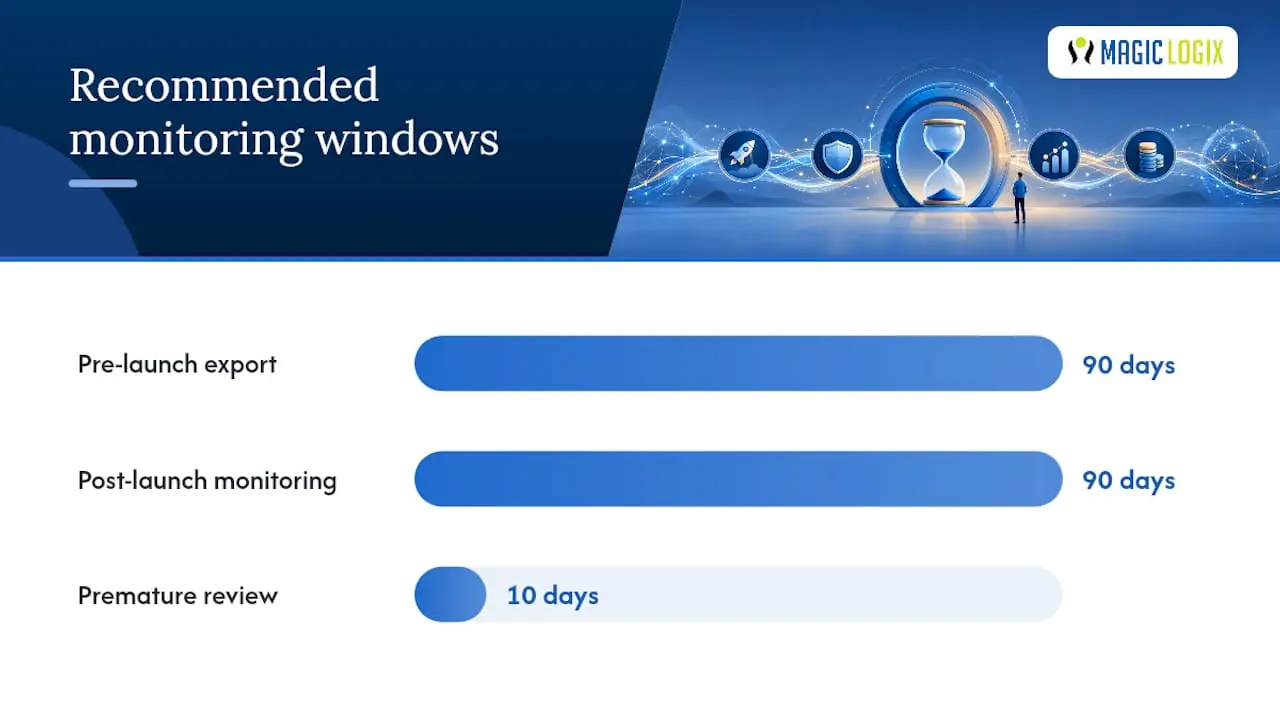
Before launch, verify your GA4 property is capturing the right events and that conversions are mapped correctly, since a redesign that changes URL structures or form logic will silently break tracking if nobody checks. Confirm the property is verified in Search Console too, since a domain change or subdirectory shift can quietly disconnect that link. Meaningful post-launch results take real time to stabilize. Reliable ROI measurement requires a 90-day monitoring window after launch alongside a documented pre-launch baseline. Reviewing traffic on day 10 and calling the redesign a win or a failure is premature either way.
Pro Tip: Set up your GA4 conversion tracking in a staging environment before launch day, not after. Testing tracking against a live site with real traffic is how teams discover their data is broken two weeks too late.
Getting conversion tracking right at this stage saves you from chasing phantom performance drops later.
Why Should Information Architecture Come Before Visual Design?
Designing screens before you’ve settled where content lives is the single most common cause of redesign rework and blown budgets. Information architecture must be locked first, because every visual decision downstream depends on how many page types exist, what the navigation looks like, and how deep users have to click to convert.
Start with a content inventory and make a keep, rewrite, merge, or remove decision for every existing page, backed by evidence rather than opinion.
- Keep pages with strong organic traffic and conversion performance as-is or with light edits.
- Rewrite pages with decent traffic but weak conversion, since the content is attracting visitors who aren’t finding what they need.
- Merge thin, overlapping pages that compete with each other in search results into one stronger page.
- Remove pages with no traffic, no backlinks, and no business reason to exist.
Build your new sitemap and navigation around actual conversion paths and audience journeys, not around your org chart. The people who ask “where does the leadership team bio go” are rarely the people converting on your site, and your navigation should reflect visitor priorities over internal politics. Solid SEO site architecture planning at this stage also protects the search rankings your existing pages have already earned.
Once the sitemap is set, build low-fidelity wireframes and clickable prototypes to verify the flow before anyone touches high-fidelity design. Walking a handful of real users through a prototype at this stage catches navigation dead ends for a fraction of what it costs to fix them after development starts.
How Do You Plan Content Migration Without Losing Search Rankings?
Every existing URL that has earned traffic, links, or rankings needs a home in the new IA, mapped one-to-one wherever possible. This single practice, more than any other technical decision, determines whether your organic traffic survives the transition. Most post-launch traffic loss traces back to poor URL handling rather than design or content problems, and a one-to-one 301 redirect map paired with staging QA is what preserves that link equity through the switch.
Copy has to be finalized before visual design starts, not written to fill placeholder boxes after the fact. Content gating means design teams don’t get to build templates around lorem ipsum text and then discover the real copy is three times longer. Run a migration rehearsal on staging using the actual content before launch, so any awkward truncation or missing asset surfaces while there’s still time to fix it.
- Build the redirect map as a spreadsheet with old URL, new URL, and redirect type for every single page in your inventory.
- Crawl the staging site and check every mapped redirect resolves correctly, with no redirect chains longer than one hop.
- Verify canonical tags on the new site point to the correct final URLs, not to staging domains or old paths.
- Set up Search Console monitoring on the new property before launch so index coverage errors surface within days, not weeks.
Pro Tip: Treat the redirect map as a deliverable that gets formal sign-off, the same way you’d sign off on a design mockup. Staging crawls routinely surface mapping errors that only show up after DNS cutover if nobody catches them beforehand.
What Makes a Design System Actually Speed Up a Redesign?
A design system with reusable components, buttons, cards, form fields, navigation patterns, lets designers and developers work from the same source of truth instead of reinventing each page from scratch. This matters most for sites with more than a handful of page templates, where inconsistent one-off designs multiply both design hours and development defects.
Prototype fidelity should escalate deliberately. Low-fidelity wireframes settle layout and flow. Mid-fidelity mockups settle visual hierarchy and content density. Only the final round needs pixel-perfect fidelity, and even then, plan for a usability test before that stage locks, not after.
- Build a component library covering every repeated element before designing individual page templates.
- Run at least one usability test on a mid-fidelity prototype, since fixing a confusing flow here costs a fraction of fixing it in code.
- Bake accessibility into templates from the start: color contrast ratios, keyboard navigation, and screen-reader friendly markup rather than a bolt-on pass at the end.
- Document accessibility requirements alongside design specs so developers know a component’s WCAG expectations before they start coding.
Grounding these templates in behavioral design principles, not just visual trends, is what separates screens that look good from screens that actually convert. The psychology behind design decisions shapes everything from button placement to form length, and it’s worth understanding before your team locks a design system.
What Technical Requirements Should Development Meet Before Launch?
Set a performance budget before development starts, not after someone notices the staging site feels sluggish. Tie that budget directly to Core Web Vitals, since Google uses those metrics as a ranking input and users notice sluggishness even when they can’t name it. A widely cited practitioner benchmark puts Interaction to Next Paint under 200 milliseconds as a reasonable target for a responsive, interactive experience.
Integration checks belong on this list well before launch week, because discovering a broken CRM connection on launch day is far more expensive than catching it in staging.
- Confirm CRM integrations pass lead data correctly, with field mapping tested end to end.
- Test payment processing in a sandbox environment against every supported payment method.
- Verify marketing tags (analytics, ad pixels, tag manager containers) fire correctly on every page template.
- Confirm API access and credentials for any third-party service are provisioned for the production environment, not just staging.
Run a full crawl of the staging site and reconcile it against your original URL inventory from the audit phase. Any URL that existed on the old site and doesn’t appear, redirected or replicated, on staging is a gap that needs an answer before launch, not an apology after.
What Does a Complete Migration QA Checklist Look Like?
The redirect map isn’t a launch-week task. It’s an early deliverable that gets built alongside the content inventory and QA’d on staging well before DNS cutover, because staging crawls routinely surface redirect mapping errors that only appear after cutover if nobody tested for them first.
- Confirm every old URL maps to exactly one new URL with a 301 status code, and flag any 302s that should be permanent redirects instead.
- Check canonical tags across the new site to confirm they point to live, correct URLs.
- Submit the new XML sitemap in Search Console and confirm robots.txt isn’t accidentally blocking pages you want indexed.
- Validate structured data markup renders correctly using Search Console’s rich results testing tools.
- Confirm analytics continuity by comparing event firing on staging against your GA4 baseline configuration.
| QA item | Tool to verify | What failure looks like |
|---|---|---|
| Redirect mapping | Site crawler + staging crawl | 404s or redirect chains after cutover |
| Canonical tags | Manual spot-check + crawler | Canonicals pointing to staging or old paths |
| Sitemap and robots.txt | Google Search Console | Pages excluded from index unintentionally |
| Structured data | Search Console rich results test | Missing or invalid schema markup |
| Analytics continuity | GA4 real-time reports | Events not firing or misconfigured |
Set a launch-day monitoring plan with a defined rollback trigger, such as a sudden spike in 404 errors or a conversion tracking failure, so someone with authority can pull the switch back to the old site if something breaks in a way that can’t be patched live.
How Should You Handle the First 90 Days After Launch?
Treat launch day as version 1.0, not the finish line. A phased rollout, launching to a percentage of traffic first or rolling out section by section, reduces risk compared with a big-bang cutover, especially for high-traffic sites where a mistake reaches everyone at once. Phased rollouts and A/B testing also make it easier to attribute conversion changes to specific design decisions rather than guessing which of a dozen simultaneous changes moved the needle.
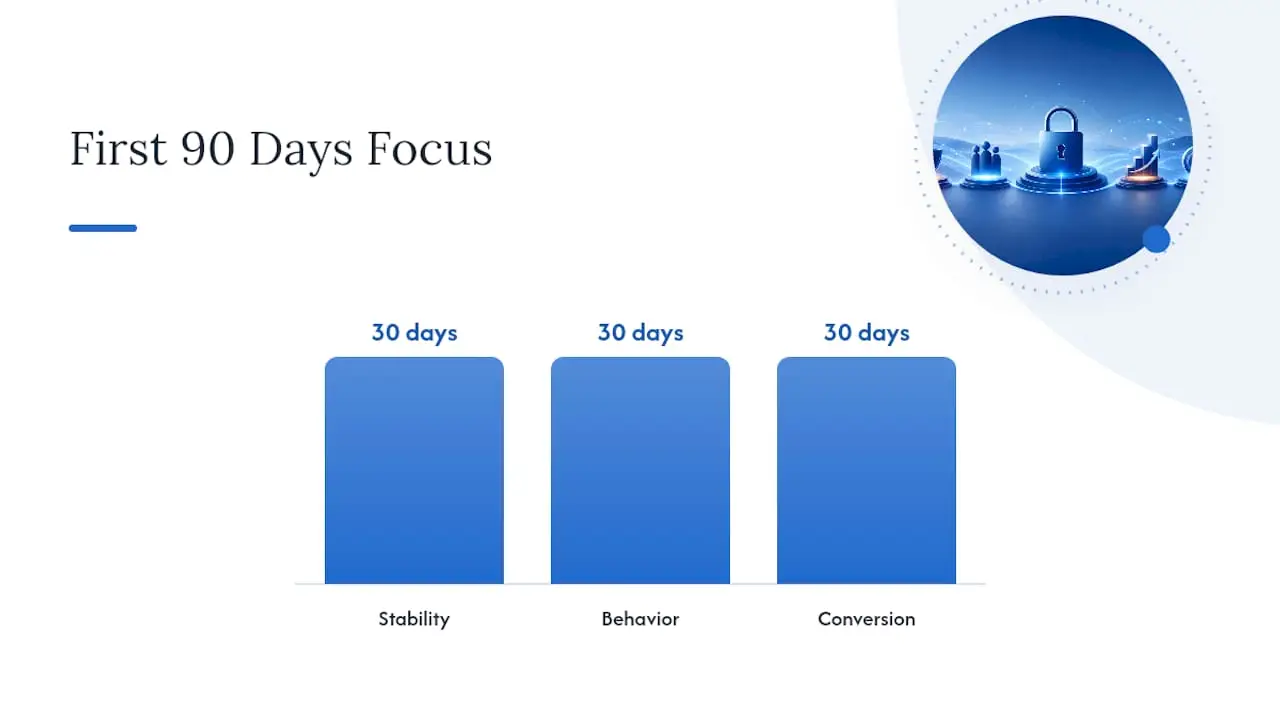
Your first 30 days should focus on stability: watch for crawl errors, broken forms, and any Core Web Vitals regression against your staging benchmarks. Days 30 to 60 shift toward behavior: are visitors reaching key pages, and is bounce rate on high-value templates trending the direction you expected? Days 60 to 90 are where you start trusting the conversion data enough to act on it, since a 90-day window is what it takes for redesign performance to stabilize into something you can reliably measure.
- Week 1 to 4: monitor crawl errors, 404s, Core Web Vitals, and form functionality daily.
- Week 4 to 8: track engagement metrics like scroll depth and page-to-page flow against your baseline.
- Week 8 to 12: begin prioritized A/B tests on your highest-traffic templates, starting with the homepage and primary conversion pages.
Pro Tip: Don’t A/B test everything at once in the first 90 days. Fix stability issues first, confirm your baseline data is trustworthy, then test one high-impact template at a time so you know exactly what caused each change.
Tracking conversion rate trends across this window, rather than a single snapshot, is what tells you whether the redesign actually moved the number that matters.
What Should the Project Plan and Governance Structure Include?
A redesign project plan works best as a governance document, not a calendar someone glances at once. Start with a signed project charter naming the project lead, the business objectives, and the scope boundaries, since a signed charter and RACI matrix before work begins materially reduce scope creep and missed deadlines compared with plans that start work informally. University web project guidance echoes this: naming a project leader and strategic plan before work starts is one of the first tasks on the list, not an afterthought.
Build a RACI matrix, who’s Responsible, Accountable, Consulted, and Informed, for every major deliverable: content, design approval, redirect map sign-off, and launch go/no-go. Ambiguity about who approves what is where timelines quietly die.
- Build in buffer time at every phase gate, discovery, design, build, QA, and launch, since redesigns almost never run exactly on schedule.
- Require a documented sign-off at each gate before the next phase starts, not a verbal “looks good, keep going.”
- Assign one person as the final approver for scope changes, so a single stakeholder can’t unilaterally expand the project mid-build.
| Scope tier | Typical timeline | Primary cost drivers |
|---|---|---|
| Small to mid-market redesign | 8 to 14 weeks | Content volume, number of templates, integrations |
| Full replatform | 16 to 26 weeks | Platform migration, e-commerce complexity, data migration |
These timeline bands come from practitioner benchmarks tied to project scope, and they hold up well as a planning anchor even before you’ve scoped your own specific requirements.
How Magic Logix Approaches Website Redesigns
Magic Logix treats every redesign as a business transformation project first and a visual refresh second. Every engagement starts with baseline measurement and ends with a phased, monitored launch rather than a single risky cutover, because outcomes like lead volume and revenue matter more than how a homepage looks in isolation.
The rescue work tells the real story. Teams call us most often for three things: rebuilding a 301 redirect map after a botched migration tanked organic traffic, fixing an information architecture that was designed before content was ever inventoried, and repairing broken GA4 and Search Console tracking that left a client with zero visibility into whether their last redesign worked at all.
If your team is planning a redesign and wants a second set of eyes on the plan, that scoping conversation starts with a look at your current audit data and goals, not a sales pitch.
— Hassan
How Magic Logix Maps to Every Phase of Your Redesign
You don’t have to run this process alone or piece together five different vendors for five different phases. Magic Logix builds the redesign around the same sequence covered in this article: audit and baseline first, then goals and IA, then content, design, build, QA and migration, launch, and structured post-launch optimization, all under one team instead of a chain of handoffs where accountability gets lost.
That single-team structure is the practical advantage over stitching together a freelance designer, a separate developer, and a third-party SEO consultant. Magic Logix’s web design team handles the design system and prototyping phase, while web development covers the build, staging, and technical QA work, including the redirect mapping and performance budget checks this article walks through. If your redesign includes an online store, ecommerce development support extends to payment integration and inventory-side technical requirements as well.
Before a scoping call, gather what you already have: your current analytics exports, a rough content inventory if one exists, and a plain-language list of the business goals driving the redesign. That’s enough for a real conversation about scope and timeline, not a generic pitch. If your redesign is closer to a full digital marketing overhaul than a single-site rebuild, the digital marketing team can fold analytics setup and campaign continuity into the same engagement. Reach out through the Magic Logix site to start that conversation and get a scope built around your actual audit data.
Primary Sources and Further Reading
The sources behind this guide each cover a different piece of the process worth checking directly. The nine-phase redesign framework breaks down sequencing and timeline impact in more depth. Netguru’s migration guide goes deeper on redirect mapping and Core Web Vitals benchmarks. The LOW/CODE ROI guide focuses on measurement methodology and the 90-day monitoring window. Refact’s governance breakdown covers project charters and RACI structures in more detail than space allowed here.
Sources
- The Website Redesign Process: 9 Phases That Ship in 2026
- Measure Website Redesign ROI in 2026 | LOW/CODE
- Website redesign in 2026: Process, cost & SEO safety guide
- The Website Redesign Process, Done Right | Refact
FAQ
How Do You Conduct a Website Redesign?
Follow the phase sequence: audit your current site, set measurable goals, finalize information architecture and content, then design, build, and QA the new site before a monitored launch. The nine-phase framework protects the most organic traffic when teams follow it in order rather than skipping straight to visual design.
What Are the Core Steps to Building a Good Website?
The core steps are research and audit, goal setting, information architecture, content, visual design, development, QA and migration testing, and a monitored launch. Skipping the audit or IA steps to jump straight to design is the most common cause of expensive rework later in the project.
How Do You Redesign a Website Step by Step?
Start with a full audit and baseline metrics, lock your IA and content before any visual design begins, build a one-to-one 301 redirect map, then move through design, build, and QA before a phased launch. Spend the first 90 days after launch monitoring performance rather than declaring success or failure immediately, since reliable ROI reads require that full window.
How Much Does It Cost to Have Someone Redesign Your Website?
Cost depends heavily on scope. Small to mid-market redesigns typically run 8 to 14 weeks, while full replatforms extend to 16 to 26 weeks, with content volume, integrations, and e-commerce complexity as the main cost drivers. Magic Logix scopes pricing individually based on your specific requirements, and current details are available directly through the web design page.
Do You Need a Redesign or Just a Refresh?
A refresh updates visuals and copy on your existing platform, while a redesign restructures navigation, templates, and information architecture. Choose a redesign when conversion has plateaued despite smaller fixes, when a rebrand outgrows your current templates, or when technical debt makes every change expensive.