
A solid marketing campaign planning template is more than just a document—it's the strategic blueprint that keeps your budget from spiraling, gets your whole team on the same page, and anchors your strategy in real data. It’s what turns a great idea into a powerful, actionable plan for launching a killer campaign.
Why a Solid Template Is Your Secret Weapon
Let's get past the idea that templates are just for ticking off boxes. A truly effective marketing plan is a strategic framework that stops the most common campaign failures dead in their tracks, long before they even start. It becomes the single source of truth that transforms chaotic brainstorming sessions into a coordinated, measurable push.
Without a structured plan, teams inevitably end up operating in silos. The social media team might be running a campaign with messaging that’s just a little different from the email team's, which subtly dilutes the brand’s voice and confuses customers. A centralized template makes sure everyone—from content creators to paid media specialists—is working from the same playbook with the exact same goals, audience personas, and key messages.
Sidestep Common Pitfalls
One of the biggest risks in any campaign is letting the budget get out of control. It’s painfully easy for ad spend to creep up or for unexpected costs to pop up when there isn't a clear budget outlined from day one. In fact, structured planning is a complete game-changer for financial control. Research has found that 72% of successful campaigns allocate budgets before launch, a stark contrast to the 28% that improvise and often overspend.
A good template forces you to nail down the tough questions right from the start:
- What are we actually trying to achieve? Is it about generating leads, boosting brand awareness, or driving direct sales?
- Who are we talking to? What are their specific pain points and what really motivates them?
- How will we know if we're winning? What specific KPIs will tell us if we’re on track?
A great template doesn't stifle creativity; it channels it. By setting the boundaries—budget, timeline, and goals—it frees up your team to innovate within a framework that's built for success.
From Checklist to Strategic Asset
Before we dive into the nuts and bolts, it's helpful to see how these individual pieces come together to form a cohesive plan.
Core Components of a High-Impact Campaign Template
A quick look at the essential sections of a comprehensive marketing campaign planning template, which we'll explore in detail throughout this guide.
| Component | Primary Function |
|---|---|
| Objectives & Goals | Defines what success looks like in clear, measurable terms. |
| Target Audience | Creates a detailed profile of the ideal customer for focused messaging. |
| Key Messaging & Offers | Articulates the core value proposition and the call to action. |
| Channels & Tactics | Outlines where and how the campaign will be executed. |
| Budget & Resources | Allocates funds and assigns team responsibilities. |
| Timeline & Milestones | Sets a clear schedule with key deadlines for all activities. |
| Creative Brief | Guides the development of all visual and written assets. |
| KPIs & Measurement | Identifies the specific metrics used to track performance. |
Each of these components plays a critical role, ensuring no stone is left unturned before you go live.
Ultimately, this document becomes the bedrock of your entire marketing operations, a discipline built on efficiency, accountability, and measurement. It also gives you the agility to pivot when things aren't going as planned. If a channel is underperforming, your plan provides the data and context you need to reallocate resources intelligently instead of just guessing.
This isn’t about creating rigid rules. It’s about building a repeatable process that saves time, cuts down on errors, and dramatically increases your odds of hitting your targets. You're not just making a checklist; you're building your most powerful strategic asset.
Defining Your Campaign's Foundational Pillars
Before you touch a single channel, sketch out an ad, or even think about a timeline, you have to pour the foundation. This is where a solid campaign plan separates the winners from the expensive failures. It forces you to answer the hard questions upfront.
These pillars are the non-negotiables. Get them right, and every decision that follows becomes clearer and more effective. Without this groundwork, you're just marketing in the dark. You might make a beautiful ad, but if it doesn't hit the right person with the right message to achieve a specific goal, it’s just expensive noise.
Crafting Sharp SMART Objectives
Let's be blunt: vague goals like "increase brand awareness" or "get more leads" are campaign killers. They give you zero direction and make it impossible to know if you've actually won. Instead, every objective you set needs to be SMART: Specific, Measurable, Achievable, Relevant, and Time-bound.
This simple framework turns fuzzy wishes into concrete targets.
A weak, forgettable goal sounds like this: "We want to sell more of our new running shoe."
A SMART objective, on the other hand, is a battle plan: "Increase e-commerce sales of the new 'Velocity X' sneaker line by 15% among urban males aged 18-24 within Q3."
See the difference? That second one is a precise roadmap. Your team knows exactly what to do (increase sales), for which product (Velocity X), who to target (urban males 18-24), by how much (15%), and by when (end of Q3). That’s the kind of clarity that drives results.
Developing Deep Target Audience Personas
You can't write a message that connects if you don't know who you're talking to. A classic mistake is stopping at the surface—basic demographics like age and location. A powerful campaign plan demands you go deeper and build out detailed target audience personas. Think of them as semi-fictional résumés of your ideal customer, built from real data and market research.
Your personas need to feel like real people with real problems.
- Demographics: Sure, start with the basics (age, gender, income, location, job title).
- Psychographics: Now, get into their heads. What are their lifestyles, values, interests, and attitudes? What do they truly care about?
- Pain Points: What specific problem are they trying to solve that your product is uniquely built for?
- Motivations: What are their personal and professional goals? What really drives their purchasing decisions?
- Media Consumption: Where do they actually hang out online? Are they scrolling TikTok, networking on LinkedIn, or geeking out on industry blogs?
This level of detail means you're no longer marketing to a generic "customer." You're talking directly to "Alex, the 28-year-old project manager who's overwhelmed by chaotic workflows and just wants a tool to get his time back."
"To be successful as a marketer, you have to deliver the pipeline and the revenue." — Sarah Franklin, former CMO at Salesforce. This starts with an almost obsessive focus on who your customer truly is.
Crystallizing Your Core Message and Value Proposition
Okay, you've got your "what" (objectives) and your "who" (audience). Now it's time for the "why." Your core message is the one central idea you need your audience to walk away with. It has to be simple, compelling, and laser-focused on their biggest pain point.
Your value proposition is the punchy, clear statement that spells out the benefit you deliver, how you solve their problem, and what makes you different. It’s the direct answer to the question every customer is silently asking: "Why should I pick you over everyone else?"
Look at the difference for a project management tool:
- Weak Message: "Our tool helps you manage tasks." (So what?)
- Strong Value Proposition: "For busy teams drowning in chaos, our platform simplifies project management by centralizing communication and automating updates, so you can deliver work on time, every time."
That second version has teeth. It names the audience (busy teams), hits the pain point (chaos), explains the solution (centralized communication), and promises the ultimate benefit (delivering work on time). This is the golden thread you'll weave through every ad, email, and landing page.
Establishing the Right Key Performance Indicators
Finally, how do you keep score? Your Key Performance Indicators (KPIs) are the specific, quantifiable metrics you'll track to see if you're hitting those SMART objectives. These are the numbers that tell you if the strategy is working or if it's time to pivot.
Don't fall for vanity metrics—those numbers that look good on a chart but don't actually move the needle. Your KPIs must be directly tied to your primary goal.
Here’s how KPIs should align with common campaign goals:
| Campaign Goal | Primary KPIs to Track | Secondary Metrics |
|---|---|---|
| Increase Sales | Conversion Rate, Revenue, Average Order Value (AOV) | Cart Abandonment Rate, Add-to-Cart Rate |
| Generate Leads | Cost Per Lead (CPL), Marketing Qualified Leads (MQLs) | Form Completion Rate, Landing Page Views |
| Boost Brand Awareness | Social Media Reach, Website Traffic, Brand Mentions | Social Engagement Rate, Share of Voice |
By locking in these foundational pillars—objectives, audience, messaging, and KPIs—you’re building an unshakeable strategic core. This disciplined thinking is what ensures every dollar you spend and every hour you work is pushing you toward a measurable, meaningful outcome.
Mapping Your Channels, Budget, and Timeline
You've done the heavy lifting on strategy. Now it's time to get operational. This is the point where your planning template stops being a document full of ideas and becomes your day-to-day command center. We're talking about putting real dollars behind channels and real dates on a calendar.
Let's be honest, even the most brilliant strategy will completely fall apart without this step. A killer message means nothing if it doesn't reach your audience. And that perfectly defined audience is just a concept if you don't have the budget to show up where they spend their time. This is all about building the logistical framework to get your campaign off the ground and over the finish line.
Think of it like this: your goals, audience, message, and KPIs are the foundational pillars holding everything up. Each one builds on the last.
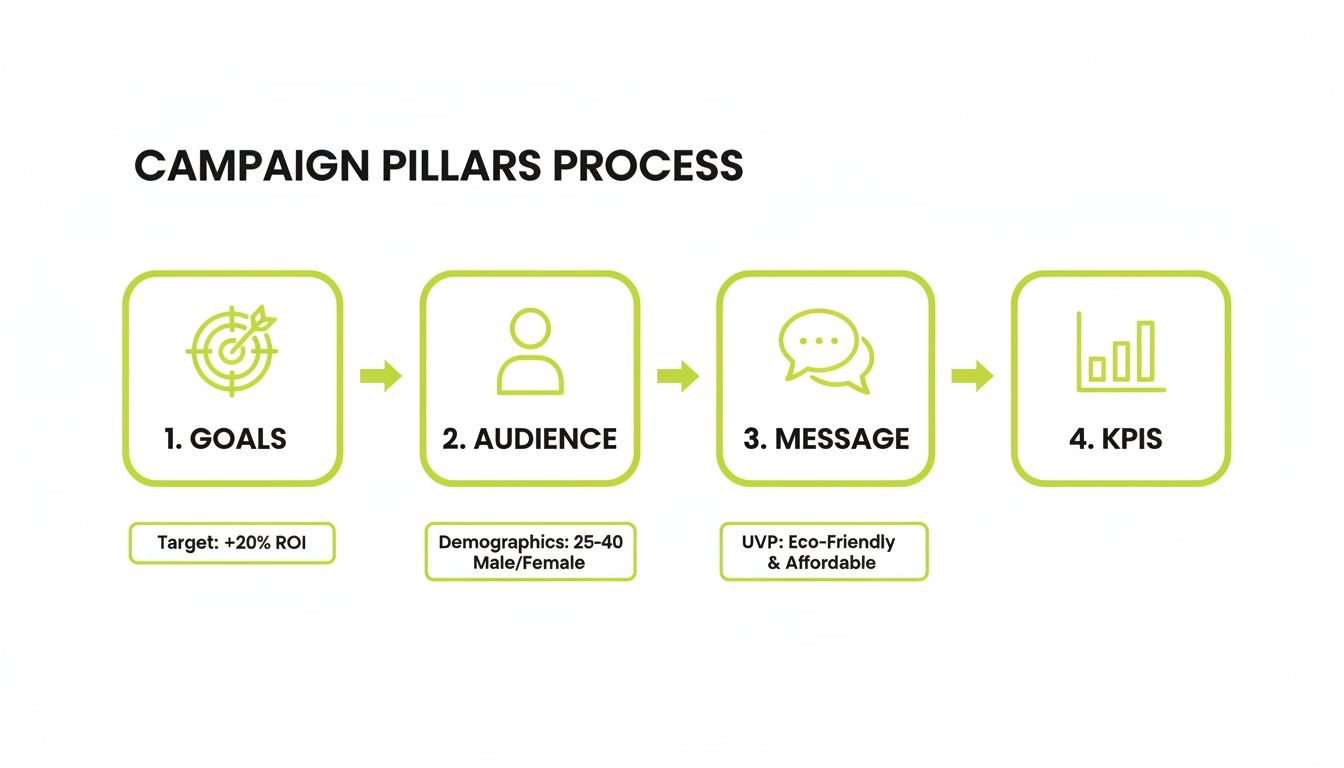
This flow shows how every operational decision you make from here on out should trace directly back to that core strategy.
Selecting the Right Marketing Channels
Choosing your channels isn't about chasing trends; it’s a direct result of knowing your audience inside and out. The question isn't, "Should we be on TikTok?" It's, "Does our ideal customer, 'Alex the project manager,' actually look for professional tools on TikTok?" That answer immediately tells you where to focus your energy and budget.
Your template needs a dedicated space for this. List out your potential channels and vet them against your customer persona.
- Social Media: Which specific platforms? For a B2B SaaS company, LinkedIn is a no-brainer. For a direct-to-consumer brand selling handmade jewelry, Instagram and Pinterest are likely your best bets.
- Content Marketing: Are you playing the long game with in-depth blog posts for SEO, or would your audience respond better to quick, punchy video tutorials on YouTube?
- Paid Advertising: Will you target high-intent keywords on Google Ads, or does a visual retargeting campaign on social media make more sense for your product?
- Email Marketing: Is the goal to nurture new leads with an automated sequence or re-engage past customers with an exclusive offer?
And don't forget the physical world. As you map out your digital channels, think about how to choose effective promotional products. Sometimes a well-timed physical touchpoint can cut through the digital noise.
Allocating Your Campaign Budget
Budgeting can feel like the scariest part, but a good template makes it manageable. The real goal here is to spend smart and create a system to track every dollar so there are no nasty surprises at the end of the quarter. Start with your total campaign budget, then carve it up by channel and activity.
A simple table in your template is your best friend here:
| Channel/Activity | Planned Budget | Actual Spend | Variance | Notes |
|---|---|---|---|---|
| Google Ads | $5,000 | $5,250 | -$250 | Higher CPC than projected for top keywords |
| LinkedIn Sponsored Content | $3,500 | $3,400 | +$100 | Leveraged a high-performing organic post |
| Email Marketing Software | $500 | $500 | $0 | Fixed monthly cost |
| Content Creation (Freelancer) | $1,500 | $1,500 | $0 | Two blog posts, one case study |
This "Planned vs. Actual" format is absolutely essential. It gives you an instant snapshot of your financial health and lets you be agile. If Google Ads is burning through cash without delivering results, you have the data to pull that money and reinvest it in a channel that's actually working.
A budget isn't a restriction; it's a strategic tool. It forces you to make deliberate choices about where to invest your resources for the highest possible return.
Mapping a Realistic Campaign Timeline
Your timeline is the roadmap that keeps the entire team marching in the same direction. The best way I've found to structure this is by breaking the campaign into clear phases. This simple act prevents the chaotic, last-minute scramble and ensures everything rolls out smoothly.
A solid timeline in your template does more than just organize tasks; it speeds things up. One study found that using standardized templates can reduce project approval cycles by a staggering 50%—from 10 days down to just 5. That’s a huge deal when you're trying to launch a time-sensitive campaign.
Pre-Launch Phase (Weeks 1-4)
This is all about getting your house in order. Everything you do here is to ensure launch day is flawless.
- Finalize Creative Brief: Get final sign-off on messaging, visuals, and the core offer.
- Develop Assets: This is where the team gets busy writing ad copy, designing graphics, shooting videos, and building landing pages.
- Technical Setup: Get all the backend work done. This means configuring tracking pixels, setting up UTM parameters for every link, and building out your email automation sequences. If you need a refresher, check out our guide on how to use UTM parameters.
- Internal Alignment: Make sure the sales and customer support teams know what's coming so they're ready for the influx of leads and questions.
Launch Phase (Weeks 5-8)
It's go-time. All your channels go live, and your focus immediately shifts to monitoring performance and making quick optimizations.
- Week 5: Deploy social media ads and sponsored content.
- Week 6: Send the first email blast to your segmented audience.
- Week 7: Publish your SEO-focused blog content and start your outreach.
- Week 8: Host the big promotional webinar or live event.
Post-Launch Phase (Weeks 9-12)
The campaign is live, but you're far from done. This phase is all about analysis, optimization, and reporting back to stakeholders.
- Ongoing: Keep a close eye on your KPIs daily. Make small tweaks to ad bids, targeting, and copy as the data rolls in.
- Weekly: Hold quick check-in meetings to review performance against your initial goals.
- End of Campaign: Pull together the final performance report. Be honest about the wins, the losses, and the key lessons you can apply to the next campaign.
By nailing down your channels, budget, and timeline, you transform that strategic vision into a concrete plan of action that you can actually manage and measure.
Grab Your Free Campaign Planning Templates
Alright, time to turn all that strategy into something real. This is where the rubber meets the road. I’ve put together a few free, downloadable marketing campaign planning templates built for how modern teams actually get work done.
Each one gives you the structure you need without boxing you in or killing your creativity. Just pick the format that already fits into your team's day-to-day workflow, whether you live in spreadsheets, build killer presentations, or manage everything in a shared doc.
Which Template Format Is Right for You?
Before you jump into the full-blown plan, it's a good idea to nail down the core of your campaign. Grabbing a dedicated campaign brief template can help you and your team get aligned on the big ideas first. Once that's solid, pick the comprehensive template below that feels right.
I've put together a quick comparison to help you decide which downloadable template will best fit your team's needs and the tools you already use.
| Template Format | Best For | Key Feature |
|---|---|---|
| Google Sheets | Teams that need granular, data-driven control over budgets and performance metrics. | Detailed tabs for planned vs. actual spend, KPI tracking, and resource allocation. |
| Google Slides | Presenting your campaign strategy to stakeholders and leadership for clear buy-in. | Visually compelling layouts that tell a story from objectives to expected outcomes. |
| Notion | Teams that need a collaborative, all-in-one workspace for planning and execution. | Integrated task management, content calendars, and creative asset databases in one place. |
Each marketing campaign planning template is pre-loaded with all the essential sections we've covered—from SMART objectives and audience personas to channel mapping and timelines. They’re also completely customizable, so you can tweak them for any industry or campaign size.
Think of these templates as strategic tools, not just checklists. Use them to get everyone on the same page, keep an eye on progress, and make smart decisions that actually drive results for your business.
Download the format that works for you and start building a more organized, effective campaign today. Just click the links, make a copy for your own drive, and you'll have a solid framework ready to guide your next launch. Getting your plan out of your head and onto a screen is the first real step toward hitting your goals with clarity and confidence.
Bringing Your Campaign Plan to Life
A brilliant plan is useless if it just sits in a folder. This is where we bridge that critical gap between a great strategy and actual execution, turning your marketing campaign planning template from a static document into a living, breathing command center for your team.
Frankly, a plan's true power isn't in its creation but in its daily application. Without that connection, even the most carefully crafted strategies fall victim to the old "launch and hope" approach. It's just not enough to set goals; you have to build the systems that let you track progress in real-time. This means getting your template wired into the tools your team already uses every single day.
Integrating Your Template with Key Tools
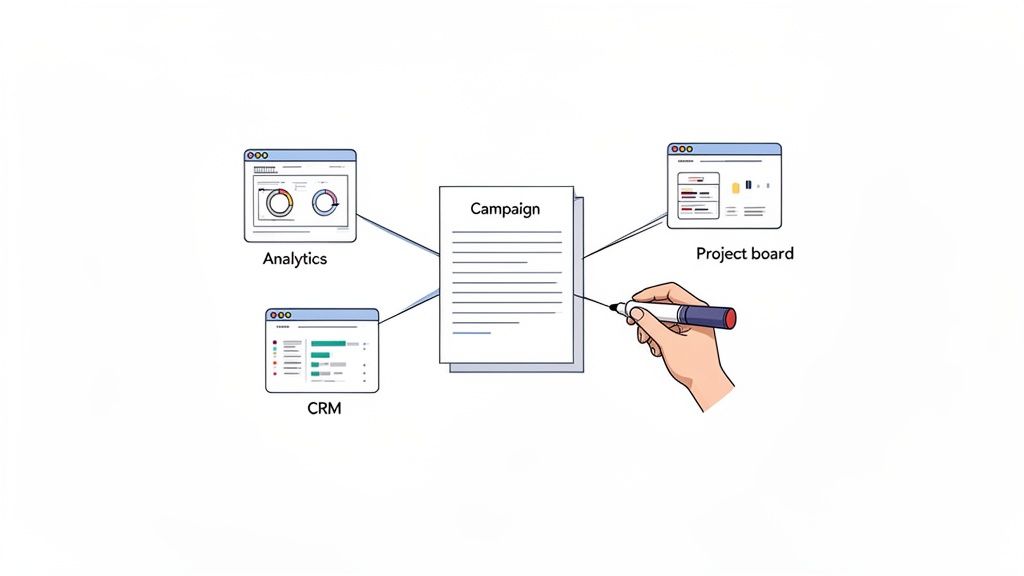
To make your plan truly actionable, it needs to become the central hub that pulls in data and pushes out tasks. Think of it as the brain of your campaign, connected to the limbs of your marketing stack. Your goal here is to create a seamless flow of information that kills manual data entry and gives you a crystal-clear picture of performance.
Here’s how to connect the dots:
- For KPI Tracking: Link your template directly to your data sources. If you're using a Google Sheets template, for example, you can use add-ons or scripts to automatically pull performance data from Google Analytics, your CRM (like Salesforce or HubSpot), and ad platforms. This keeps your dashboard fresh without you lifting a finger.
- For Project Management: Your campaign timeline isn't just a calendar; it's a series of jobs that need to get done. Connect it to a project management tool like Asana, Trello, or Monday.com. When you set a milestone in your plan, it should automatically create a corresponding project with tasks and deadlines in your PM software.
- For Team Collaboration: If your team lives in something like Notion, you can embed live reports from data tools and link directly to project boards. This creates that single source of truth where strategy, execution, and results all live together.
This isn't just about convenience; it's a strategic advantage. It lets you instantly compare your real-time performance against the goals you meticulously set in your marketing campaign planning template.
Establishing a Rhythm for Performance Check-Ins
Once your tools are talking to each other, the next step is building a routine. Campaigns don't run on autopilot. They demand consistent monitoring and agile adjustments based on what the data is telling you. Setting up a regular rhythm for check-ins ensures nothing falls through the cracks.
A campaign plan isn't a "set it and forget it" document. It’s a dynamic guide that should be referenced and updated weekly, if not daily. Its value comes from its ability to inform in-the-moment decisions.
Consider setting up a simple, two-tiered review process:
- Weekly Tactical Huddles: A quick, 15-30 minute meeting with the core campaign team. The focus is purely on execution and immediate performance. Are tasks on schedule? Are any channels showing early signs of over- or underperformance?
- Monthly Strategic Reviews: This is a more in-depth session with key stakeholders. Here, you zoom out and compare your month-to-date performance against the KPIs in your plan. This is where you make bigger calls about shifting budget or pivoting strategy.
This structured approach makes sure you’re not just putting out fires but actively looking for opportunities to optimize. Speaking of optimization, improving your on-page experience is a constant process. You can learn more by checking out our guide on website conversion optimization.
A Real-World Scenario in Action
Let's walk through an example. Imagine a team is running a campaign to promote a new software feature. Their plan has a $10,000 budget, split between social media ads and an email marketing flow.
During a weekly check-in, they pull up their integrated dashboard. The data from their ad platform shows their social ads have a great click-through rate, but the landing page has an abysmal conversion rate. At the same time, their CRM data shows the email flow is converting leads at 3x the projected rate.
Because their plan and tools are connected, they don't have to guess. They can see that the ad creative is grabbing attention, but the landing page isn't sealing the deal. Instead of blindly pouring more money into the underperforming ads, they make a data-driven pivot. They immediately reallocate $2,000 from the social ad budget to drive more qualified traffic into their high-converting email sign-up form.
This is the power of a living campaign plan. It turns data into decisions, letting your team stay nimble and responsive. This kind of active management is what truly drives success, with some reports showing that monthly monitoring can boost conversions by as much as 24% just by keeping a close eye on key metrics.
Your Campaign Planning Questions Answered
Even with the best marketing campaign planning template in hand, questions are bound to pop up. Building a plan is one thing; putting it to work effectively as the campaign unfolds is another story entirely. I’ve seen this happen time and again.
Here are some of the most common questions marketers have when they're in the trenches, building and executing their campaign plans. Think of this as the quick-start guide to sidestepping common mistakes and getting the most out of your new template.
How Often Should I Update My Campaign Plan?
Think of your template as a living document, not something carved in stone. While your core objectives and audience should stay firm for the campaign's duration, the day-to-day execution details need constant attention. A plan that’s just collecting dust is a plan that’s failing.
I strongly recommend a rhythm of weekly check-ins to monitor task progress and monthly reviews to stack your performance data up against your KPIs. This cadence is what keeps you agile. It lets you spot what’s working and what isn’t early on, giving you the chance to shift budget away from underperforming tactics and double down on your winners before it's too late.
Your marketing campaign planning template is a dynamic guide, not a one-time setup document. Its real value is in its ability to inform in-the-moment decisions throughout the campaign lifecycle.
Of course, if a major market shift happens—like a new competitor launching a disruptive product or a sudden algorithm change on a key platform—you need to revisit the plan immediately. Agility is your greatest asset here.
What's the Biggest Mistake People Make with These Templates?
The single most common error is treating the template as a one-time setup task instead of an active management tool. So many teams pour a ton of effort into creating a beautiful, detailed plan, get it approved, and then promptly forget about it until the post-campaign report is due.
Its real power comes from using it continuously. If you're not consistently tracking 'actual' spend against your 'planned' budget or measuring live results against your initial KPIs, you're missing the entire point. A template is designed to guide ongoing decisions, not just the initial ones.
Using it only at the start is like planning a cross-country road trip with a map and then leaving the map at home when you pull out of the driveway. You have a destination, but no reliable way to navigate the journey. For a deeper look at what to track, you can explore our overview of key digital marketing performance metrics.
How Can I Adapt This for a Niche B2B Industry?
Adaptation isn't just recommended; it's absolutely essential for success in specialized markets. A generic, one-size-fits-all approach just won't cut it. For a niche like B2B SaaS, for instance, you'll want to seriously customize a few key areas of your template.
- Target Audience: Go way beyond simple personas and build out detailed Ideal Customer Profiles (ICPs). You need to be thinking about company size, industry, specific business pain points, and the job titles of the people who actually sign the checks.
- Channels: Prioritize platforms where your audience is actively looking for professional solutions. This often means focusing heavily on LinkedIn, industry-specific publications, and content like whitepapers and case studies, rather than broad consumer channels like Instagram.
- KPIs: Your success metrics should be less about vanity numbers like general traffic and more about actions that signal real purchase intent. I'm talking about tracking Marketing Qualified Leads (MQLs), demo requests, trial sign-ups, and ultimately, your contribution to the sales pipeline.
By tailoring these sections, your template transforms into a sharp, relevant tool that actually reflects the unique dynamics of your industry.
What Tools Integrate Best with a Planning Template?
To turn your template from a simple document into a true command center, you need to plug it into your live data sources. The goal is a seamless flow of information, letting you compare real-time performance against your plan without spending hours manually pulling reports.
For KPI tracking, the best integrations pull data directly from:
- Web Analytics: Google Analytics is the gold standard for tracking website traffic, user behavior, and conversion goals.
- CRM Platforms: Your CRM, whether it's HubSpot or Salesforce, holds the critical data on lead quality, sales conversions, and customer lifetime value.
- Ad Platforms: Connect directly to Google Ads, LinkedIn Ads, and other paid channels to monitor spend, impressions, clicks, and cost per acquisition in real time.
When it comes to managing your timeline and tasks, connecting your plan to a project management tool like Asana, monday.com, or Trello is a game-changer. This ensures the strategic milestones in your plan are broken down into actionable tasks with clear owners and deadlines, keeping everyone aligned and accountable.
At Magic Logix, we specialize in building the strategies and systems that connect your marketing plans to measurable business growth. Learn how our digital marketing solutions can bring your next campaign to life.