
Using UTM parameters is all about adding simple text tags—like utm_source and utm_campaign—to the end of your URLs. This process tells analytics tools exactly where your website traffic comes from, letting you measure the effectiveness of specific emails, social posts, or ads with total precision.
Unlock Marketing Insights With UTM Parameters
Imagine launching a new marketing campaign and knowing, without a doubt, which specific ad creative or social media post drove your most valuable conversions. That’s the real power of using UTM parameters. They are simple, yet potent, snippets of code that attach to your URLs, acting like digital breadcrumbs for your website traffic.
Without them, you're essentially flying blind. Your analytics might show a spike in traffic, but you won't know if it came from your latest Instagram story, a partner's newsletter, or a paid ad. This lack of clarity leads to messy, misattributed data, which can cause huge headaches for any marketing team. When developing a strong SaaS product marketing strategy, for example, precise measurement is non-negotiable for understanding which channels actually drive sign-ups versus churn.
The Problem With Un-Tagged URLs
When your links aren't tagged, analytics platforms like Google Analytics have to guess the origin of your traffic. Clicks from a Facebook ad and an organic post might just get lumped together under a generic "social" bucket. Even worse, some traffic might be incorrectly labeled as 'direct,' making it seem like users typed your URL straight into their browser when they really just clicked a link in an email.
This data chaos has real financial consequences. A study by Analytics Mates found that businesses using consistent UTM tagging see a 28% improvement in attribution accuracy, which directly ties marketing spend to revenue. The same research showed that without proper tagging, up to 40% of traffic can be misclassified. This contributes to the estimated $50 billion wasted globally on poorly tracked advertising each year.
The biggest mistake marketers make is not starting with UTMs from day one. It's the foundational layer of data integrity. Without it, every report you build and every decision you make is based on a shaky, incomplete picture of reality.
The Five Core UTM Parameters
To solve this, there are five standard parameters that work together to tell the full story of each click. Think of them as the 'who, what, where, when, and why' of your traffic. Getting a handle on them is the first step toward mastering UTMs.
Here’s a quick breakdown of the five essential UTM parameters you need to know. While only the first three are technically required, using all five gives you the richest, most actionable data.
| Parameter | Purpose | Example Usage |
|---|---|---|
| utm_source | (Required) Identifies the specific platform or site where the traffic originated. | google, facebook, newsletter, partner_blog |
| utm_medium | (Required) Explains the general marketing channel or "how" the traffic got to you. | cpc, social, email, affiliate |
| utm_campaign | (Required) Names the specific promotion, sale, or strategic effort. | summer_sale_2024, q4_product_launch, webinar_promo |
| utm_term | (Optional) Tracks specific keywords in paid search or identifies ad sets. | saas_marketing_tools, retargeting_audience_1 |
| utm_content | (Optional) Differentiates links within the same ad or email. Great for A/B testing. | blue_button, header_link, image_ad_v2 |
Mastering these five tags is the key to transforming your analytics from a confusing mess into a clear, strategic guide for all your marketing efforts.
Alright, let's get down to business. Theory is great, but now it's time to actually build your first tracked URL. Once you get a feel for how the pieces fit together, you'll see just how easy it is to apply this to all of your marketing. The good news is, you don't have to do it by hand—there are some fantastic free tools that make the process practically foolproof.
The go-to for most marketers is Google's Campaign URL Builder. It’s a simple form that takes your destination page and your five UTM values, then spits out a perfectly formatted link, ready for action. This little tool is a lifesaver, as it prevents the typos and syntax errors that can completely wreck your tracking data.
Building a Link for a Real Campaign
Let's walk through a scenario you've probably encountered. Imagine you're running an e-commerce store and launching a "Summer Sale 2024" campaign. The first push is an email newsletter to your subscriber list, aiming to drive everyone to the main sales page.
Here’s exactly how you'd fill out the Campaign URL Builder for that email:
- Website URL:
https://www.yourstore.com/summer-sale(The page you want people to land on.) - utm_source:
newsletter(This tells you the traffic came directly from your email list.) - utm_medium:
email(This buckets the visit into your broader email marketing channel.) - utm_campaign:
summer_sale_2024(This is the master tag for the entire promotion.) - utm_content:
main_cta_button(Super useful for A/B testing—this tells you the click came from the main button, not a text link in the footer.)
Plug those values in, and the builder generates your new, tagged-up URL. You can immediately see how a clean link gets packed with valuable tracking information.
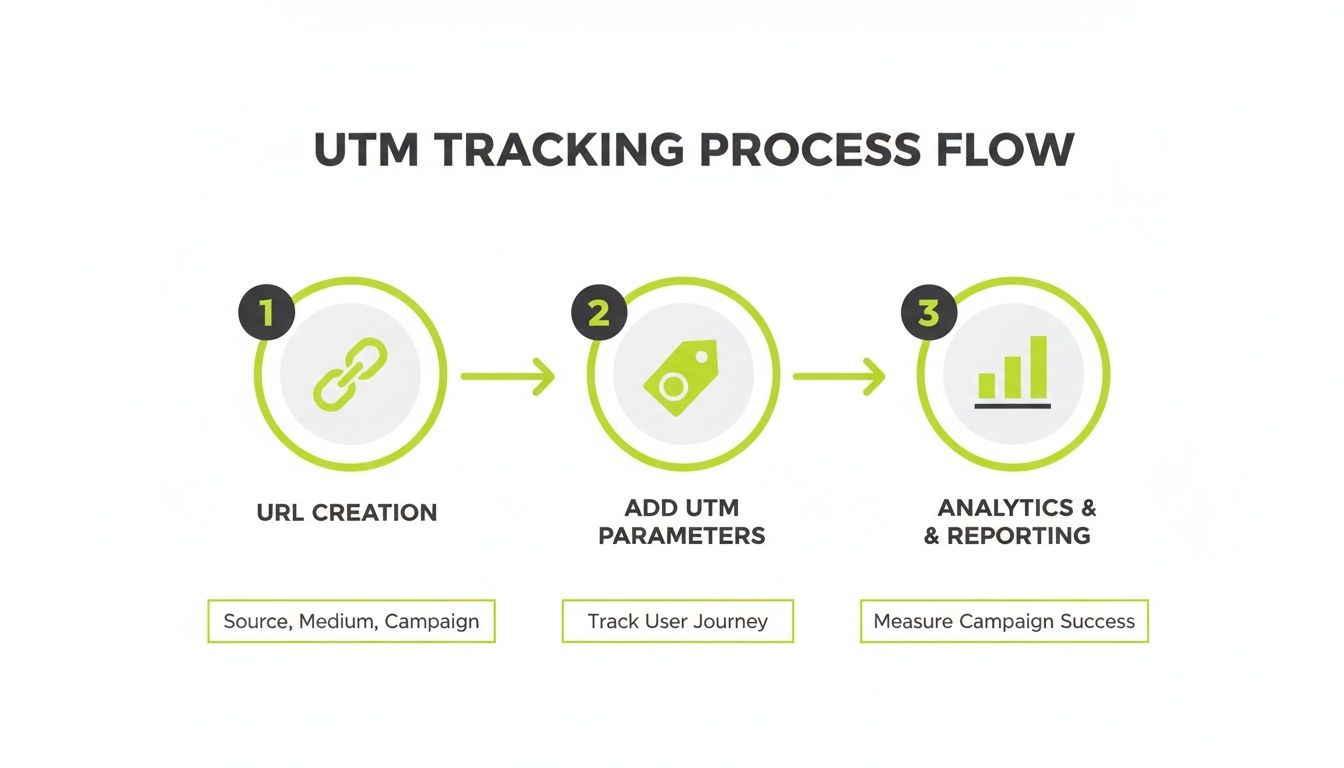
This process is simple but powerful. It takes a standard URL, adds the tracking tags, and feeds that clean, precise data straight into your analytics reports.
What Happens When Someone Clicks
The moment a user clicks that link, nothing seems different to them—they land on your summer sale page just as they normally would. The experience is seamless. But behind the scenes, a lot is happening.
The UTM parameters are passed directly to your Google Analytics script. GA4 immediately reads utm_source=newsletter, utm_medium=email, and utm_campaign=summer_sale_2024 and correctly categorizes the visit. Instead of being lumped into "Direct" traffic, that session is now properly attributed to your summer sale email campaign.
The real magic of using UTMs isn't just knowing where a click came from. It's about connecting that specific click to a conversion, a purchase, or any other key business metric. It draws a clear line from your effort to your ROI.
This is what makes or breaks a campaign analysis. You can now jump into your GA4 reports, filter by the campaign name "summer_sale_2024," and see exactly how many sessions, conversions, and how much revenue that single email drove. Without UTMs, that data would just be noise.
And this works for every channel. You can create another link for a Facebook ad with utm_source=facebook and utm_medium=cpc while keeping the same utm_campaign. Suddenly, you can see your email and paid social results for the summer sale right next to each other, giving you a complete picture of what's working and what's not.
Building a Scalable UTM Naming System
Anyone can slap together a single UTM-tagged link. That’s the easy part. The real challenge—and where most marketing analytics strategies completely fall apart—is trying to manage hundreds or even thousands of them across different teams, channels, and campaigns.
This is exactly why building a consistent, scalable naming system is the most important thing you can do for your tracking program. If you don't, your analytics reports will quickly devolve into a chaotic mess of fragmented data that’s nearly impossible to understand.
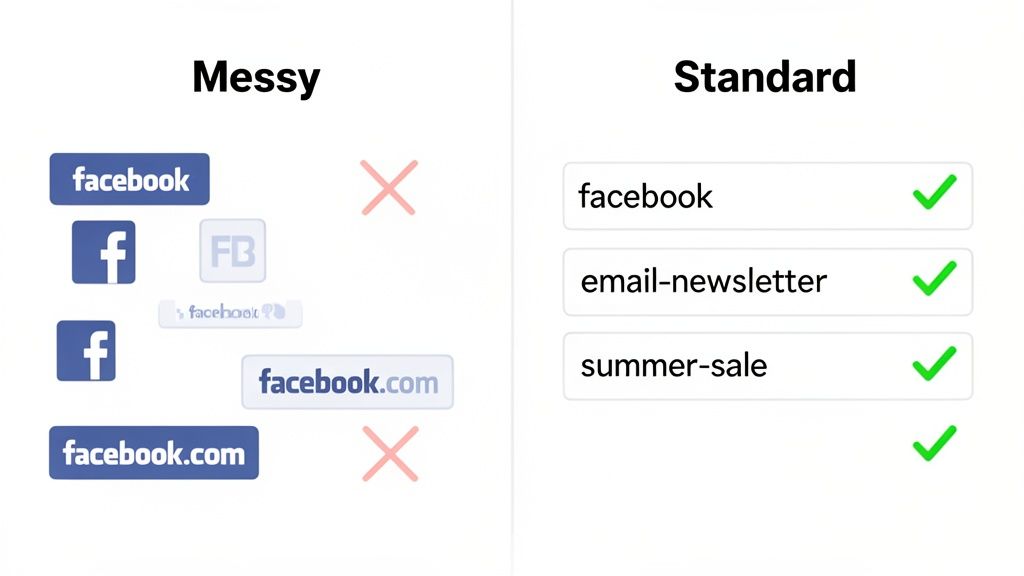
The idea is to create a single source of truth, a simple framework the entire organization can follow. This isn't about being overly strict; it's about making sure every piece of data you collect is clean, reliable, and actually usable. A tiny inconsistency, like one person using utm_source=Facebook and another using utm_source=facebook, splits your data into two separate rows in Google Analytics. Just like that, your reports are less accurate.
Core Principles for Naming Consistency
To prevent your data from splintering, everyone on your team needs to follow the same set of rules. These rules should be simple, logical, and documented somewhere everyone can find them, like a shared spreadsheet or an internal wiki.
Here are the foundational principles you should put in place right away:
- Always Use Lowercase: UTM parameters are case-sensitive. To Google Analytics,
Facebook,facebook, andFBare three completely different sources. Making lowercase mandatory for all parameters is the easiest fix for this common mistake and keeps all your data neatly consolidated. - Choose a Separator and Stick with It: You can't have spaces in URLs—they'll break your links. Always use a character to separate words within a parameter, like in
utm_campaign=summer_sale. The most common choices are underscores (_) or hyphens (-). Neither one is technically better than the other, but you absolutely have to pick one and use it exclusively. - Keep It Simple and Descriptive: Your naming convention should be so clear that a brand-new team member can figure out a campaign’s purpose just by looking at the tags. Steer clear of complicated codes or internal jargon that only a handful of people will get. A campaign named
q4_retargeting_promois infinitely more useful than something cryptic likepromo_v2_rtg_4.
While AI can now generate campaign links five times faster than a human, UTMs are still the reliable backbone for tracking what actually works. A recent guide from Dub.co highlights that 75% of top agencies report cleaner data and 33% higher campaign ROIs just from proper UTM implementation. When you standardize your approach in a team document—ensuring utm_source=newsletter is always lowercase, for example—you avoid the reporting splits that can cost businesses 20-30% in data visibility. You can see more of their findings on UTM best practices on their blog.
Here's a quick look at what to do versus what to avoid when setting up your own naming rules.
UTM Naming Convention Do's and Don'ts
| Best Practice (Do) | Common Mistake (Don't) |
|---|---|
Use all lowercase: utm_source=linkedin |
Use mixed case: utm_source=LinkedIn |
Stick to one separator: utm_campaign=black_friday_sale |
Mix separators: utm_campaign=black-friday_sale |
Be descriptive: q3_webinar_retargeting |
Use vague codes: q3_web_rtg_01 |
Stay consistent: utm_medium=cpc for all paid ads |
Use inconsistent terms: cpc, paid, ppc |
Keep it concise: utm_content=blue_header_link |
Make it too long or complex: utm_content=header-link-with-blue-text-in-the-main-banner |
Following these simple guidelines is the first step toward analytics data you can actually trust.
Defining Your Campaign Structure
Beyond the basic rules, a truly scalable system needs a defined structure, especially for campaign names. A thoughtfully designed utm_campaign tag lets you group, filter, and compare marketing efforts without a headache. A great way to do this is by building your campaign names from several descriptive components.
A flexible and effective structure might look something like this:year_initiative_target_descriptor
Here's how that plays out in the real world:
2024_q4-launch_us-prospects_ebook-download2024_summer-sale_all-customers_20-off-promo
This structured approach does more than just keep things tidy. It transforms your campaign list from a random collection of names into a filterable database of your marketing activities, allowing you to analyze performance by year, initiative, or target audience.
Ultimately, the best naming system is the one your team will actually stick with. It needs to be logical enough for people to follow without constant oversight but rigid enough to ensure your data stays clean.
Document your rules, provide clear examples, and make the whole process as smooth as possible. Putting in this effort upfront is the secret to unlocking reliable, long-term insights that can guide your business for years to come.
Finding and Analyzing Your Campaign Data in GA4
You’ve put in the work creating tracked links and building a solid naming system. Now for the fun part: turning all that clean data into real insights. This is where you get to see exactly how your marketing efforts translate into traffic, engagement, and conversions inside Google Analytics 4 (GA4).
The real magic of consistent UTM tagging is how it transforms GA4 from a general analytics tool into a laser-focused performance dashboard for your campaigns. You can stop guessing which channels are pulling their weight and start seeing definitive results tied directly to the utm_campaign, utm_source, and utm_medium tags you’ve so carefully put in place. It's the difference between just driving traffic and strategically investing in what truly works.
Navigating to Your Campaign Reports in GA4
Finding your campaign data in GA4 is pretty simple once you know where to click. Your main destination is the Traffic Acquisition report, which gives you a complete overview of how people are finding your site.
Here’s the path:
- From your GA4 property, head over to Reports > Acquisition > Traffic acquisition.
- By default, this report will group traffic by Session default channel grouping. To see your UTMs in action, you’ll need to switch up the primary dimension.
- Just click the little dropdown arrow right above the first column of the table and choose Session campaign.
That one small change pivots the entire report to display performance metrics—like users, sessions, engaged sessions, and conversions—for each of your utm_campaign names. It’s the fastest way to get a bird's-eye view of which campaigns are bringing in the most valuable visitors.
Diving Deeper with Primary and Secondary Dimensions
The Session campaign dimension is really just the beginning. To get the full story on performance, you need to slice and dice the data a bit more. Luckily, GA4 makes this easy by letting you add secondary dimensions for a more granular look.
These are a few of the most useful dimensions for analyzing your UTM data:
- Session source / medium: This is a powerhouse combination that shows you both the "where" (source) and the "how" (medium) of your traffic. It’s perfect for seeing if your
summer_sale_2024campaign performed better ongoogle / cpccompared tofacebook / social. - Session manual term (utm_term): If you're tracking keywords in your paid campaigns, this dimension is non-negotiable. It tells you which specific keywords are driving the highest-quality traffic.
- Session manual ad content (utm_content): Ideal for A/B testing, this dimension reveals which ad creative, call-to-action button, or link placement is getting the best engagement.
Adding a secondary dimension is as simple as clicking the "+" icon next to the primary dimension dropdown in your report. For example, you could set Session campaign as your primary dimension and add Session source / medium as the secondary to see exactly how each channel contributed to every campaign you’re running.
The real power of using UTM parameters comes to life in GA4's reporting. It’s not just about seeing clicks; it's about connecting your campaign spend to user engagement, conversions, and ultimately, revenue. This is how you prove ROI and make smarter budget decisions.
Building Custom Explorations for Comparative Analysis
While the standard reports are great for a quick pulse check, the Explore section in GA4 is where you can roll up your sleeves and build custom reports to answer specific business questions. For instance, you could create a side-by-side comparison of two different campaigns to see which one generated a higher conversion rate or better average engagement time. This is especially handy for fine-tuning your Google Ads marketing by really understanding what resonates with your audience.
And while UTMs give you incredible tracking capabilities, it’s always smart to be aware of any potential reporting gaps. To make sure your data is as airtight as possible, it can be helpful to understand why GA4 might under-report certain traffic sources, such as referrals from ChatGPT. When you combine your own custom explorations with an awareness of GA4’s little quirks, you can build a truly complete and reliable picture of your marketing performance.
Advanced UTM Strategies for Deeper Insights
Once you’ve mastered the fundamentals of UTMs, you can start unlocking a whole new level of strategic tracking that delivers much deeper business intelligence. Moving beyond just source, medium, and campaign lets you answer more specific, valuable questions about your marketing performance.
It's the difference between knowing a channel works and knowing why it works. These advanced tactics are all about isolating variables and connecting specific actions to real results. You can start measuring the impact of individual ad creatives, influencer partnerships, and even offline marketing with surprising accuracy. This is where you transform UTMs from a simple tracking tool into a powerful optimization engine.
Using utm_content for A/B Testing
One of the most powerful yet underutilized parameters is utm_content. Its main job is to differentiate between links that point to the same URL from within the same campaign, source, and medium. That makes it the perfect tool for running precise A/B tests on your ad creatives and email content.
Imagine you're running a Facebook ad campaign for a summer sale. You want to test two different ad images to see which one drives more engagement and conversions. Both ads will use the same destination URL and have identical utm_source, utm_medium, and utm_campaign tags.
Here’s how utm_content sets them apart:
- Ad 1 URL:
...&utm_campaign=summer_sale_2024&utm_content=beach_photo_ad - Ad 2 URL:
...&utm_campaign=summer_sale_2024&utm_content=product_grid_ad
By isolating the creative in the utm_content tag, you can jump into Google Analytics 4, filter for your summer_sale_2024 campaign, and then add "Session manual ad content" as a secondary dimension. Just like that, you'll get a clean, side-by-side comparison of how the "beach_photo_ad" performed against the "product_grid_ad" in terms of sessions, conversion rate, and revenue.
Tracking Influencer and Offline Campaigns
UTM parameters aren't just for digital ads. They are incredibly effective for measuring the ROI of influencer marketing and bridging the gap between your offline and online worlds. The trick is to give a unique, trackable link to each specific initiative.
For an influencer campaign, you can create a distinct link for each creator:
- Influencer A:
...&utm_source=instagram&utm_medium=influencer&utm_campaign=q3_product_launch&utm_content=jane_doe - Influencer B:
...&utm_source=instagram&utm_medium=influencer&utm_campaign=q3_product_launch&utm_content=john_smith
This setup shows you exactly how much traffic and how many conversions each influencer drove, making it easy to calculate their individual ROI. This level of detail is crucial for optimizing your social media marketing budget and partnering with creators who actually deliver.
You can apply the same logic to offline campaigns using QR codes. If you run a print ad in a magazine, place a QR code that directs users to a UTM-tagged URL, like ...&utm_source=city_magazine&utm_medium=print&utm_campaign=fall_promo. Now, you have a direct way to measure how many people scanned your ad and visited your site.
Advanced UTM usage is about creating a unique digital fingerprint for every marketing touchpoint, whether it's online or offline. This gives you the clarity to invest more in what’s proven to work and cut what isn't.
Powering Retargeting with UTM Data
Perhaps the most strategic application of UTMs is using them to build hyper-targeted retargeting audiences. Since UTM parameters are captured by analytics and ad platforms, you can create audience segments based on the specific campaigns a user previously engaged with.
For Magic Logix's digital transformation seekers, using UTMs in retargeting is a game-changer. For example, by tagging ebook downloads with utm_campaign=lead_gen_ebook, you can build audiences that showed 2.5x higher signup rates in EMEA tests.
Research shows that inconsistent UTMs can fragment data and lead to a 25% misallocation of budgets. On the flip side, standardized tags correlate to a 40% uplift in personalization triggers, with on-site CTAs boosting conversions by 19%. You can explore more about how people engage with different content in this Statista analysis of daily media usage.
This approach means you can serve highly relevant ads to users based on their demonstrated interests. Someone who clicked a link for a webinar promotion (utm_campaign=may_webinar) can be retargeted with ads for the webinar recording or a related product, significantly boosting your conversion rates.
Common UTM Mistakes to Avoid
Even the most experienced marketers can fall into simple UTM traps that completely corrupt their analytics data. It’s one thing to know how to use UTM parameters, but it's just as important to know what mistakes to sidestep. These common errors can quickly turn your clean, organized reports into a confusing mess, making it impossible to trust your metrics.
Fortunately, most of these pitfalls are surprisingly easy to fix once you know what to look for. By steering clear of them, you’ll ensure your data remains accurate, actionable, and a reliable foundation for making smart marketing decisions.
Tagging Your Internal Links
This is the cardinal sin of UTM tracking, and it's a big one. You should never add UTM parameters to links that point from one page of your website to another. Think of adding a tracked link to a "Learn More" button on your homepage that leads to your services page—that's a huge mistake.
Why is this so bad? When a user clicks an internal link with UTM tags, it completely overwrites their original source data. If someone arrived from an organic Google search, clicking that internal link will start a brand new session in Google Analytics, attributing it to whatever you put in the UTM source and medium. This shatters the user journey, inflates your session counts, and makes it impossible to know where your visitors really came from.
Key Takeaway: UTM parameters are exclusively for tracking external traffic coming to your site. Once a visitor is on your domain, let your analytics tool do its job and track the session naturally.
Using Inconsistent Capitalization
This is such a small detail, but it causes massive headaches. UTM parameters are case-sensitive. To Google Analytics, facebook, Facebook, and FACEBOOK are three completely different traffic sources. This tiny inconsistency is one of the most common ways marketers accidentally fragment their data.
When this happens, you’re stuck manually combining the data from all three sources just to get a true picture of your Facebook performance. It's tedious, time-consuming, and leaves room for error.
- What Not to Do:
utm_source=Facebookon one campaign andutm_source=facebookon another. - The Simple Fix: Just establish a rule to always use lowercase for all your UTM parameters. It's a simple, foolproof way to keep your data clean and consolidated from the start.
Mixing Up Source and Medium
Another frequent slip-up is confusing the utm_source and utm_medium parameters. It's easy to get them backward if you're in a hurry.
Just remember the golden rule: the source is the "where" (the specific platform, like google or facebook), and the medium is the "how" (the general channel type, like cpc or social). Getting this wrong completely muddies your channel-level reporting. You'll end up with data that’s difficult to group and analyze, preventing you from seeing how your broader channels like email or paid search are actually performing.
Your Top UTM Questions, Answered
Even with the best strategy in place, you’re bound to have questions as you get into the weeds with UTMs. Let's tackle some of the most common ones I hear from marketers, clearing up confusion and helping you sidestep those rookie mistakes.
Can I Use UTM Parameters for Internal Links?
Let me be crystal clear: absolutely not.
You should never, ever use UTM parameters on links that point from one page of your site to another. When you do this, you completely blow up your session data.
Imagine a user finds you through a Google organic search. They land on a blog post. Then, they click an internal link you’ve tagged with UTMs to get to your services page. Google Analytics will immediately end the "organic" session and start a brand new one, attributing that user to your internal UTM campaign. This completely breaks the user journey and makes a mess of your attribution data.
What Is the Difference Between UTM Source and Medium?
This is a classic. The easiest way to remember it is to think of utm_source as the "where" and utm_medium as the "how."
- Source: This is the specific place the traffic came from. Think
google,facebook, oractive-campaign-newsletter. It’s the name of the platform or referrer. - Medium: This is the general marketing channel you used. Examples include
cpc(for paid ads),social(for organic social), oremail.
So, you could have traffic from the facebook source that came via the social medium (an organic post) or the cpc medium (a paid ad). They are distinct but work together to tell the story.
Do UTM Parameters Affect My Website SEO?
Nope, UTMs won't directly hurt your SEO rankings.
Search engines like Google are smart enough to know these are just tracking parameters. They recognize them for what they are and generally don't let them interfere with indexing.
However, to be on the safe side and avoid any potential for duplicate content confusion, it's always a good practice to have a canonical tag set up on your pages. This tells search engines which version of a URL is the "master" copy, ensuring everything stays clean.
Getting these details right is what separates clean, actionable data from a confusing mess. For more straight answers to common digital marketing questions, check out our full FAQ page.
At Magic Logix, we live and breathe this stuff. We help businesses transform messy marketing data into clear strategies that actually drive growth. If you’re tired of guessing and ready to get serious about your analytics, let's talk. See how we can help at https://www.magiclogix.com.