
Server-side rendering helps SEO for most content-first websites because it hands search engines complete, indexable HTML the moment they request a page, instead of an empty shell they have to execute JavaScript to fill in. Google’s own rendering pipeline and its Core Web Vitals guidance both reward this. But SSR only pays off when it’s built well. A slow server response or a broken hydration step can quietly undo every gain.
TL;DR:
- Well-implemented SSR delivers fully formed HTML in the initial response, reducing the risk of delays caused by JavaScript rendering queues and improving crawl speed.
- Caching rendered HTML and using resource hints like preload can significantly mitigate slow server response times that often diminish SSR’s performance benefits.
- Verifying crawlers’ behavior with Google’s URL inspection tools ensures server-side content rendering works as intended, especially beyond Googlebot which has less consistent JS rendering.
- Streaming SSR sends page content progressively but requires careful configuration to ensure crawlers retrieve complete HTML, not partial streams that may cause indexing issues.
- In cases of persistent server-side hydration mismatches or slow TTFB, optimizing caching layers or trimming JavaScript bundles often fixes SEO problems rather than switching frameworks.
Table of Contents
- What Server-Side Rendering Means for SEO (And How It Differs From CSR)
- How SSR Affects Crawling, Rendering, and Indexing
- Core Web Vitals: Where SSR Helps Performance and Where It Can Hurt It
- SSR Patterns Worth Knowing: Streaming, Hydration, and Caching
- An SSR Implementation Checklist for SEO
- What We’ve Learned Fixing SSR for Real Sites
- When to Actually Choose SSR Over the Alternatives
- Get Help Implementing SSR the Right Way
- Sources
- FAQ
What Server-Side Rendering Means for SEO (And How It Differs From CSR)
Server-side rendering (SSR) builds the full HTML for a page on the server before sending it to the browser or crawler. Client-side rendering (CSR) sends a mostly blank document with a JavaScript bundle, and the browser assembles the actual content after the script runs. Static site generation (SSG) is a cousin of SSR: pages get built once, ahead of time, and served as static files rather than rendered fresh on every request.
The architecture matters because it decides who does the work and when. SSR shifts computation to the server on every request, which raises Time to First Byte (TTFB) but delivers content instantly once that byte arrives. CSR pushes the work to the visitor’s device, which keeps the server cheap but delays visible content until the JavaScript finishes running. SSG sidesteps both problems for content that doesn’t change often, since there’s no rendering work at request time at all.
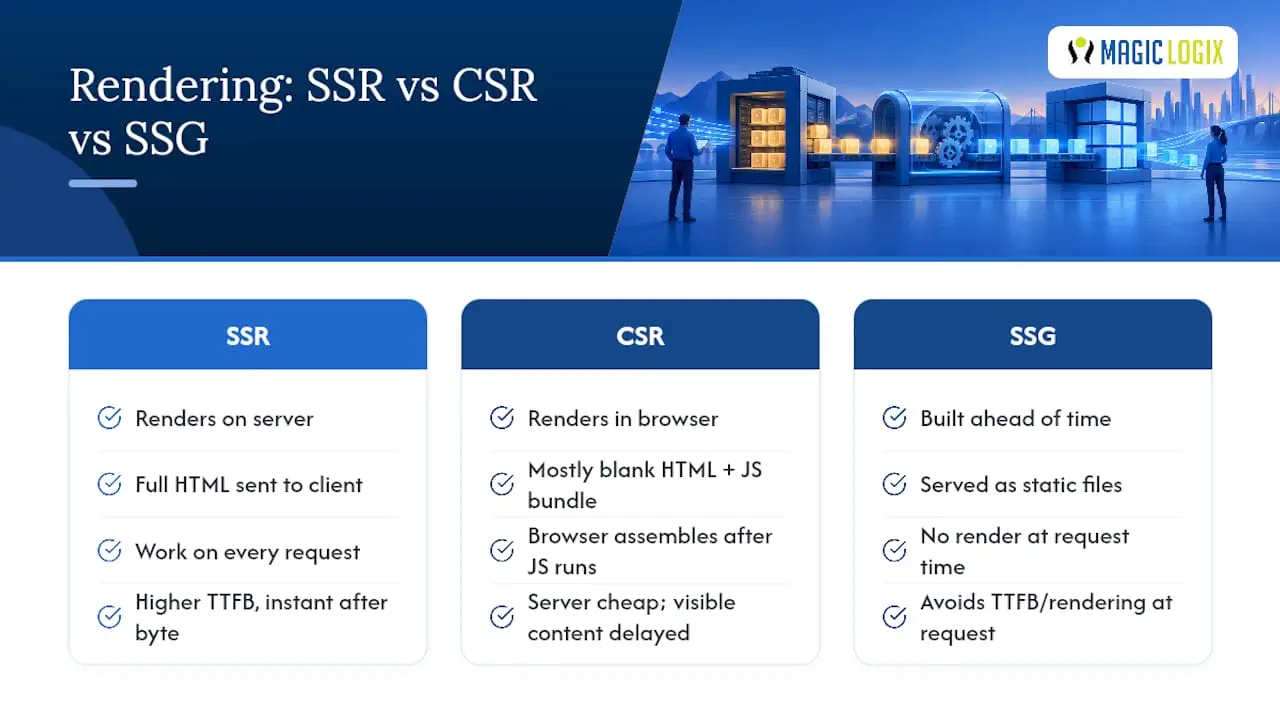
A news site or a product catalog usually fits SSR or SSG well because the content is largely the same for every visitor and needs to be indexable fast. A dashboard or a highly interactive tool, where content is personalized and constantly changing after load, tends to favor CSR. Dynamic rendering sits outside all three as a workaround, and it’s worth understanding why Google discourages it as a primary strategy.
How SSR Affects Crawling, Rendering, and Indexing
Googlebot’s process happens in two stages. It crawls the raw HTML first, then queues the page for a second pass where a headless Chromium instance actually executes the JavaScript and renders the final DOM. That second stage, Google confirms, can take seconds or considerably longer depending on how busy the rendering queue is. SSR removes the need for that second pass to reveal your primary content, because the HTML Googlebot sees on the first crawl already contains it.
That’s the practical difference between “indexed eventually” and “indexed immediately.” A CSR page with a render-blocking JavaScript bundle might sit in the rendering queue for hours before Google sees the actual text, links, and metadata. An SSR page delivers all of that in the initial response, so there’s nothing left for the render queue to reveal.
A few caveats matter here:
- Not every crawler runs JavaScript as reliably as Googlebot. Bing and other search engines have historically had less consistent JS rendering support, which makes SSR more valuable if you care about visibility beyond Google.
- Rendering queue delays are unpredictable. A page that depends on client-side JavaScript for its core content can sit unindexed longer during high-traffic periods or site migrations.
- Blocked resources break the whole model. If your robots.txt disallows a JavaScript file or API endpoint the page needs to render, even a well-built SSR setup can serve incomplete content to crawlers.
You can verify actual crawler behavior with Google’s URL Inspection tool, which shows a rendered screenshot and any JavaScript errors encountered. The Mobile-Friendly test offers a similar rendered preview, and server logs will tell you whether Googlebot is requesting the resources your page actually needs. Skipping this verification step is the most common reason teams assume SSR is working when it isn’t.
Core Web Vitals: Where SSR Helps Performance and Where It Can Hurt It
SSR’s biggest performance win is Largest Contentful Paint (LCP). Because the browser receives fully formed HTML instead of an empty shell, the main content can paint almost as soon as the response arrives, rather than waiting for JavaScript to fetch data and build the DOM. Google recommends keeping LCP under 2.5 seconds for a good user experience, and SSR is one of the more reliable ways to hit that number on content-heavy pages.
Target thresholds: Core Web Vitals guidance sets LCP under 2.5 seconds, Interaction to Next Paint (INP) under 200 milliseconds, and Cumulative Layout Shift (CLS) under 0.1 as the marks of a good user experience.
The trade-off is TTFB. Every SSR request means the server does real work: fetching data, running templates, assembling markup, before it sends a single byte. If that server-side work is slow, you can end up with a fast-rendering page that still feels sluggish because the browser waited too long for the response to start. This is why SSR without caching often disappoints teams who expected an automatic performance win.
The fix isn’t complicated: pair SSR with resource hints like preload tags, use Early Hints where your infrastructure supports it, and cache rendered HTML at the edge whenever content doesn’t change per request. A technical SEO audit will usually catch a slow TTFB before it shows up as a ranking problem, and tightening page speed fundamentals compounds with any rendering strategy you choose.
SSR Patterns Worth Knowing: Streaming, Hydration, and Caching
Streaming SSR changes the delivery model rather than the rendering model. Instead of waiting for the entire page to finish rendering before sending anything, the server flushes a page shell immediately and streams the remaining content as it becomes ready. React’s renderToPipeableStream API exposes this through callbacks like onShellReady and onAllReady, letting developers choose when to send the shell versus waiting for complete content.

That flexibility comes with a real caveat for crawlers. If a bot needs the complete, final HTML rather than a progressively arriving stream, using onAllReady instead of onShellReady ensures nothing critical gets served late or truncated.
Hydration is where a lot of SSR implementations quietly lose their performance gains. Hydration attaches React’s (or another framework’s) event handlers to server-rendered HTML on the client. When the server and client render different output, even in small ways, hydration mismatches cause wasted CPU cycles and visible flicker as the browser reconciles the difference.
A few practical habits reduce that risk:
- Keep server and client render logic identical. Avoid conditionals based on
windoworDate.now()that produce different output on each side. - Profile hydration with your framework’s dev tools before shipping, not after a Core Web Vitals regression shows up in Search Console.
- Cache at the component level for repeated data, and cache full HTML at the edge for pages that don’t vary by user.
- Reserve client-side rendering for the interactive slices of a page: a comment widget, a cart drawer, a live filter, while the surrounding content stays server-rendered.
Pro Tip: If your framework supports partial or islands-style hydration, use it for anything below the fold. It cuts the JavaScript the browser has to execute before the page feels interactive, without touching the SSR benefits for your critical content.
An SSR Implementation Checklist for SEO
Running through this checklist before and after launch catches most of the SEO issues that come from a rushed SSR rollout.
- Inspect the rendered HTML. Run the page through Google’s URL Inspection tool and the Mobile-Friendly test to confirm your critical content, titles, and meta tags appear without waiting on JavaScript.
- Audit robots.txt and resource access. Confirm nothing blocks the CSS, JS, or API calls your server rendering depends on, and check that your sitemap and canonical tags point to the correct, final URLs.
- Watch for duplicate or inconsistent meta tags. SSR frameworks that generate metadata dynamically can accidentally serve the same title or description across multiple routes if a template isn’t scoped correctly. Check a sample of URLs across sections, not just the homepage.
- Set performance SLAs. Define acceptable TTFB and LCP targets for your team and monitor them continuously rather than checking once at launch.
- Treat dynamic rendering as temporary only. If you’re serving a different response to bots than to users, Google is explicit that this should be a stopgap, not a long-term architecture, and it needs documentation and monitoring so it doesn’t quietly become permanent.
| Check | Tool | What it catches |
|---|---|---|
| Rendered content visibility | URL Inspection tool | Missing content, JS execution errors |
| Mobile rendering | Mobile-Friendly test | Layout and rendering issues on mobile crawl |
| Crawl access | Server logs, robots.txt | Blocked resources, wasted crawl budget |
| Core Web Vitals | PageSpeed Insights, Lighthouse | LCP, INP, CLS regressions |
| Metadata consistency | Manual URL sampling | Duplicate titles, missing canonical tags |
A solid site architecture makes every one of these checks faster to run, because clean internal linking and predictable URL patterns reduce the number of edge cases your rendering setup has to handle.
What We’ve Learned Fixing SSR for Real Sites
Most SSR problems we see aren’t rendering problems. They’re caching and server-cost problems dressed up as SEO issues. A page that indexes fine but ranks poorly usually has a TTFB nobody measured, or a hydration mismatch quietly inflating Interaction to Next Paint on mobile. The fix is rarely a framework swap. It’s usually a caching layer, a trimmed JavaScript bundle, or fixing a template that renders differently on the server than the client. If your infrastructure needs more headroom for server-side rendering at scale, providers like AceRDP offer the kind of dedicated compute that keeps TTFB predictable under load.
— Hassan
When to Actually Choose SSR Over the Alternatives
Pick SSR when content changes often and needs to rank fast. Pick SSG when content is stable and speed matters more than freshness. Pick CSR for interaction-heavy tools where personalization outweighs indexability. Whatever you choose, measure the business outcome, not just the Lighthouse score, and be willing to test a hybrid approach if your team has the skills to support it.
Get Help Implementing SSR the Right Way
Choosing between SSR, SSG, and CSR is only half the battle. Getting the implementation right, without a slow TTFB, broken hydration, or a hundred small metadata inconsistencies, is where most projects actually stumble.

Some digital marketing companies work with businesses that need their site’s rendering strategy to actually support rankings, not just look modern in a stack diagram. Our web development team builds and audits SSR implementations with SEO requirements baked in from the start: clean server response times, correct hydration, and HTML that search engines can index without waiting on a rendering queue. Pair that with a technical SEO engagement and you get both the architecture and the ongoing monitoring to keep Core Web Vitals in the range Google rewards. If your current site is leaning on client-side rendering and you’re not sure what Googlebot actually sees, consider requesting a technical audit to identify where the gaps are.
Sources
FAQ
Is SSR Better for SEO Than CSR?
For content-first pages, yes. SSR delivers indexable HTML in the initial response, while CSR relies on Googlebot’s secondary rendering step to reveal content, which can delay indexing. CSR still works fine for interactive tools where indexability matters less than personalization.
What Is Server-Side Rendering?
Server-side rendering builds the complete HTML for a page on the server and sends that finished markup to the browser or crawler, rather than sending a blank shell for JavaScript to fill in later. It’s the model behind most SSR frameworks, including React’s streaming server APIs.
What Does “Rendering” Mean in an SEO Context?
Rendering is the process of turning code, HTML, CSS, and JavaScript, into the visual page a visitor or crawler actually sees. In SEO, it specifically refers to whether a search engine can see your full content without executing JavaScript, since that determines how fast and reliably a page gets indexed.
Is a Single-Page App (SPA) Worse for SEO Than SSR?
A pure client-rendered SPA is generally riskier for SEO than SSR because its content depends entirely on JavaScript execution to become visible. Many frameworks now offer SSR or hybrid modes specifically to solve this, so the SPA architecture itself isn’t disqualifying if it’s paired with server rendering for the pages that need to rank.
Should I Use Dynamic Rendering Instead of SSR?
No, not as a long-term strategy. Google recommends SSR or static generation as primary architectures and treats dynamic rendering as a temporary workaround with real maintenance overhead.