

An SEO content brief is a writer-ready roadmap that turns a keyword and a search intent into clear instructions, so drafts arrive closer to publishable and need fewer revisions. Treat it as a plan, not a wish list. Your first move is simple: copy the one-page quick brief template later in this guide, fill in every field for your next assignment, and hand it to your writer before any drafting starts.
TL;DR:
- Include the primary and supporting keywords, stated search intent, audience, single message, section outline with word budgets, linking targets, voice notes, assets, deadline, and contact.
- Use a quick brief for routine posts; add source notes, compliance checks, approval steps, and evidence plans for complex or regulated assignments.
- Store brand voice, style rules, and approved assets in a reusable package; assign owners and keep approval gates to brief review and draft review.
- Treat AI output as a draft: verify query demand, open every source URL, check headings against search intent, and remove claims you cannot verify.
- Measure first draft acceptance and time to publish first, then track organic traffic and keyword movement against a baseline before changing template fields.
Table of Contents
- What an SEO content brief is and why it matters for content operations
- Key elements every SEO content brief must include
- Step-by-step process to create an SEO content brief
- Practical brief templates and two annotated examples
- Scaling briefs: briefing packages, role definitions and approval workflows
- Tools, automation and AI-generated briefs: how to use them responsibly
- Measuring brief effectiveness and iterating the template
- Our perspective: how we operationalize briefing packages across SEO, AEO and GEO
- How we help teams build briefing packages and scale content operations
- FAQ
- Sources
What an SEO content brief is and why it matters for content operations
A brief’s primary job is to define clear expectations. According to the Content Marketing Institute’s guidance on creative briefs, when a writer understands the exact “why” behind an assignment, drafts are far more accurate, and production becomes a repeatable, strategic process instead of a pile of ad hoc requests. That is the whole case for briefs in one sentence: they replace guesswork with shared context.
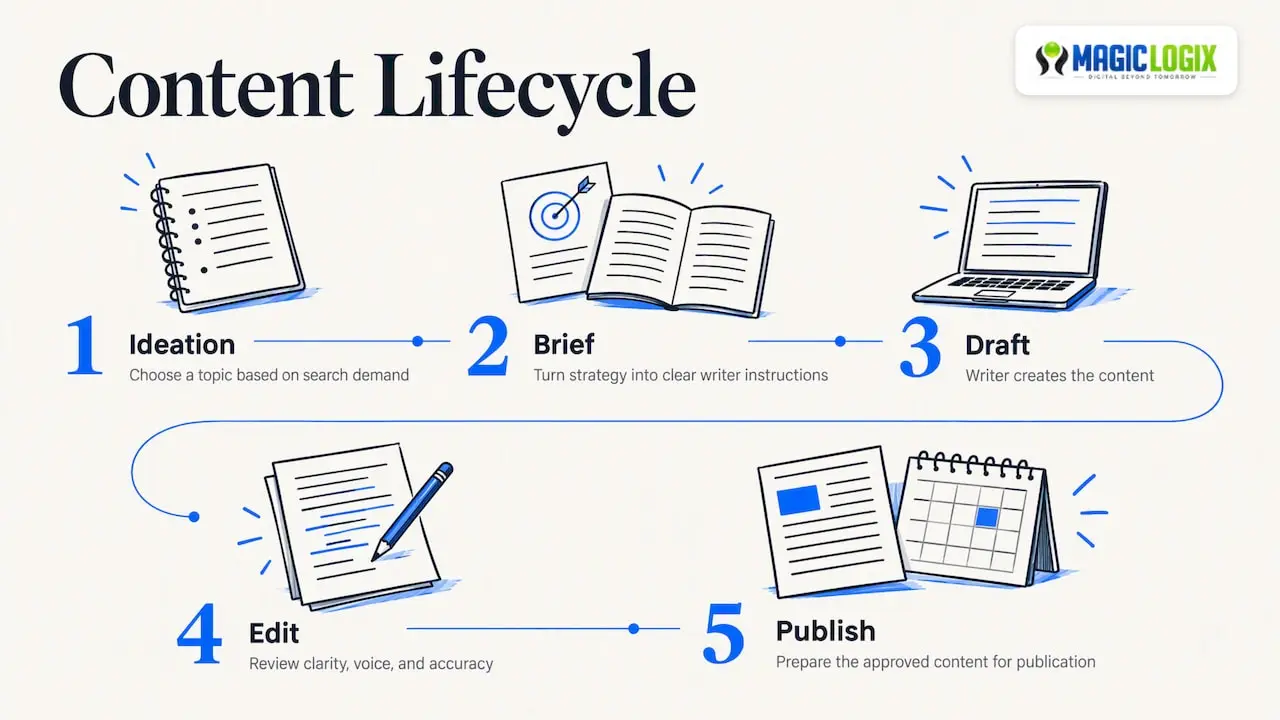
Think of the brief as the hinge in your content lifecycle. Work usually moves from ideation to brief, then draft, edit and publish. Teams that document this workflow map each stage from ideation through publication, and the Content Marketing Institute notes that doing so reduces handoffs, clarifies ownership and keeps content from stalling in review. The brief sits at the point where strategy becomes instructions. If it is vague, every later stage pays for it: the writer guesses, the editor rewrites, the SEO reviewer reopens decisions that should have been settled on day one.
Why does this matter for operations, not just for quality? Because rework is the hidden cost of content. A draft that misses the search intent, skips a required section or ignores brand voice does not simply need a polish. It needs a second round of writing, a second round of review and a second place in the calendar. A good brief moves those decisions to the start, when they are easier to change.
A brief also keeps editorial work tied to business goals. Without one, a writer picks an angle that sounds interesting. With one, the writer knows which reader the piece serves, which query it should answer and what the reader should do next. That clarity is what lets you hand work to a freelancer or a new hire and still get something close to what you pictured.
Finally, the brief is where search demand gets checked. Content ideation works best when it aligns with what people actually search for, validated with keyword research and query tools before you commit. A brief is the natural checkpoint for that validation, because nobody has spent drafting time yet.
Key elements every SEO content brief must include
A brief works when a writer can read it once and start without asking questions. These are the fields we treat as non-negotiable, along with why each one earns its place.
- Primary keyword, secondary keywords and stated search intent. Name the exact phrase, the supporting terms, and the intent in plain words, such as “the reader wants a step-by-step process they can copy today.” Intent is the field writers skip most often and the one that shapes everything else.
- Target audience and the single message. Describe who is reading and what they should remember. One message per article keeps the draft from wandering.
- Suggested structure and section-length guidance. List the H2s you expect and indicate the relative depth for each section. This gives the writer a clear budget instead of an arbitrary target.
- On-page SEO tasks. Include title variants, notes for the meta description, the intent behind the H1 and each H2, and any schema hints, such as FAQ or HowTo markup where the content fits.
- Linking plan. Specify required internal links by page name or ID and the categories of trusted external sources, such as official documentation, original research or reputable industry publications.
- Tone, brand voice and assets. Point to the style guide, give one or two reference pieces, and state image requirements and alt-text instructions.
- Logistics. Add the deadline, submission format, a named contact person and what to expect from revisions.
Keep each field short. An overly long brief for a standard blog post may get skimmed, and a skimmed brief is no better than none. If a field has no content for a given assignment, say so rather than leaving it blank, so the writer knows it was considered.
For internal links, it helps to have a clear picture of how your pages relate. Our guide to SEO site architecture covers how to map topics to pages so your linking plan points somewhere sensible.
Entities deserve a line too. List the people, products, standards and tools a strong article on this topic would naturally mention. This supports topic coverage for classic search and for answer engines alike, and it stops writers from falling back on generic phrasing.
Step-by-step process to create an SEO content brief
You can build a complete brief more efficiently once the routine is familiar. Work through these steps in order.
- Validate demand. Run a quick keyword and SERP check. Search the target phrase, read the top results, and test your headline idea against what already ranks. If keyword research does not show demand, reconsider the topic before proceeding. Our keyword research guide walks through the intent checks in more detail.
- Set the outcome. Write one sentence describing what the article must achieve and one describing the reader. “Help a marketing manager build a repeatable brief process” beats “write about briefs.”
- Capture research. Pull the headings that top-ranking pages share, the evidence they cite and the examples they use. Then look for what they miss: a content gap analysis helps you prioritize topics and focus on target reader needs. Record gaps as must-cover points.
- Build the structure. Propose the H2s, assign a word count to each and list the points every section must cover. Order sections to match how the reader thinks, not how your internal team does.
- Plan the optimization. Place the primary keyword in the title, opening paragraph and a prominent H2. List secondary keywords, entities and the internal link targets, with a note on where each fits.
- Gather assets and references. Attach images or image direction, any data the writer should use and the mandatory sources, each with a working URL you have already opened.
- Deliver and run QA. Send the brief through your agreed channel, attach the editorial checklist the draft will be reviewed against and state the expected turnaround. Confirm the writer has read it before work begins.
Pro Tip: Ask the writer to summarize the brief before drafting. If the summary misses the intent, you can catch the problem early.
Two habits make this process stick. First, write the brief for the least experienced writer on your roster. If a junior can follow it, a senior will fly through it. Second, keep a running list of questions writers ask after receiving a brief. Every repeated question is a missing field.
Practical brief templates and two annotated examples
Teams may benefit from a fast version for routine posts and a fuller one for pieces that carry more risk. Below is how we think about each.
The quick brief is for standard blog posts and updates. Copy these fields into your document tool:
- Working title and primary keyword
- Secondary keywords and key entities
- Search intent in one sentence
- Audience and the single message
- Outline with H2s and word count per section
- Required internal links and source categories
- Voice notes and image requirements
- Deadline, contact person, submission format
The long-form brief adds depth. Use it for gated content, research-heavy reports or anything with legal, medical or financial implications. Extra fields include a competitor summary, a source list with notes on what each source supports, a stakeholder approval chain, a compliance checklist and a section-by-section evidence plan.
Here is a short annotated example for a standard blog post, showing how fields translate into draft instructions.
| Field | Sample entry | What it tells the writer |
|---|---|---|
| Primary keyword | project status report template | Use in title, opening and first H2 |
| Search intent | The reader wants a copyable template with a short explanation | Lead with the template, explain after |
| Audience and message | Team leads; make a status report efficient to complete | Keep advice practical and brief |
| Structure | Template, field guide, two examples, FAQ | Each section gets its own word budget |
| Linking plan | Relevant internal pages and an official source | Link where the claim appears |
| Voice | Plain, direct, no jargon | Match the style guide |
Adapting the templates is mostly a matter of how much you leave to judgment. For freelancers new to your brand, attach the full briefing package and be explicit about voice. For junior writers, add a sample paragraph showing the tone you want. For senior in-house authors, trim the brief to intent, angle and constraints, and trust them with the rest.
Scaling briefs: briefing packages, role definitions and approval workflows
Briefs stay consistent at higher volume when you stop rewriting the same information. The Content Marketing Institute recommends separating “static” components, such as brand voice, style guide and approved asset libraries, from “variable” ones, then keeping a standardized briefing package as the default. Each individual brief then only covers what is unique: the goal, the search intent and the structure for that asset.
That split saves real time. Writers read the package once and refer back to it. Editors stop correcting the same voice errors. New freelancers get up to speed from a single folder.
Scaling also depends on clear ownership. Teams that build repeatable workflows separate rigid structural requirements, such as common headings, approval steps and SEO optimization points, from topic-specific nuance, and the Content Marketing Institute links this to fewer bottlenecks and less recurring frustration. Define who does what:
- Content owner: decides the topic, goal and priority, and signs off the brief.
- Author: drafts to the brief and flags gaps early.
- Editor: checks clarity, voice and accuracy against the brief.
- SEO reviewer: confirms intent match, keyword placement, entities and linking.
- Approver: gives final sign-off, ideally one person rather than a committee.
Keep approval gates light: review the brief before drafting and the draft before publishing. Set a clear time limit for each gate and decide in advance what happens if it passes without a response.
Tie briefs to your planning tools so throughput is predictable. When a topic enters the calendar, a brief task should be created with it. Our walkthrough on building a content calendar shows how to connect planning to publishing cadence, and our piece on marketing automation workflows covers how briefs can feed scheduling and distribution. Platforms such as OppRise can help connect briefs to campaign execution.
Tools, automation and AI-generated briefs: how to use them responsibly
Automation saves time on the repetitive parts of briefing: pulling SERP headings, listing related questions, suggesting entities and formatting the document. It does not replace judgment. For complex topics or regulated content, a person should draft the strategic sections and use tools only to gather raw material.
AI-generated briefs are only as reliable as their inputs. Give them clear inputs:
- A clear, one-sentence search intent
- A defined audience
- A list of authoritative sources you have already vetted
- Seed headings that reflect your angle
Then verify before issuing anything to a writer. Treat the output as a first draft of a brief, never a finished one.
- Confirm the keywords match real queries by checking them in your research tool.
- Open every source URL and confirm the page exists and says what the brief claims.
- Sanity-check each proposed H2 against the intent and against what already ranks.
- Remove invented statistics, quotes or claims. Generated text can sound confident and be wrong.
Be honest about uncertainty here. Search engines and answer engines change how they select and present content, and best practice for generative engine optimization is still evolving. Nobody can promise that following a template earns a ranking or an AI citation. What a good brief can do is make your content clearer, better structured and easier for both people and machines to interpret. For more on how we think about answer engines, see our AEO optimization page.
For integration, export brief fields into your CMS or project board so they travel with the draft, and keep version history so you can audit what changed and why.
Pro Tip: Store each brief as a structured record, not a free-form document. When fields are consistent, you can filter by keyword, writer or status, and compare outcomes across briefs.
Measuring brief effectiveness and iterating the template
A brief is working when drafts improve, not when the document looks thorough. Track a small set of indicators and review them on a schedule.
- First-draft acceptance rate: the share of drafts that move to edit without a rewrite request.
- Time-to-publish: days from brief approval to live page.
- Organic traffic change: movement in organic visits to the page after publication, compared with a baseline you set beforehand.
- Keyword ranking movement: changes for the primary and secondary terms, which the content gap approach ties back to reader needs and semantic relevance.
Use a regular cadence. First, check process signals such as acceptance rate, revision counts and time-to-publish. Later, add search signals such as impressions and indexed status. Once enough performance data is available, review traffic and ranking movement and decide which template fields to keep, cut or add. Set your own targets from your baseline rather than borrowing someone else’s numbers.
Capture editorial feedback in the same place as the brief. Add a short “what slowed us down” note after each piece, and log every template change with a date and a reason. A spreadsheet works fine, with columns for brief ID, keyword, writer, intent match, revision rounds, time to publish, publish date, traffic over time and notes.
Our perspective: how we operationalize briefing packages across SEO, AEO and GEO
Most teams treat briefs as paperwork, and that is why their briefs fail. The brief is the cheapest place in the whole process to make a decision, so it should hold the hardest ones. We keep the static material, voice, standards and approved assets, in a briefing package, and write each variable brief around one search intent and one reader. That separation is what lets output grow without quality drifting.
We also think a brief should now serve three audiences at once: the searcher, the answer engine and the generative model. That means clear definitions near the top, self-contained sections and named entities, checked in editorial QA the same way we check keyword placement. If your revisions stay high or your volume is outgrowing your process, outside help can save months of trial and error.
How we help teams build briefing packages and scale content operations
Digital Beyond Tomorrow starts with a process your team can run on a Tuesday afternoon. We help you build the briefing package, fit it into the tools you already use and connect it to your search strategy. Our Search Engine Optimization (SEO) services cover the keyword, intent and structure work behind each brief.
Here is how we can support you:
- Create a briefing package with your voice, standards and approved assets
- Design brief templates for blogs, product pages and landing pages
- Map approval workflows and roles so work stops stalling
- Align briefs with SEO, AEO and GEO practices for search and answer engines
Consider bringing us in when drafts are inconsistent, revision rounds keep piling up or your publishing goals have outgrown your current process. The next step is a conversation: contact us and we will review how you brief writers today and where a package would help.
FAQ
What is an SEO content brief?
An SEO content brief is a document that gives a writer the search intent, keywords, audience, structure and requirements for one piece of content. It sets expectations before drafting starts. The goal is a draft that matches what searchers want with fewer revisions.
What should an SEO content brief include?
At minimum, include the primary and secondary keywords, the stated search intent, the audience, a proposed outline with word counts and a linking plan. Add voice notes, image requirements, a deadline and a contact person. Keep each field short enough that a writer can act on it right away.
How do I make SEO content briefs repeatable across a team?
Keep static material, such as brand voice and style guide, in a standard briefing package, and write only the variable fields for each assignment. The Content Marketing Institute recommends this split. Then assign clear roles and keep approval gates light.
Can AI write my SEO content briefs?
AI can speed up research and formatting, but it should not issue a brief unchecked. Give it clear intent, audience and vetted sources, then verify keywords, open every URL and review each proposed heading. Remove any statistic or claim you cannot trace to a real source.
How do I know if my briefs are working?
Track first-draft acceptance rate and time-to-publish first, since those show whether writers understand the assignment. Then watch organic traffic and keyword movement over time. Review the template on a set cadence and log each change.